
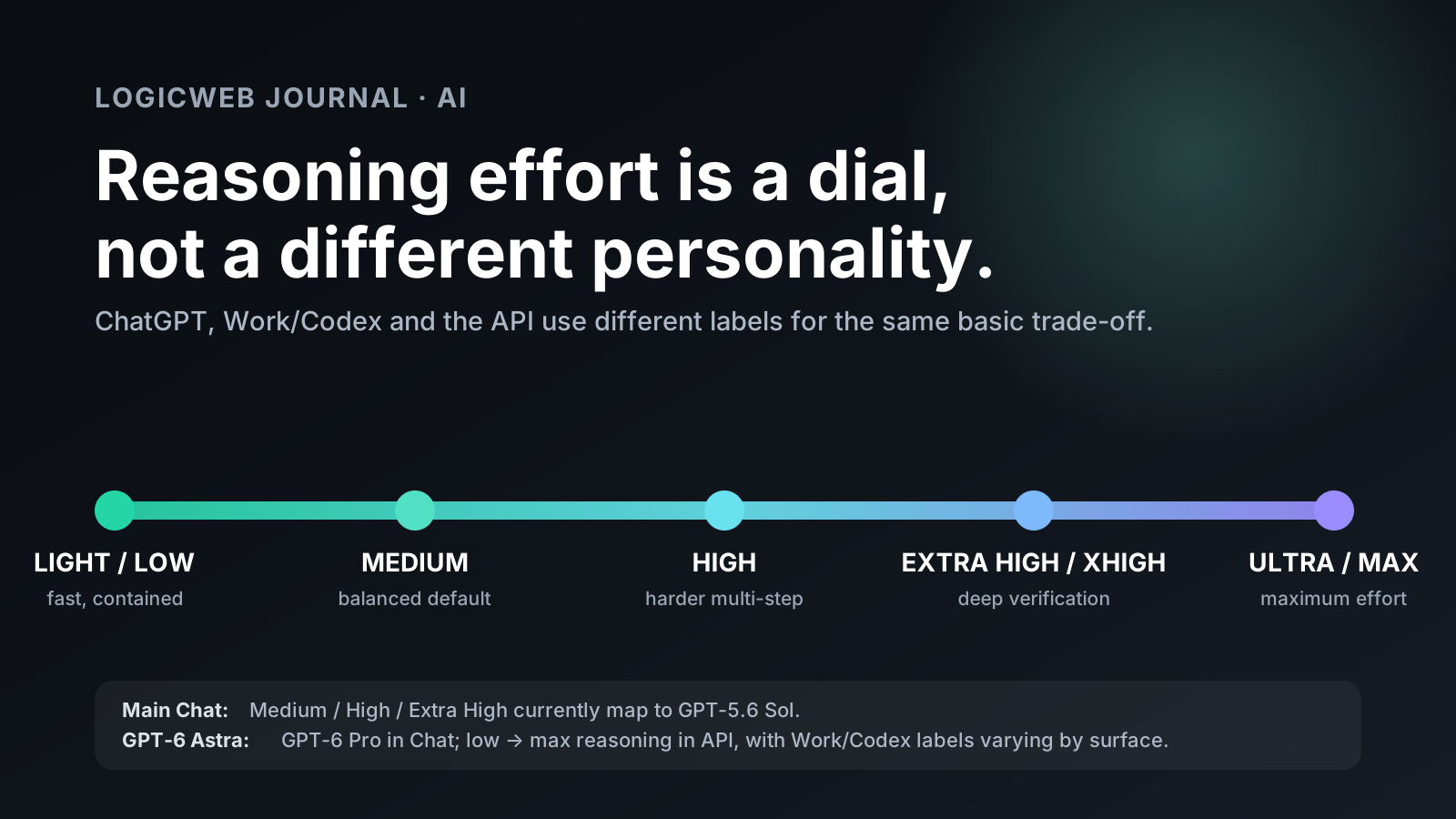
ChatGPT’s reasoning controls are useful. Their names are not. In 2026, OpenAI uses one set of labels in the main ChatGPT chat, another set across Work and Codex, and machine-readable values in the API. The result is a model picker where Light, Medium, High, Extra High, Ultra, low, xhigh, and max can all describe the same basic idea: how much reasoning effort the system should spend before and during an answer.
There is one terminology correction worth making before the comparison: OpenAI’s current flagship is GPT-6 Astra. There is no official OpenAI model called “Astra 3” as of September 14, 2026. GPT-6 Astra launched on September 3, 2026. In standard ChatGPT conversations it appears through GPT-6 Pro on eligible plans; in ChatGPT Work and Codex it can appear as Astra directly; and in the API the model ID is gpt-6-astra.
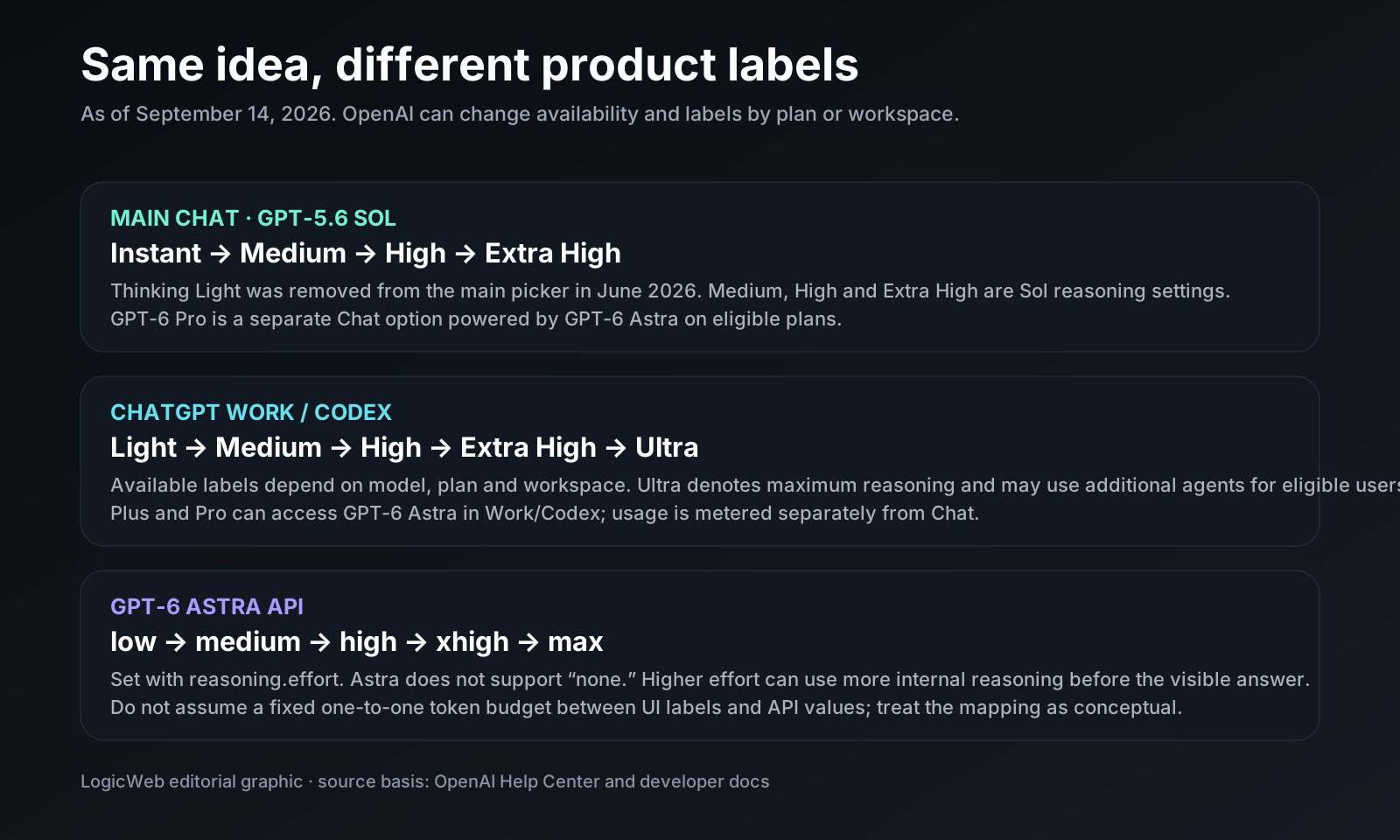
The second correction is more important: Medium, High and Extra High in the main ChatGPT reasoning picker currently refer to GPT-5.6 Sol, not Astra. OpenAI removed the old “Thinking Light” option from the main ChatGPT picker in June 2026. Astra is a separate Pro-class option in Chat, while Work, Codex and the API expose their own reasoning controls.
The short version
If you only want the operating rule, use this one:
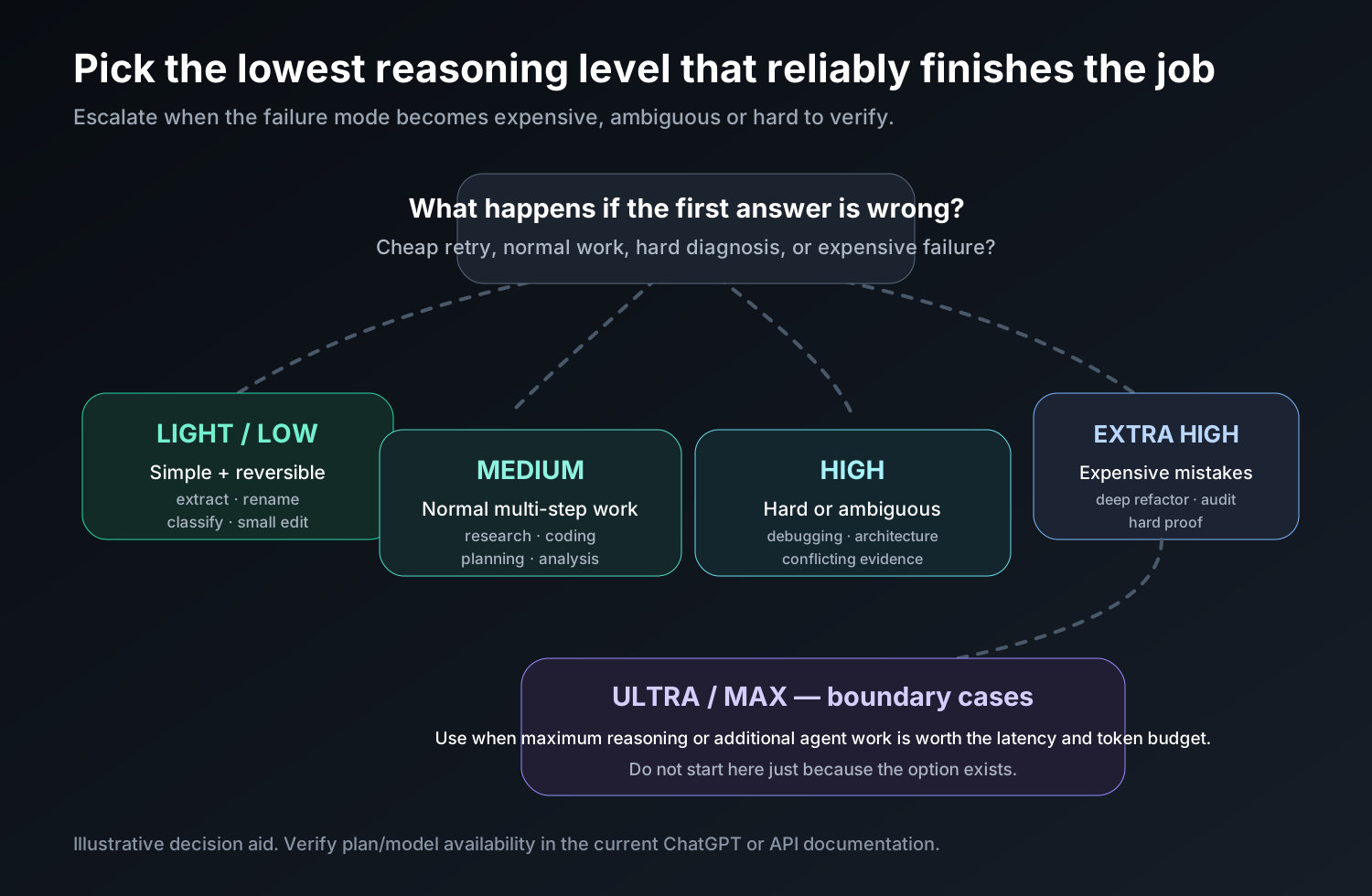
- Light / Low: use it for fast, contained, reversible work where a missed edge case is cheap to fix.
- Medium: use it as the default for normal coding, research, planning, troubleshooting and professional writing.
- High: use it when the task has real ambiguity, several dependencies or a non-obvious failure mode.
- Extra High / XHigh: use it when mistakes are expensive and you want more planning, verification and iteration.
- Ultra / Max: reserve it for boundary cases where maximum reasoning or additional agent work is worth the latency and token budget.
Do not spend Extra High on a typo. Do not spend Light on a production migration plan. The right setting is the lowest reasoning level that reliably completes and verifies the task.
Why the names are confusing: ChatGPT is several surfaces now
The easiest way to understand the menu is to stop treating “ChatGPT” as a single model selector. It is a product with multiple execution surfaces.
| Surface | Reasoning labels you may see | What is actually running |
|---|---|---|
| Main Chat | Instant, Medium, High, Extra High, Pro | Medium/High/Extra High currently use GPT-5.6 Sol. GPT-6 Pro is powered by GPT-6 Astra on eligible plans. |
| ChatGPT Work / Codex | Light, Medium, High, Extra High, Ultra, depending on model and plan | The selected Work/Codex model, which can include GPT-6 Astra on eligible plans. Ultra means maximum reasoning and can use additional agents for eligible users. |
| OpenAI API | low, medium, high, xhigh, max for GPT-6 Astra |
gpt-6-astra with reasoning.effort set by the developer. |
The labels line up conceptually, but do not assume an exact one-to-one token budget across products. OpenAI can tune the amount of reasoning behind a label, route tasks differently, or expose different controls by plan and workspace. Treat “Light ≈ low,” “Extra High ≈ xhigh,” and “Ultra ≈ max” as a useful mental map, not a contractual equivalence.
What reasoning effort actually changes
Reasoning effort controls how much internal work the model is allowed to spend on planning, checking, revising and deciding what to do next. Higher effort is most visible on tasks that require several dependent steps: debugging a distributed failure, reconciling conflicting sources, changing a large codebase, or operating tools until a result is verified.
OpenAI’s own Astra launch material describes the effect in practical terms: higher effort can buy more iterations on a build, more browser verification and a stronger tendency to execute and test rather than stop after a plausible patch. That is the important distinction. Higher effort is not a different writing style and it is not a magic “be smarter” button. It is more budget for deliberation and follow-through.
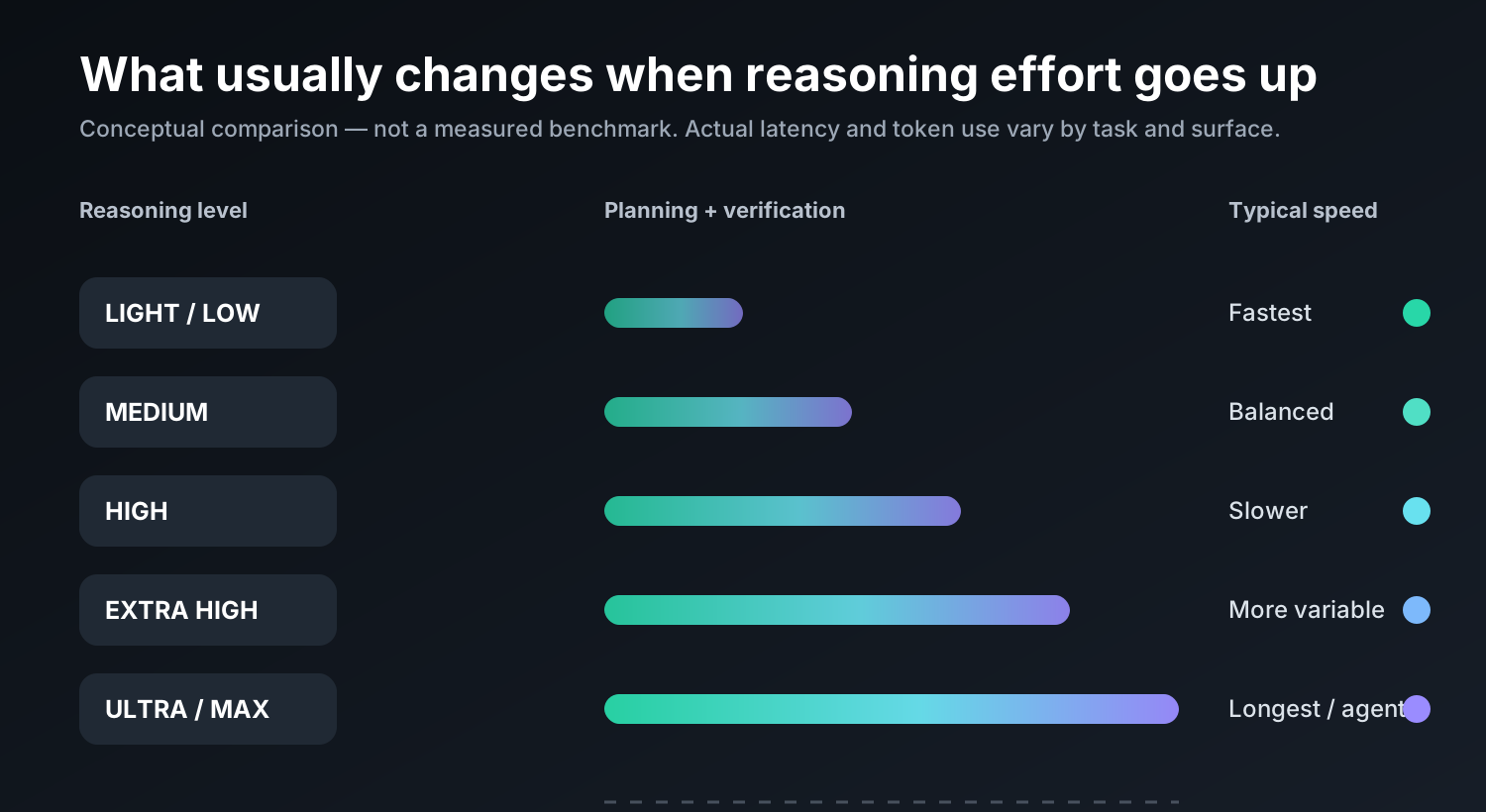
| Characteristic | Light / Low | Medium | High | Extra High / XHigh | Ultra / Max |
|---|---|---|---|---|---|
| Typical latency | Lowest | Balanced | Higher | Higher and more variable | Highest / potentially agentic |
| Planning depth | Shallow | Moderate | Deep | Very deep | Maximum |
| Verification tendency | Minimal to moderate | Normal | More checking | Heavy checking and iteration | Maximum; may involve additional agents in supported Work/Codex flows |
| Best fit | Contained routine tasks | Most professional work | Complex multi-step work | Hard tasks with expensive mistakes | Boundary-case, long-horizon work |
| Main risk | Underthinking | Usually the best trade-off | Extra latency | Overthinking / unnecessary tool use | Cost and latency can dominate |
That last row matters. OpenAI’s model guidance explicitly warns that higher reasoning is not automatically better: conflicting instructions, weak stopping criteria and open-ended tool access can cause a high-effort model to search too long, overthink or produce a worse result. Reasoning effort should be tuned against the task, not selected as a status symbol.
Light / Low: speed first, but still reasoning
Light is the human-facing name you may see in Work or Codex; low is the GPT-6 Astra API value. The old “Thinking Light” option in the main ChatGPT model picker was removed in June 2026, so do not expect the same label everywhere.
Low effort is best when the task is narrow, reversible and easy to verify. Good examples include extracting fields from a clean document, renaming variables, writing a small unit test, reformatting JSON, classifying support tickets, drafting a simple SQL query, explaining a short function, or making a localized CSS change.
The failure mode is predictable: the model may take the shortest plausible path and miss a second-order dependency. If the job touches authentication, migrations, money, permissions, production data, a large refactor or several tools, move up.
Medium: the setting most people should use most of the time
Medium is the practical default. It gives the model enough room to plan and check without turning every normal task into an investigation. For developers, it is a strong starting point for feature work, debugging with a clear reproduction, code review, writing tests, refactoring a small module and explaining an unfamiliar subsystem. For non-developers, it fits comparative research, data interpretation, structured writing, spreadsheet analysis, project planning and troubleshooting.
Medium also gives you the cleanest escalation signal. If the answer is correct and well-supported, stop. If it misses dependencies, fails verification or treats ambiguity too casually, move to High. If the task is costly to get wrong, move directly to Extra High.
High: for real ambiguity and multi-step dependencies
High is where the model gets more room to decompose the task and revisit early assumptions. Use it for unfamiliar codebases, architecture decisions with trade-offs, incident analysis, multi-source research, complex formulas, stubborn bugs, migration planning, security reviews, or any workflow where step three depends on getting steps one and two exactly right.
High is also useful when the model needs tools. A fast answer can look correct before it has actually opened the file, run the test, checked the page or compared the sources. More reasoning budget can make the system more willing to verify instead of merely explain what it would have done.
Extra High / XHigh: spend it where failure is expensive
Extra High is the UI label; xhigh is the API value on GPT-6 Astra. This is where you should expect the largest trade-off in responsiveness. The point is not a longer answer. The point is to give the model more room for difficult reasoning, iteration and verification before it commits to an answer or action.
Use Extra High for tasks such as a multi-file refactor with brittle tests, reconciling contradictory requirements, diagnosing an intermittent production failure, reviewing a complex infrastructure change, proving or disproving a hard technical claim, or producing a decision memo where a missed constraint changes the recommendation.
It is also the right place to retry a task that was almost solved at Medium or High but failed for reasoning rather than missing information. Do not automatically escalate because you dislike the prose. Reasoning effort and visible writing style are separate concerns.
Ultra / Max: maximum effort is a special case
Ultra appears in supported ChatGPT Work/Codex contexts; OpenAI’s current rate card says Ultra uses maximum reasoning and may run additional agents for eligible users. In the GPT-6 Astra API, the top reasoning setting is max.
This is not the place to begin a normal request. It is the place to finish the tasks that remain hard after you have supplied good context, clear stopping criteria and a way to verify the result. Long-horizon engineering work, difficult research synthesis, large migrations, unusually complex planning and evaluation tasks can justify it. A five-line rewrite cannot.
Where GPT-6 Astra fits
GPT-6 Astra is not simply “Extra High ChatGPT.” It is a newer model family with its own capabilities and controls. OpenAI positions Astra for complex reasoning, coding, computer use, research and document creation. The API exposes a 1.05-million-token context window, up to 128,000 output tokens, and reasoning settings from low through max. In ChatGPT, GPT-6 Pro is powered by Astra on eligible plans; Plus plans can access Astra in Work and Codex even when GPT-6 Pro is not available in the normal Chat picker.
That distinction matters when someone says “I used Extra High Astra in ChatGPT.” They may actually mean one of three things:
- They selected Extra High in normal Chat, which currently uses GPT-5.6 Sol.
- They selected Astra in Work or Codex and chose a high reasoning level there.
- They used GPT-6 Astra through the API with
reasoning.effort: "xhigh".
Those are related experiences, not identical ones.
Speed, usage and cost: the part the picker does not explain
Higher reasoning tends to take longer because the model can perform more internal work. It can also consume more reasoning tokens in token-metered products. In the OpenAI API, reasoning tokens count toward output usage and are billed at the output-token rate even though the hidden reasoning is not printed in the answer.
For GPT-6 Astra, OpenAI currently lists standard API pricing at $10 per million input tokens, $1 per million cached input tokens, $12.50 per million cache-write tokens, and $50 per million output tokens. The model page also lists a 2× input/cache and 1.5× output multiplier when prompts exceed 272,000 input tokens. Product-specific rules can differ: the current Codex rate card, for example, says Codex does not charge Astra an additional long-context multiplier above 272K input tokens.
In credit-metered Business and Enterprise Chat, OpenAI currently charges the same 10-credit message rate for GPT-5.6 Sol at Medium, High and Extra High. That does not mean the settings are free-equivalent everywhere. Work, Codex and the API are token-metered, and a higher-effort run can cost more simply because it uses more reasoning or launches more work.
Plan availability in ChatGPT, as of September 14, 2026
| Plan | GPT-5.6 Sol Medium / High | GPT-5.6 Sol Extra High | GPT-6 Pro in Chat | GPT-6 Astra in Work/Codex |
|---|---|---|---|---|
| Free / Go | No — Think uses GPT-5.6 Luna | No | No | Availability differs; current help documentation does not list standard Astra access for Free/Go |
| Plus | Yes | No | No | Yes |
| Pro | Yes | Yes | Yes | Yes |
| Business | Yes | Yes | Yes | Yes |
| Enterprise | Yes, subject to workspace controls | Yes, subject to workspace controls | Yes, subject to workspace controls | Yes, subject to workspace controls |
OpenAI changes plan allowances and model routing more often than most software vendors change major versions. Check the live model picker and current Help Center before buying a plan for one specific reasoning label.
Practical use cases: which level should you pick?
| Task | Starting level | Why |
|---|---|---|
| Rewrite a paragraph, summarize a short note, extract fields | Light / Low | Contained, reversible, easy to inspect |
| Write a normal blog draft from supplied facts | Medium | Needs structure and consistency, not a research expedition |
| Compare vendors using several current sources | Medium → High | Start balanced; escalate if evidence conflicts or coverage is incomplete |
| Fix a small isolated bug with a good reproduction | Medium | Enough reasoning to inspect, patch and test |
| Debug a race condition or intermittent production issue | High → Extra High | Requires hypothesis testing and careful verification |
| Refactor a large codebase with tests and migration constraints | Extra High | Many dependencies; failed assumptions are expensive |
| Plan an infrastructure migration or security-sensitive change | High / Extra High | Needs explicit assumptions, rollback thinking and validation |
| Long-horizon agentic build where the system can execute and verify repeatedly | Extra High → Ultra / Max | Maximum effort can be justified if the loop and stopping criteria are well-defined |
A better escalation strategy than “always use the highest”
A good reasoning workflow is progressive:
- Start at Medium for normal work.
- Give the model a verification target: tests must pass, sources must agree, totals must reconcile, or the page must render.
- Move to High when ambiguity or dependencies cause misses.
- Move to Extra High when the remaining failure is genuinely difficult or costly.
- Use Ultra/Max only when you can justify the additional runtime and token budget.
This beats selecting maximum effort by habit. The prompt and the verification loop still matter. “Think harder” cannot repair missing requirements, contradictory instructions or a tool that does not have permission to read the file.
For developers: the Astra API setting
GPT-6 Astra accepts low, medium, high, xhigh and max reasoning effort. Astra does not support none. A Responses API request can set the effort explicitly:
curl https://api.openai.com/v1/responses \
  -H "Authorization: Bearer $OPENAI_API_KEY" \
  -H "Content-Type: application/json" \
  -d '{
    "model": "gpt-6-astra",
    "reasoning": { "effort": "medium" },
    "input": "Review this migration plan and identify failure modes."
  }'
The best production setting is not the one that wins a single demo. Build an eval set from representative tasks, record accuracy, completion rate, latency and token usage, then move the effort knob only when the gain is measurable. For many workloads, that means Medium for the common path and a deliberate escalation to High or XHigh for difficult cases.
Reasoning effort is not the same as output length
A high-effort model can still return a concise answer. Conversely, a low-effort model can produce a long answer that is mostly surface detail. Do not judge reasoning by paragraph count. Judge it by whether the model found the constraints, verified the result and handled the failure modes.
This is especially important for coding agents. A short final message after a long tool run can represent more useful work than a long explanation that never executed the tests.
How this fits into the rest of an AI stack
Reasoning effort only solves one layer of the system. A coding agent still needs repository access, tests and a deployment path; a research agent still needs current sources; a site-building agent still needs DNS, TLS, backups and a host after the preview works. LogicWeb’s guide to agentic tools in 2026 covers the execution layer, while the local AI on a VPS guide covers the opposite trade-off: smaller models you operate yourself instead of buying frontier-model tokens.
Bottom line
Medium is the workhorse. Light/Low is for speed and contained jobs. High is for genuine complexity. Extra High/XHigh is for difficult tasks where verification is worth waiting for. Ultra/Max is for the narrow set of long-horizon or boundary-case tasks where maximum reasoning has a measurable payoff.
And GPT-6 Astra is not a synonym for Extra High. Astra is the model; reasoning effort is the dial. In normal ChatGPT, Medium/High/Extra High currently belong to GPT-5.6 Sol, while GPT-6 Pro is powered by Astra. In Work and Codex, reasoning labels can include Light through Ultra. In the API, Astra uses low through max.
The menu will change again. The operating principle probably will not: use the least reasoning that reliably produces a verified result, then escalate when the task earns it.
FAQ
Is “Astra 3” an official ChatGPT model?
No. As of September 14, 2026, OpenAI’s current Astra model is GPT-6 Astra. There is no official OpenAI product named “Astra 3.”
Is ChatGPT Extra High the same as GPT-6 Astra?
No. In the current main ChatGPT picker, Medium, High and Extra High use GPT-5.6 Sol. GPT-6 Pro is a separate option powered by GPT-6 Astra on eligible plans.
What happened to Thinking Light in ChatGPT?
OpenAI removed Thinking Light from the main ChatGPT picker in June 2026 when it renamed Thinking Standard to Medium, Thinking Extended to High and Thinking Heavy to Extra High. Light can still appear in other product surfaces such as Work or Codex.
Is Extra High always more accurate than Medium?
No. Higher reasoning can help on difficult multi-step tasks, but it can also add latency, unnecessary searching or overthinking. Use task-specific verification rather than assuming the highest setting is always best.
Does a higher reasoning level cost more?
It depends on the product. In credit-metered Business/Enterprise Chat, Medium, High and Extra High currently have the same per-message rate for GPT-5.6 Sol. In token-metered Work, Codex and API usage, higher effort can consume more reasoning tokens, so the total cost can increase even when the per-token rate is unchanged.
Which reasoning level should developers start with?
Medium is the sensible default for most development work. Move to High for harder debugging or architecture, Extra High/XHigh for difficult refactors and costly failure modes, and Ultra/Max only when evals or repeated failures justify it.
Sources and further reading
- OpenAI — GPT-6 Astra: A new generation of intelligence (September 3, 2026)
- OpenAI Help Center — GPT-5.6 and GPT-6 Pro in ChatGPT
- OpenAI Help Center — ChatGPT release notes (June 10, 2026 model-picker changes)
- OpenAI Developers — GPT-6 Astra model reference
- OpenAI Developers — Model guidance
- OpenAI Help Center — ChatGPT Rate Card
- OpenAI Help Center — Understanding and counting tokens
Editorial note: OpenAI changes model availability, labels, pricing and usage limits frequently. This article was verified against OpenAI’s current documentation on September 14, 2026.
Reader discussion
Join the conversation.
Questions, corrections, and useful context are welcome.