Linux distributions are renowned for their robustness and flexibility, but in an era of escalating cyber threats, securing your system is paramount. Whether you’re running Ubuntu, Fedora, Arch, or any other distro, implementing strong security practices can mitigate risks from malware, unauthorized access, and data breaches. This comprehensive article outlines 100 practical security tips, organized into thematic sections for clarity. These tips draw from best practices applicable across most Linux distros, with commands and tools that are widely available. We’ll include relevant diagrams and images to illustrate key concepts visually.

What is Ubuntu? Security Features and How It Enhances …
Section 1: System Updates and Patches (Tips 1-10)
Keeping your system up-to-date is the foundation of security. Vulnerabilities are constantly discovered, and patches address them promptly.
- Enable Automatic Updates: Configure your package manager to install security updates automatically. On Debian-based systems, use
unattended-upgrades; on RPM-based,dnf-automatic. - Regularly Check for Updates: Run
sudo apt update && sudo apt upgrade(Debian/Ubuntu) orsudo dnf update(Fedora) daily to ensure all packages are current. - Subscribe to Security Alerts: Join mailing lists like Ubuntu Security Notices or Fedora Security Advisories to stay informed about vulnerabilities.
- Use a Stable Distro Release: Opt for LTS (Long Term Support) versions like Ubuntu LTS for fewer updates but more stability and security focus.
- Kernel Updates: Always reboot after kernel updates to apply new security features; use
uname -rto verify the running kernel. - Remove Unused Packages: Periodically run
sudo apt autoremoveto eliminate obsolete packages that could harbor vulnerabilities. - Enable Security Repositories: Ensure your sources.list includes security repos, e.g.,
deb http://security.ubuntu.com/ubuntu focal-security main. - Use Snap or Flatpak for Isolated Apps: These provide sandboxing, reducing the impact of vulnerabilities in applications.
- Monitor CVE Databases: Use tools like
cve-searchto scan your system for known Common Vulnerabilities and Exposures. - Backup Before Updates: Always create a system snapshot with tools like Timeshift to rollback if an update causes issues.

The World’s Major Technology Providers Converge to Improve the …
Section 2: User and Account Management (Tips 11-20)
Proper user management prevents privilege escalation and unauthorized access.
- Use Strong Passwords: Enforce complex passwords with
passwdand tools likepwgenfor generation. - Disable Root Login: Set
PermitRootLogin noin/etc/ssh/sshd_configto force sudo usage. - Implement sudo: Add users to the sudo group with
usermod -aG sudo usernameand usevisudofor fine-grained control. - Account Lockout Policies: Use
pam_tally2in PAM configuration to lock accounts after failed login attempts. - Two-Factor Authentication (2FA): Enable Google Authenticator for SSH and sudo with PAM modules.
- Regularly Audit Users: Run
getent passwdto list users and remove unnecessary accounts withuserdel. - Password Aging: Set password expiration with
chage -M 90 usernameto force periodic changes. - Key-Based SSH Authentication: Generate keys with
ssh-keygenand disable password auth in SSH config. - Limit sudo Access: Use
/etc/sudoersto restrict commands, e.g., allowing only specific tools. - Use Separate Accounts for Services: Create dedicated users for daemons like Apache with
useradd -r -s /bin/false apache.
Section 3: Firewall and Network Security (Tips 21-30)
Firewalls and network controls block unwanted traffic.
- Enable UFW or Firewalld: On Ubuntu,
sudo ufw enable; on Fedora,sudo firewall-cmd --set-default-zone=drop. - Allow Only Necessary Ports: Use
sudo ufw allow 22/tcpfor SSH, denying all else by default. - Rate Limiting: Configure UFW to limit connections with
sudo ufw limit ssh. - IPv6 Firewall Rules: Ensure rules apply to IPv6; disable IPv6 if unused via sysctl.
- Install Fail2Ban: Use Fail2Ban to ban IPs after failed logins; configure jails for SSH, etc.
- Network Segmentation: Use VLANs or namespaces for isolating services.
- Disable Unneeded Services: Run
sudo systemctl disable avahi-daemonfor unused daemons. - Secure SSH: Set
MaxAuthTries 3and use fail2ban integration. - Use VPN for Remote Access: Configure WireGuard or OpenVPN for encrypted tunnels.
- Monitor Network Traffic: Install
iftopornethogsto watch for anomalies.

Section 4: File System and Permissions (Tips 31-40)
Tight permissions prevent unauthorized file access.
- Set Strict Permissions: Use
chmod 600on sensitive files like~/.ssh/id_rsa. - Use umask: Set
umask 027in/etc/profilefor secure default permissions. - Audit File Permissions: Run
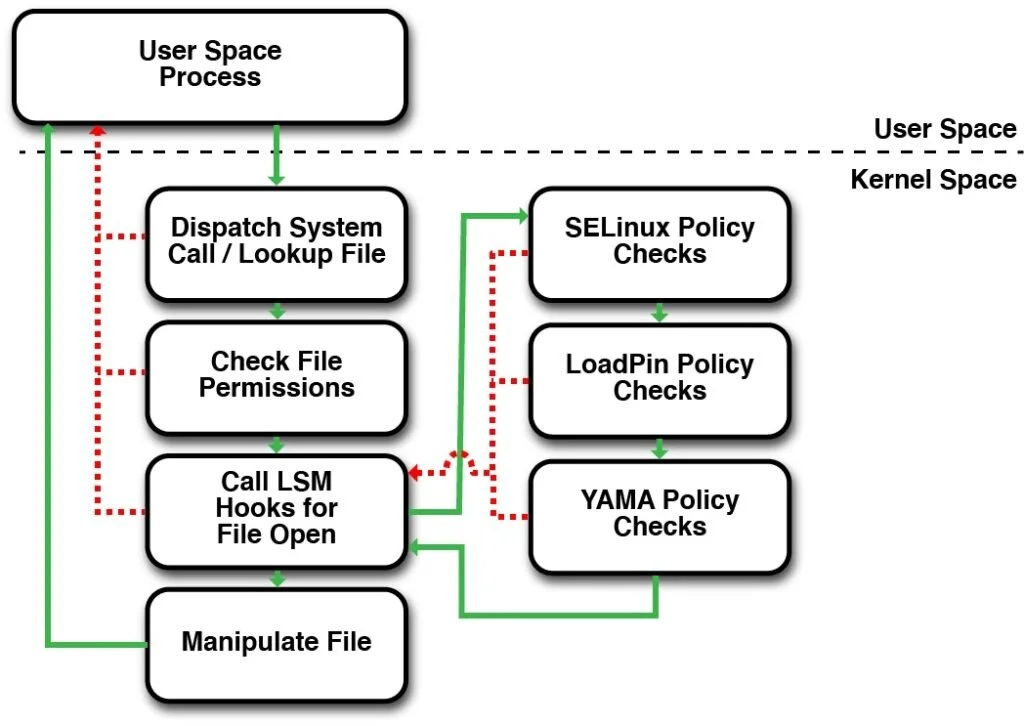
find / -perm -002to find world-writable files. - Enable SELinux or AppArmor: On Fedora,
setenforce 1; on Ubuntu, enable AppArmor profiles. - Mount Options: Add
noexec,nodev,nosuidto/etc/fstabfor /tmp and /var. - Chroot Jails: Use chroot for services like FTP to isolate them.
- ACLs for Fine Control: Use
setfaclto set access control lists on files. - Regular Backups: Use
rsyncorduplicitywith encryption for data integrity. - Immutable Files: Make critical files immutable with
chattr +i /etc/passwd. - Scan for SUID/SGID: Find and review with
find / -perm -4000 -o -perm -2000.
Section 5: Encryption and Data Protection (Tips 41-50)
Encrypt data to protect against theft.
- Full Disk Encryption: Use LUKS during installation or
cryptsetuppost-install. - Encrypt Home Directories: Enable ecryptfs for user homes.
- Secure Swap: Encrypt swap space with LUKS to prevent data leaks.
- Use HTTPS Everywhere: Configure services like Apache with Let’s Encrypt certificates.
- GPG for Files: Encrypt sensitive files with
gpg -c file.txt. - VPN Encryption: Ensure all remote traffic is encrypted.
- Secure Boot: Enable UEFI Secure Boot to prevent rootkits.
- Password Managers: Use tools like
passor KeePassXC for secure storage. - Data at Rest: Use dm-crypt for external drives.
- Wipe Free Space: Use
shredorwipeto securely delete files.

Section 6: Monitoring and Logging (Tips 51-60)
Detect issues early with monitoring.
- Enable Syslog: Configure rsyslog or systemd-journald for centralized logs.
- Log Rotation: Use logrotate to manage log sizes.
- Auditd for Auditing: Install and configure auditd to track system calls.
- Intrusion Detection: Use Snort or OSSEC for real-time alerts.
- Monitor Processes: Use
top,htop, orpsregularly. - Systemd Timers for Checks: Set up timers for security scans.
- Email Alerts: Configure tools to send emails on anomalies.
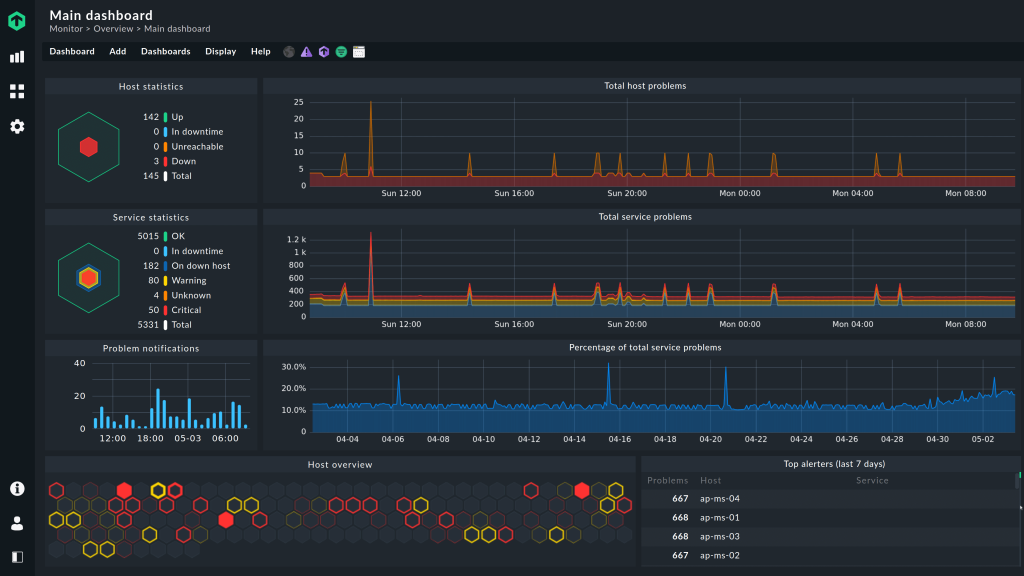
- Prometheus and Grafana: For advanced monitoring dashboards.
- Check for Rootkits: Use
rkhunterorchkrootkitweekly. - Log Analysis Tools: Employ
logwatchfor daily summaries.
Section 7: Software and Package Management (Tips 61-70)
Secure your software sources.
- Verify Package Signatures: Always check GPG keys for repos.
- Use Official Repos: Avoid third-party PPAs unless trusted.
- AppArmor Profiles for Apps: Create profiles for untrusted software.
- Sandbox with Firejail: Run browsers in firejail.
- Minimal Installations: Start with a base system and add only needed packages.
- Static Code Analysis: Use
cppcheckfor custom code. - Container Security: If using Docker, scan images with Trivy.
- Disable Autostart Services: Review with
systemctl list-unit-files. - Secure Pip and Gem: Use virtualenvs for Python packages.
- Regular Vulnerability Scans: Use
lynisfor system audits.
Section 8: Service Hardening (Tips 71-80)
Harden running services.
- Apache Security: Use mod_security and disable directory listing.
- Nginx Configuration: Set server_tokens off and use SSL.
- Database Security: For MySQL, remove anonymous users.
- FTP vs SFTP: Prefer SFTP over FTP.
- Email Server Hardening: Use Postfix with TLS.
- Disable Telnet: Use SSH instead.
- Secure Samba: Restrict shares and use passwords.
- Cron Job Security: Lock down /etc/cron.d permissions.
- Web Application Firewall: Integrate ModSecurity.
- Service Isolation: Use systemd’s PrivateTmp and ProtectHome.
Section 9: Kernel and System Hardening (Tips 81-90)
Strengthen the core system.
- Sysctl Hardening: Set
net.ipv4.tcp_syncookies=1for SYN flood protection. - Disable Core Dumps: Set
ulimit -c 0to prevent info leaks. - ASLR Enabling: Ensure Address Space Layout Randomization is on.
- Grsecurity/PaX: Compile kernel with these patches if possible.
- Module Blacklisting: Blacklist unused kernel modules in /etc/modprobe.d.
- Bootloader Password: Set GRUB password.
- Disable USB Autorun: Use udev rules.
- Harden /proc: Mount /proc with hidepid=2.
- Use Seccomp: For processes like Chrome.
- Kernel Parameters: Tune with sysctl for security.
Section 10: Miscellaneous and Advanced Tips (Tips 91-100)
Additional layers of protection.
- Antivirus Installation: Use ClamAV for scans.
- Firewall Logging: Enable logging in UFW.
- Secure Bootloader: Use signed kernels.
- Network Sniffing Detection: Use tools like
promiscdetect. - Passwordless Sudo for Specific Commands: Configure carefully.
- Regular Reboots: To apply updates.
- Honeypots: Deploy for detection.
- BIOS/UEFI Password: Set firmware passwords.
- Physical Security: Lock servers physically.
- Continuous Education: Stay updated via resources like OWASP or Linux security forums.
In conclusion, implementing these 100 tips will significantly enhance your Linux distro’s security posture. Start with the basics like updates and firewalls, then layer on advanced features. Remember, security is an ongoing process—regular audits are key.