Building an app with AI sounds straightforward—until you ask which model did what. Did AI write the code, generate a website, or simply answer questions inside an existing product? The distinction matters when you are deciding what to build, what to buy and what a demo actually proves.
This guide brings together 40 real AI app and website examples across Grok, Claude, ChatGPT/OpenAI and Gemini: five app or extension workflows and five browser-based experiences for each ecosystem. Every profile includes a documented model relationship, a source and a practical place to start exploring.
Scope: these are documented AI-powered products, model integrations and AI-assisted building tools—not 40 products independently proven to have been coded entirely by AI. They are not presented as a “top-rated” ranking: comparable independent ratings were not established for all 40.
Research date: September 16, 2026. Model names are tied to the cited disclosure. Historical releases, undisclosed versions and access restrictions are labelled; the suggested tests below were not executed as a hands-on benchmark.
Jump to: What “built with AI” means · Grok · Claude · ChatGPT / OpenAI · Gemini · Choosing and deploying · FAQ
What “built with AI” actually means
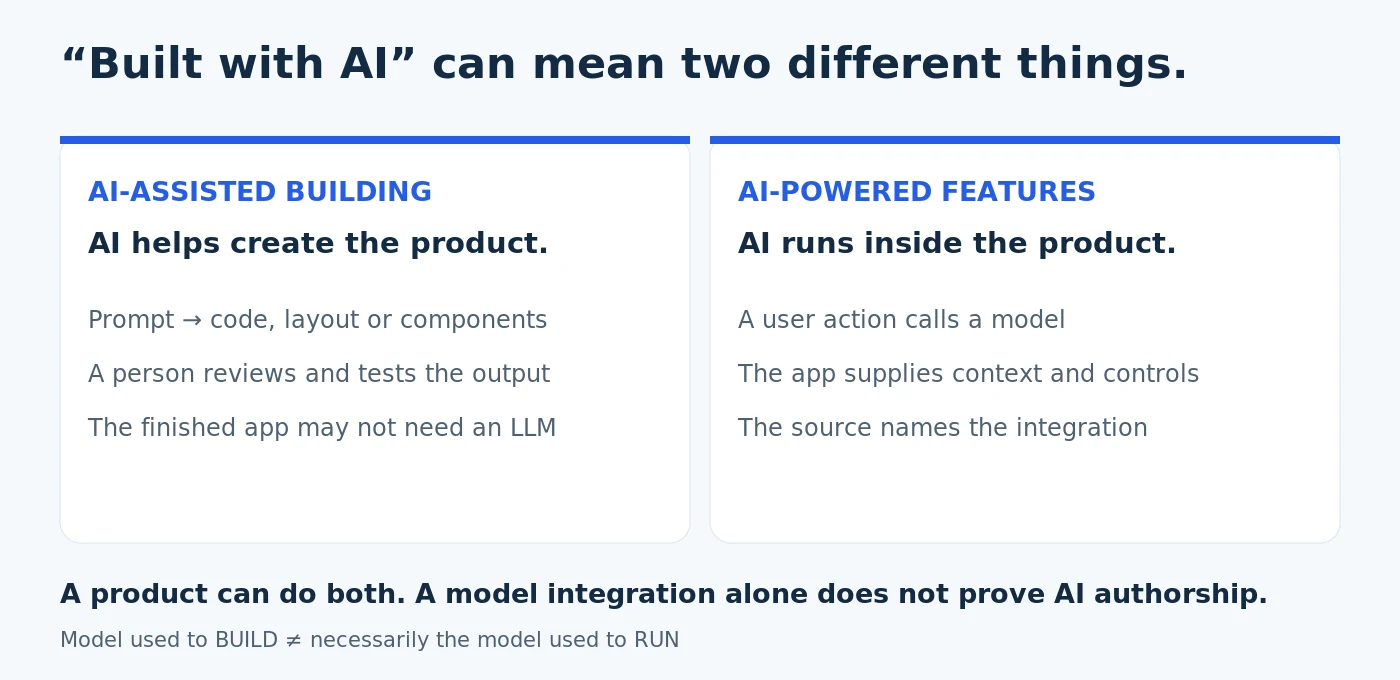
AI-assisted building means a model helps generate or change code, layouts or components. AI-powered means a product calls a model to provide a feature. A tool can do both. For example, Wix documents GPT-4o in website-building capabilities, while Duolingo’s original Max announcement describes GPT-4-powered learning features. Wix case study; Duolingo Max announcement.
There is a third useful label: model integration. A product such as an editor or multi-model chat interface can offer Grok, Claude, OpenAI or Gemini without being built by that model. Replit makes the distinction especially important: its AI Integrations announcement describes connecting apps to providers, including Grok via OpenRouter; that is not a disclosure of the model running Replit’s coding Agent. Replit’s explanation.
In this article, “apps” includes installable desktop/mobile apps and IDE extensions. “Websites” includes browser-based applications and hosted AI services—not just marketing sites. Products available in several formats are counted once. ChatGPT is a product; GPT-4, GPT-4o and GPT-5 are model names used in the OpenAI examples below.
The 40-example map
| Ecosystem | Apps / extensions | Web experiences | What to look for |
|---|---|---|---|
| Grok | 5 | 5 | Coding integrations and multi-model access |
| Claude | 5 | 5 | Workplace features and building workflows |
| ChatGPT / OpenAI | 5 | 5 | Learning, accessibility, search and site building |
| Gemini | 5 | 5 | Device features, interactive tools and research |
Selection favors recognizable products and documented developer tools, with primary-source evidence taking priority over promotional claims. Some entries are specialist tools rather than household names. Official case studies are useful evidence of a model relationship, but they are not independent product reviews. “Try it” links lead to official products or documentation; an account, device, paid tier or sales demo may still be required.
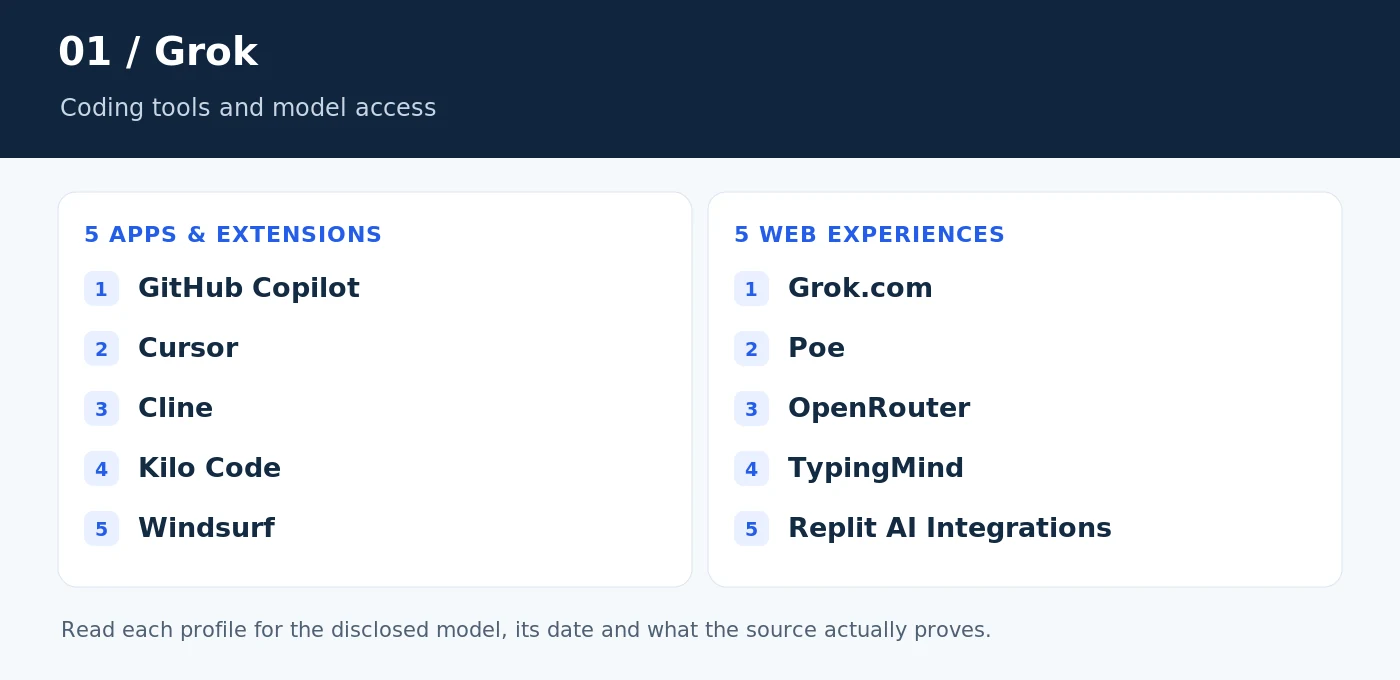
Grok examples: five apps and five web experiences
Start here for documented Grok coding integrations and websites that expose xAI models. Most examples in this section demonstrate model support, not proof of a Grok-authored application.
Five apps and extensions
1. GitHub Copilot
Model: grok-code-fast-1; Grok 4.5 and 4.6. Role: Model integration. Launch integration; later model catalog.
GitHub Copilot is an example of an established coding assistant offering a Grok option, not an application proven to have been written by Grok. xAI named it a launch partner for Grok Code Fast 1. GitHub’s supported-model reference also lists Grok 4.5 and 4.6, with availability depending on the client and plan. GitHub’s supported-model reference; xAI’s launch announcement.
Try it: In a disposable repository, ask the selected Grok model to add input validation and tests. Review the patch rather than accepting the whole change unseen. Open GitHub Copilot.
Access note: GitHub account and a compatible Copilot client/plan; consult the current model picker.
2. Cursor
Model: grok-code-fast-1. Role: Model integration. Documented August 2025 integration.
Cursor appears in xAI’s Grok Code Fast 1 launch-partner list. That establishes a coding-model integration; it does not establish that Cursor itself was AI-built. xAI’s launch-partner announcement.
Try it: Try a narrowly scoped website edit: improve one mobile navigation component, then inspect keyboard behavior, changed files and the resulting page. Open Cursor.
Access note: Install Cursor; verify that the documented model remains available in your account.
3. Cline
Model: grok-code-fast-1. Role: Model integration. Documented August 2025 integration.
Cline is another named Grok Code Fast 1 launch partner. It belongs in the development-workflow category, rather than a list of independently verified Grok-authored businesses. xAI’s launch-partner announcement.
Try it: Use a test project to request a small bug fix. Keep control of file changes and terminal actions, and compare the proposed solution with a failing test. Open Cline.
Access note: Cline installation and compatible provider access; model availability can change.
4. Kilo Code
Model: x-ai/grok-code-fast-1. Role: Model integration. Published model catalog entry.
Kilo Code maintains a dedicated page for Grok Code Fast 1. It is a concrete example of a coding product exposing an xAI model, with a model identifier that developers can actually look up. The integration is the evidence—not a claim about who wrote Kilo’s own code. Kilo’s Grok model page.
Try it: Ask it to explain an unfamiliar module before requesting a change. A useful evaluation checks both whether the explanation is accurate and whether the later patch stays within scope. Open Kilo Code.
Access note: Kilo installation/account and model access; usage conditions belong to the current product.
5. Windsurf
Model: grok-code-fast-1. Role: Model integration. Documented August 2025 integration.
Windsurf was also a Grok Code Fast 1 launch partner. The defensible claim is support for that model at the documented launch, not that every Windsurf session uses Grok today. xAI’s launch-partner announcement.
Try it: Give the selected model a single acceptance criterion, such as fixing a form’s empty-state behavior. Compare the browser result with the original requirement. Open Windsurf.
Access note: Install the editor and check its current model catalog before purchasing access.
Five websites and browser-based experiences
6. Grok.com
Model: Grok 4. Role: First-party AI product. Documented July 2025 release.
Grok’s own website is a first-party example of an AI-powered web experience. The Grok 4 announcement documents that model’s release. This is a historical model reference, not a promise that every current subscription, mode or response uses Grok 4. xAI’s Grok 4 announcement.
Try it: Ask for a small, self-contained HTML calculator and test the output locally with normal, empty and invalid inputs. Treat a convincing preview as a starting point, not deployment approval. Open Grok.com.
Access note: Account, feature and subscription restrictions may apply; check the current interface.
7. Poe
Model: Grok 4.6. Role: Model integration. Listed on the product homepage at review.
Poe is a browser-based place to access multiple AI models; its homepage lists Grok 4.6. That makes it a useful example of a website offering Grok alongside other providers. It does not make Poe a Grok-built website or mean that all bots on Poe share the same model. Poe’s model listing.
Try it: Open a Grok-labelled bot and confirm its description before testing a prompt. Save the model label with the result so a later comparison remains meaningful. Open Poe.
Access note: Account and message/point allowances may apply. Avoid old bot links that have been deprecated.
8. OpenRouter
Model: x-ai/grok-code-fast-1. Role: Model integration. Published model endpoint.
OpenRouter publishes an exact endpoint for Grok Code Fast 1 and provides a model page with a chat entry point. This is especially useful when researching how an app calls a model through a routing service instead of through a consumer chatbot. OpenRouter’s model endpoint.
Try it: Compare the same small coding request across available models. Record the selected endpoint, response and observed errors; do not assume a model’s provider name explains every difference. Open OpenRouter.
Access note: Interactive use may require an account and credits; the model page is publicly viewable.
9. TypingMind
Model: Grok 4. Role: Model integration. Model advertised by the product.
TypingMind’s website advertises Grok 4 among its supported models. It illustrates a different arrangement: a web interface connects users to models rather than owning the underlying model itself. Support for Grok is not evidence that Grok generated the TypingMind application. TypingMind’s supported-model overview.
Try it: Use the same short brief for a product FAQ, then assess factual accuracy, tone and how much editing the draft needs. Use non-confidential sample material. Open TypingMind.
Access note: Check the current license, provider configuration and API billing requirements.
10. Replit AI Integrations
Model: Grok via OpenRouter; exact variant undisclosed. Role: Model integration. Documented November 2025 integration.
Replit’s AI Integrations announcement includes Grok through OpenRouter. The important distinction is where Grok is used: an app made on Replit can integrate that model. The announcement does not establish that Replit’s coding Agent itself runs on Grok, and it does not disclose a single Grok version for every integration. Replit’s AI Integrations announcement.
Try it: Inspect the model configured in a generated app before testing its chatbot. Distinguish the model that helps build the app from the model answering users inside it. Open Replit AI Integrations.
Access note: Replit account and applicable integration/deployment usage charges; inspect project settings.
Watch a real demo
Watch the video on YouTube. Playback may depend on the uploader, location and consent settings.
Claude examples: five apps and five web experiences
The Claude examples cover workplace assistance, coding and prompt-to-product workflows. Pay particular attention to the component named in a case study: a design-system agent is not necessarily the whole application.
Five apps and extensions
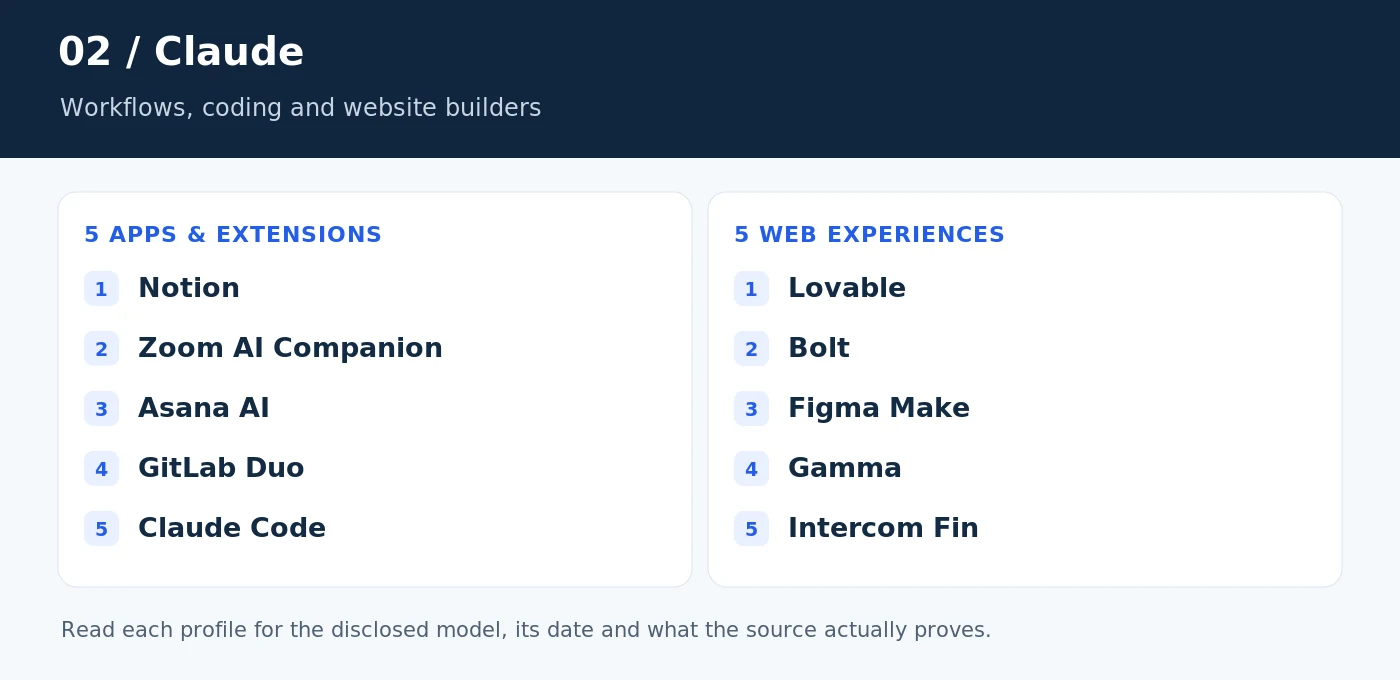
11. Notion
Model: Claude Opus 4.6. Role: AI-powered feature. Named in the customer case study.
Notion’s customer story names Claude Opus 4.6 in the development of Notion Agent. The interesting example is AI working within an existing workspace, where documents and tasks provide context. This is evidence for a Claude-powered product capability, not evidence that Notion’s entire application was generated from a prompt. Anthropic’s Notion case study.
Try it: Try a sample workspace with a brief, a project plan and a few notes. Ask the agent to turn those materials into a reviewable next-step plan. Open Notion.
Access note: Notion account and access to the relevant AI features; use a test workspace.
12. Zoom AI Companion
Model: Claude 3.5 Sonnet. Role: AI-powered feature. Historical deployment in the customer case study.
Zoom’s case study describes deploying Claude 3.5 Sonnet within its federated AI approach. That multi-model architecture matters: the cited model is a documented component, not a claim that every AI Companion feature or meeting summary always uses the same provider. Anthropic’s Zoom case study.
Try it: Test with a short, consented practice meeting. Compare the resulting summary with the actual decisions and check whether tentative suggestions were incorrectly turned into commitments. Open Zoom AI Companion.
Access note: Eligible Zoom account, enabled AI Companion features and appropriate participant consent.
13. Asana AI
Model: Claude; version undisclosed. Role: AI-powered feature. Provider confirmed; exact model not named.
Asana’s customer story connects Claude with Asana AI and the context supplied by its Work Graph. This is a workflow example: AI is used inside a work-management product rather than presented as a standalone chatbot. The source does not identify an exact Claude version, so guessing a Sonnet or Opus release would overstate the evidence. Anthropic’s Asana case study.
Try it: Use a fictional project to test a status summary. Check dependencies, owners and dates against the underlying tasks before sending the result to anyone. Open Asana AI.
Access note: Asana workspace and an eligible AI-enabled plan or trial.
14. GitLab Duo
Model: Claude 3 family; variant undisclosed. Role: AI-powered feature. Documented customer deployment.
GitLab’s case study describes using Claude 3 models for Duo within a multi-model strategy. It connects AI with software-development tasks such as code assistance and chat. Duo spans GitLab and supported development environments; it is counted here as an application/IDE workflow, not as a separately generated website. Anthropic’s GitLab case study.
Try it: Ask for an explanation of a small code change, then compare it with the diff. For security-related suggestions, require independent review rather than treating the answer as a finding. Open GitLab Duo.
Access note: GitLab project, compatible client and the relevant Duo entitlement.
15. Claude Code
Model: Claude 3.7 Sonnet at launch. Role: AI-assisted builder. Historical February 2025 launch; current models vary.
Anthropic introduced Claude Code alongside Claude 3.7 Sonnet. The launch describes an agent that can inspect a codebase, edit files, run commands and work with tests. It is a direct example of AI-assisted software development, although that does not establish that Claude Code’s own implementation was wholly AI-written. Anthropic’s Claude Code launch.
Try it: Use a disposable branch to request one change with tests. Review command permissions, the patch and the test output before merging. Open Claude Code.
Access note: Install/configure Claude Code and confirm the model and access terms currently available to you.

Five websites and browser-based experiences
16. Lovable
Model: Claude 3.5 Sonnet and Claude Opus 4.5. Role: AI-assisted builder. Documented product-development milestones.
Lovable’s customer story describes early agents using Claude 3.5 Sonnet and later improvements associated with Claude Opus 4.5. Its relevance is straightforward: people use a browser-based builder to turn instructions into applications. The named models document stages of Lovable’s system, not a permanent single-model promise for every project. Anthropic’s Lovable case study.
Try it: Generate a modest directory or booking prototype with fictional records. Then check whether editing, validation and empty states work—not just whether the landing screen looks polished. Open Lovable.
Access note: Account and applicable build/deployment allowances; inspect generated integrations before launch.
17. Bolt
Model: Claude Opus 4.7 for its design-system agent. Role: AI-assisted builder. Specific subsystem named in the case study.
Bolt’s case study identifies Claude Opus 4.7 in a design-system agent built with Anthropic’s Agent SDK. This is narrower than saying that every part of Bolt uses Opus 4.7. The product is relevant to AI-built websites because it helps users generate and develop applications through a browser. Anthropic’s Bolt case study.
Try it: Test a component against an existing design brief. Check spacing, responsiveness and consistency across several screens instead of judging a single attractive preview. Open Bolt.
Access note: Bolt account; feature availability and usage allowances depend on the current offering.
18. Figma Make
Model: Claude Sonnet 4.5. Role: AI-assisted builder. Named in the customer case study.
Figma’s customer story names Claude Sonnet 4.5 in Make. It is a useful bridge between interface design and functional prototypes: the AI is part of a tool people use to build an experience. That is different from claiming Figma’s entire design platform was produced by Claude. Anthropic’s Figma case study.
Try it: Turn a small interface concept into a prototype and test the interaction flow. Confirm navigation, focus order and realistic content before treating the result as production-ready. Open Figma Make.
Access note: Figma account and Make access; prototype generation is not a substitute for release testing.
19. Gamma
Model: Claude 3 Haiku in a documented rollout; website-generator version undisclosed. Role: AI-assisted builder. Historical rollout plus provider-confirmed website generation.
Gamma’s case study describes putting Claude 3 Haiku into production and separately identifies a Claude-powered website generator. It does not explicitly establish that the website generator itself used Haiku. That distinction matters when a company uses several models across presentations, documents and websites. Anthropic’s Gamma case study.
Try it: Create a concise service-page draft from your own outline. Review every business claim and replace generic sections with useful, specific information before sharing it publicly. Open Gamma.
Access note: Gamma account and current generation/publishing allowances.
20. Intercom Fin
Model: Claude; version undisclosed. Role: AI-powered feature. Provider confirmed in the customer case study.
Intercom’s case study connects Claude with Fin, its customer-support AI. This is a commercial web-service example: the model works inside a support experience rather than merely drafting a marketing page. The source does not name an exact Claude version, and a business should not infer one from the Fin brand alone. Anthropic’s Intercom case study.
Try it: Test a demo with questions that have clear answers in a sample help center. Include an unanswerable question to see whether the system acknowledges the limit or invents a policy. Open Intercom Fin.
Access note: Public product information; an interactive evaluation may require a demo, trial or account.
Watch a real demo
Watch the video on YouTube. Playback may depend on the uploader, location and consent settings.
A related visual workflow—not another counted example
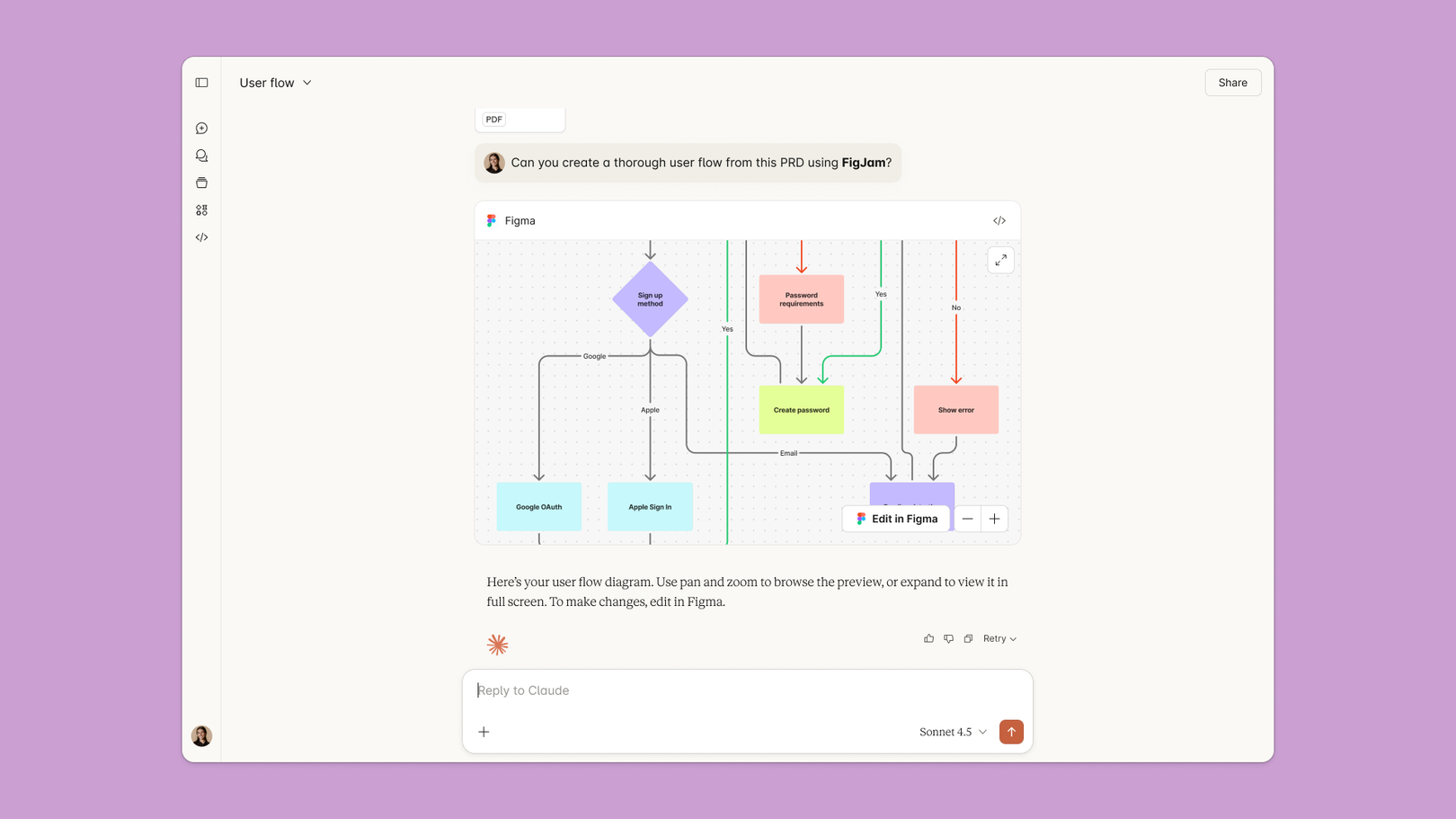
Figma also publishes a visual example of a Claude–FigJam workflow. It is included here to show a real interface reference, not to relabel FigJam as Figma Make or claim that a screenshot proves which model generated an entire product. Figma’s original article.
ChatGPT and OpenAI examples: five apps and five websites
“Built with ChatGPT” is often used loosely. In these examples, the evidence may concern an OpenAI model inside another company’s product—not someone using the ChatGPT website to write the entire application.
Five apps and extensions
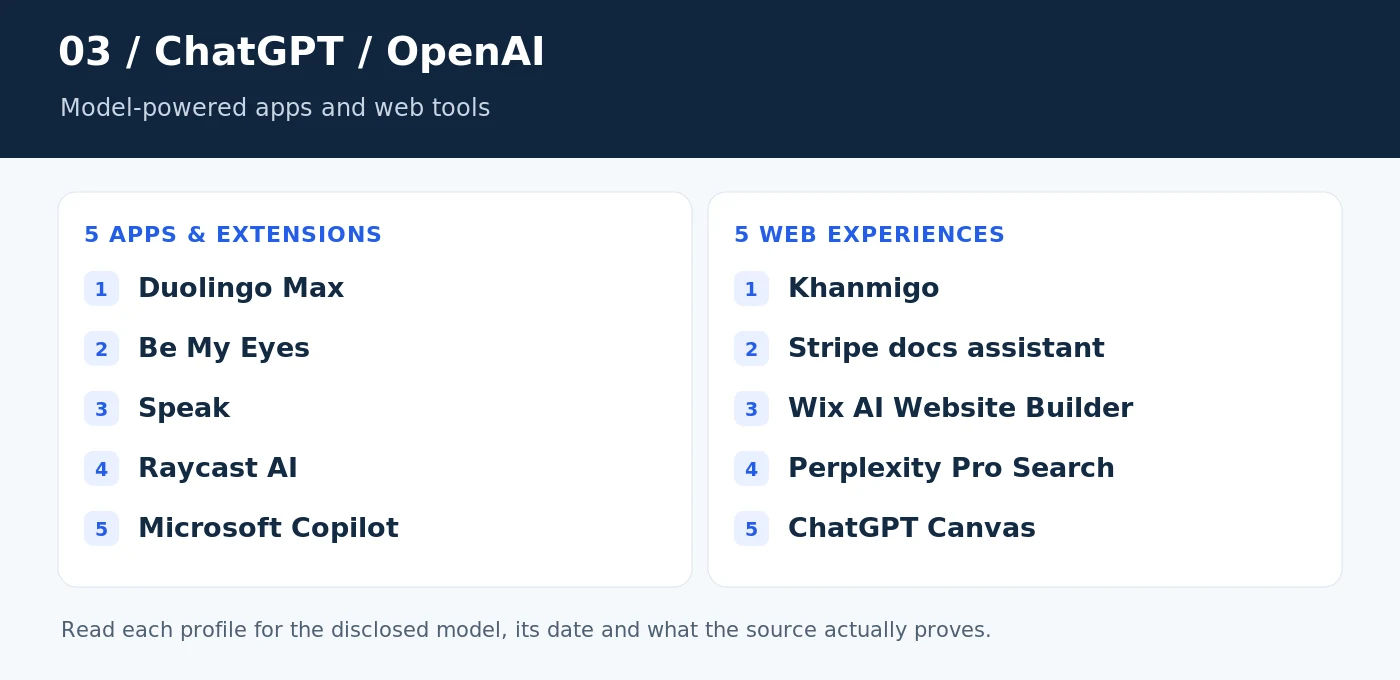
21. Duolingo Max
Model: GPT-4. Role: AI-powered feature. Original March 2023 announcement.
Duolingo’s original Max announcement named GPT-4 for conversational learning features such as Roleplay. It is a recognizable example of an existing mobile product adding a model-powered experience. The 2023 disclosure establishes the original model relationship; it should not be read as a complete specification of today’s Max features or routing. OpenAI’s Duolingo case study; Duolingo’s original Max announcement.
Try it: Try an available practice conversation and inspect the feedback. The useful question is whether the explanation helps a learner improve, not whether the conversation merely sounds fluent. Open Duolingo Max.
Access note: Eligible subscription, language course, device and region; current feature availability varies.
22. Be My Eyes / Be My AI
Model: GPT-4. Role: AI-powered feature. Original visual-assistant deployment.
OpenAI’s Be My Eyes case study describes using GPT-4 to help explain images through a virtual visual assistant. It shows how an AI model can become a focused accessibility feature inside an app rather than a generic chat window. This model disclosure is historical, not an assurance about every current request. OpenAI’s Be My Eyes case study.
Try it: Test with a harmless, familiar image and compare the description with what it actually contains. Do not rely on an AI description alone for navigation, medication identification or other safety-critical decisions. Open Be My Eyes / Be My AI.
Access note: Use the official app and its currently available Be My AI features.
23. Speak
Model: GPT-4o; gpt-4o-realtime-preview at launch. Role: AI-powered feature. Documented October 2024 Realtime API example.
OpenAI’s Realtime API launch names Speak as a language-learning customer using the API for roleplay. The launch connected the experience with GPT-4o and the original gpt-4o-realtime-preview model. That exact identifier is useful provenance, but it is not a recommendation to build a new application on a historical preview endpoint. OpenAI’s Realtime API launch.
Try it: Practice a short scenario, such as ordering lunch, and evaluate interruptions, corrections and whether the conversation stays on task. Open Speak.
Access note: Speak app/account and access to the relevant speaking features.
24. Raycast AI
Model: GPT-4. Role: Model integration. Documented July 2023 release.
Raycast’s version 1.56.0 changelog introduced a GPT-4 upgrade for its AI experience. This is an example of AI appearing inside a desktop workflow rather than requiring a separate browser tab. The changelog proves that historical integration; it does not mean the current product offers only GPT-4 or has unchanged pricing. Raycast’s GPT-4 release notes.
Try it: Test a short transformation, such as turning rough notes into a clear message. Compare the result with the original meaning and remove any invented detail. Open Raycast AI.
Access note: Compatible Raycast installation and the relevant current AI access.
25. Microsoft Copilot
Model: GPT-5. Role: AI-powered feature. Documented August 2025 rollout.
Microsoft’s August 7, 2025 release notes say GPT-5 became available in Copilot across web, Windows, Mac and mobile, with Smart Mode routing work according to the task. This is a named-model deployment, not a claim that Microsoft’s application was coded by ChatGPT or that every Copilot feature uses one fixed model. Microsoft’s GPT-5 release notes.
Try it: Use a non-sensitive brief to test planning or explanation. Check the active mode and verify factual statements separately before reusing the output. Open Microsoft Copilot.
Access note: Official Copilot app or website; current modes and entitlements may differ from the launch.
Five websites and browser-based experiences
26. Khanmigo
Model: GPT-4. Role: AI-powered feature. Original Khan Academy deployment.
OpenAI’s Khan Academy case study describes GPT-4 in Khanmigo, an educational assistant intended to support learning. It is an example of a model wrapped in a domain-specific experience rather than offered as unrestricted chat. The original model disclosure is not a statement about the complete current Khanmigo architecture. OpenAI’s Khan Academy case study.
Try it: Try a supported sample problem and look for guidance that helps the learner reason through it. A useful tutor should not simply make a wrong answer sound authoritative. Open Khanmigo.
Access note: Khanmigo access depends on the offering, user type and location.
27. Stripe documentation assistant
Model: GPT-4. Role: AI-powered feature. Documented March 2023 use case.
Stripe’s case study describes using GPT-4 to help developers navigate its documentation and understand integration questions. Keep the claim narrow: this is a documented documentation-assistant use case, not evidence that every Stripe service, payment decision or fraud system runs on GPT-4. OpenAI’s Stripe case study.
Try it: Open the current documentation and use any available assistant for a sandbox integration question. Check the answer against the actual API reference and test code before using real transactions. Open Stripe documentation assistant.
Access note: Documentation is public; assistant behavior and availability may have changed since the case study.
28. Wix AI Website Builder
Model: GPT-4o. Role: AI-assisted builder. Named in the May 2025 case study.
OpenAI’s Wix case study names GPT-4o in Wix’s AI website-building capabilities. This is one of the clearest examples in this guide of AI helping produce websites. The evidence concerns features inside Wix’s builder; it does not establish that Wix itself was built entirely by an AI agent. OpenAI’s Wix case study.
Try it: Generate a simple business site from an accurate brief. Replace unsupported claims, inspect the mobile layout and test every form before connecting a live domain. Open Wix AI Website Builder.
Access note: Wix account; publishing, domain and premium-feature requirements depend on the plan.
29. Perplexity Pro Search
Model: GPT-5 as a selectable model. Role: Model integration. Named in current help documentation at review.
Perplexity’s Pro Search help page lists GPT-5 among its selectable models. It also lists models from other providers, so describing Perplexity simply as a ChatGPT-powered website would be misleading. The precise example is OpenAI model access inside a multi-model search product. Perplexity’s Pro Search help page.
Try it: Choose a documented model, ask a question with verifiable sources and open those sources yourself. Check that each source supports the nearby claim, not merely the general topic. Open Perplexity Pro Search.
Access note: An account and the relevant model-selection entitlement; inspect current limits.
30. ChatGPT Canvas
Model: GPT-4o. Role: AI-assisted builder. Original October 2024 launch.
OpenAI introduced Canvas as a writing-and-coding workspace built with GPT-4o. It brings code or text into a separate working area for iterative changes. That makes it directly relevant to AI-assisted app development, while the launch model should not be mistaken for a guarantee about today’s available Canvas models. OpenAI’s Canvas announcement.
Try it: Build a small HTML page, then request one revision at a time. Check the output in a real browser and confirm that a visual change has not broken an interaction. Open ChatGPT Canvas.
Access note: ChatGPT account and current Canvas availability.
Watch a real demo
Watch the video on YouTube. Playback may depend on the uploader, location and consent settings.
Gemini examples: five apps and five web experiences
Gemini appears in device features, consumer applications and browser-based building tools. Some sources name an exact model; others confirm only the Gemini family. Both are useful, provided that the distinction stays visible.
Five apps and extensions
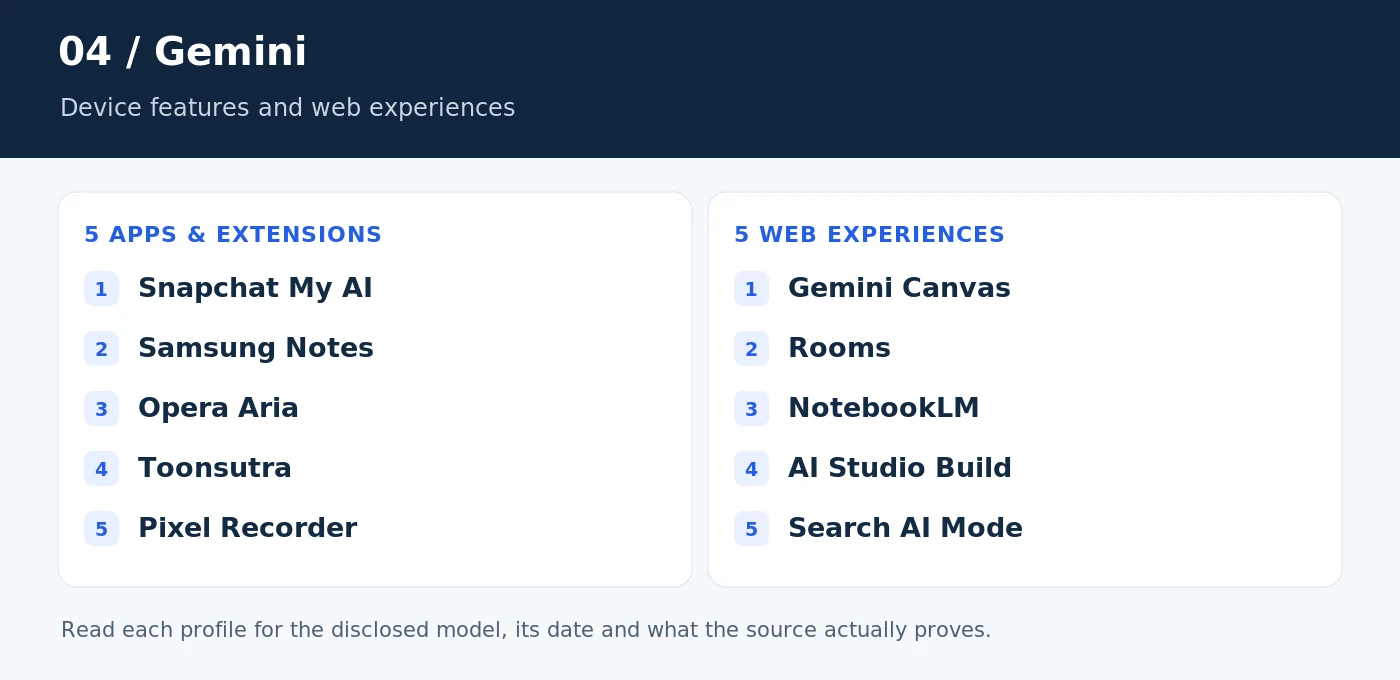
31. Snapchat My AI
Model: Gemini on Vertex AI; version undisclosed. Role: AI-powered feature. Documented September 2024 partnership.
Snap’s announcement identifies Gemini on Vertex AI as part of My AI’s multimodal experience. It is a recognizable example of Google’s models being integrated into a third-party consumer app. The announcement does not name an exact Gemini version, so assigning one would be speculation. Snap’s Google Cloud partnership announcement.
Try it: Try an ordinary, non-sensitive image question where the answer is easy to verify. Avoid sharing private information merely to see what the assistant can recognize. Open Snapchat My AI.
Access note: Snapchat account and access to the relevant My AI features; availability can vary.
32. Samsung Notes / Note Assist
Model: Gemini Pro. Role: AI-powered feature. Documented January 2024 Galaxy S24 launch.
Samsung’s Galaxy S24 announcement names Gemini Pro for summarization capabilities in applications including Notes. This is an AI-enhanced device-app workflow. The same announcement discusses other models for other features, which is a good reminder not to label all of Galaxy AI as Gemini. Samsung’s Galaxy S24 announcement.
Try it: Summarize a sample note containing decisions, dates and exceptions. Compare the summary with the original, especially where a short sentence could change the intended meaning. Open Samsung Notes / Note Assist.
Access note: Supported device, software, account, language and region; the cited launch concerned the S24 series.
33. Opera Aria
Model: Gemini; version undisclosed. Role: AI-powered feature. Documented May 2024 integration.
Opera’s announcement describes integrating Gemini into Aria through its Composer system. This is a multi-model browser assistant, not evidence that Opera’s browser code was generated by Gemini. The release does not specify an exact Gemini variant for every Aria interaction. Opera’s Gemini integration announcement.
Try it: Use a public page to test a short explanation and follow-up question. Verify details against the page itself, and distinguish the native assistant from a separate Gemini website opened in a sidebar. Open Opera Aria.
Access note: Compatible Opera version and the currently offered AI features.
34. Toonsutra
Model: Gemini 2.0. Role: AI-powered feature. Named in Google’s developer showcase.
Google’s developer showcase identifies Gemini 2.0 in Toonsutra’s work on multilingual comic translation. It is a focused content-workflow example, rather than evidence that the comic-reading application itself was entirely AI-written. Google’s Toonsutra developer showcase.
Try it: Explore a title in a language you understand well. Evaluate dialogue, cultural context and consistency of character names rather than assuming a fluent translation preserves every detail. Open Toonsutra.
Access note: Use the official Toonsutra product; content, languages and access vary.
35. Pixel Recorder
Model: Gemini Nano. Role: AI-powered feature. Documented December 2023 Pixel 8 Pro feature.
Google’s December 2023 Pixel feature drop introduced Gemini Nano-powered summarization in Recorder on Pixel 8 Pro, including on-device operation. It is a useful contrast to cloud chatbots: an AI feature can be embedded in a device app. Do not generalize that launch’s support to every Pixel model or recording feature. Google’s December 2023 Pixel feature drop.
Try it: Record a short practice note with permission from anyone involved, then compare the summary with the audio. Check names and numbers particularly carefully. Open Pixel Recorder.
Access note: Supported Pixel hardware and software; verify current language and feature support.
Five websites and browser-based experiences
36. Gemini Canvas
Model: Gemini 2.5 Pro Experimental. Role: AI-assisted builder. Documented March–May 2025 capability.
Google’s Gemini release notes document using 2.5 Pro Experimental with Canvas to create web apps and generate code. This is a direct example of AI-assisted building inside a browser. The historical model label records the documented capability; it is not a claim about the app’s current default. Gemini’s official release notes.
Try it: Create an interactive checklist or simple quiz, then test empty input, keyboard use and a smaller screen. Save the code and requirements so someone else can review the result. Open Gemini Canvas.
Access note: Google account and available Canvas/model access; limits and model choices change.
37. Rooms
Model: Gemini 2.0. Role: AI-powered feature. Named in Google’s developer showcase.
Google’s showcase describes Rooms using Gemini 2.0 for text and audio interactions with avatars. This makes it an example of AI inside an interactive web experience, not merely a generated business homepage. The source does not establish that every room or every visitor interaction uses Gemini. Google’s Rooms developer showcase.
Try it: Explore public creations and look for a supported AI interaction. Check how the experience handles an unexpected question instead of only following the happy path. Open Rooms.
Access note: Public browsing and creator/AI features may have different access requirements.
38. NotebookLM
Model: Gemini 1.5 Pro. Role: AI-powered feature. Documented June 2024 upgrade.
Google’s June 2024 NotebookLM announcement names Gemini 1.5 Pro and describes source-grounded research, inline citations and support for uploaded material. This is a concrete model-powered web application. The version is historical; readers should check the current product rather than assume the underlying model has remained unchanged. Google’s NotebookLM upgrade announcement.
Try it: Create a notebook with two short, non-confidential documents and ask for a comparison. Open the cited passages and check that the answer does not blend incompatible statements. Open NotebookLM.
Access note: Google account and current NotebookLM availability and source limits.
39. Google AI Studio Build
Model: Gemini; no single model version specified in the Build guide. Role: AI-assisted builder. Provider confirmed; project/model selection matters.
Google’s Build-mode documentation describes generating full-stack web applications through natural-language prompts, with a code view, preview and deployment/export options. It does not pin the whole experience to one Gemini version. For an individual project, record the actual model configuration rather than inventing a universal default. Google’s AI Studio Build documentation.
Try it: Generate a minimal app, inspect its client and server code, and check how secrets are stored. Test the exported project independently before treating a successful preview as a finished release. Open Google AI Studio Build.
Access note: Google account; API, deployment and other service usage can incur charges.
40. Google Search AI Mode
Model: Custom Gemini 2.5. Role: AI-powered feature. Documented May 2025 rollout.
Google’s I/O 2025 Search update describes bringing a custom version of Gemini 2.5 to AI Mode. This is a public search experience using a model inside a larger retrieval system, not a standalone website generated by Gemini. The model disclosure records that rollout, not every present-day Search request. Google’s AI Mode announcement.
Try it: Ask a question that benefits from several sources, then open the linked pages. Evaluate whether the answer captures important disagreements or missing information. Open Google Search AI Mode.
Access note: AI Mode availability depends on the current market, account and product rollout.
Watch a real demo
Watch the video on YouTube. Playback may depend on the uploader, location and consent settings.
How to choose an AI building workflow
Start with the outcome, not a provider leaderboard. For an existing codebase, test a coding assistant against a small change with clear acceptance criteria. For a new website, compare a prompt-to-site builder against the pages, forms and editing controls you actually need. For an AI feature inside your own product, evaluate the model integration separately from the interface used to build it.
A useful comparison is deliberately boring: the same brief, the same sample data and the same checks. Ask each candidate to handle normal input, missing information and an obvious failure case. Record the actual model identifier when it is visible. Otherwise, write “not disclosed” instead of treating a product name as a model specification.
Do not confuse a public demo with unrestricted access. A landing page may be public while the working feature requires a subscription or device. A video may show an older interface. A model named in a 2023 or 2025 announcement may no longer be selectable. That does not invalidate the historical example; it limits what you can conclude from it.
From an impressive demo to a site you can maintain
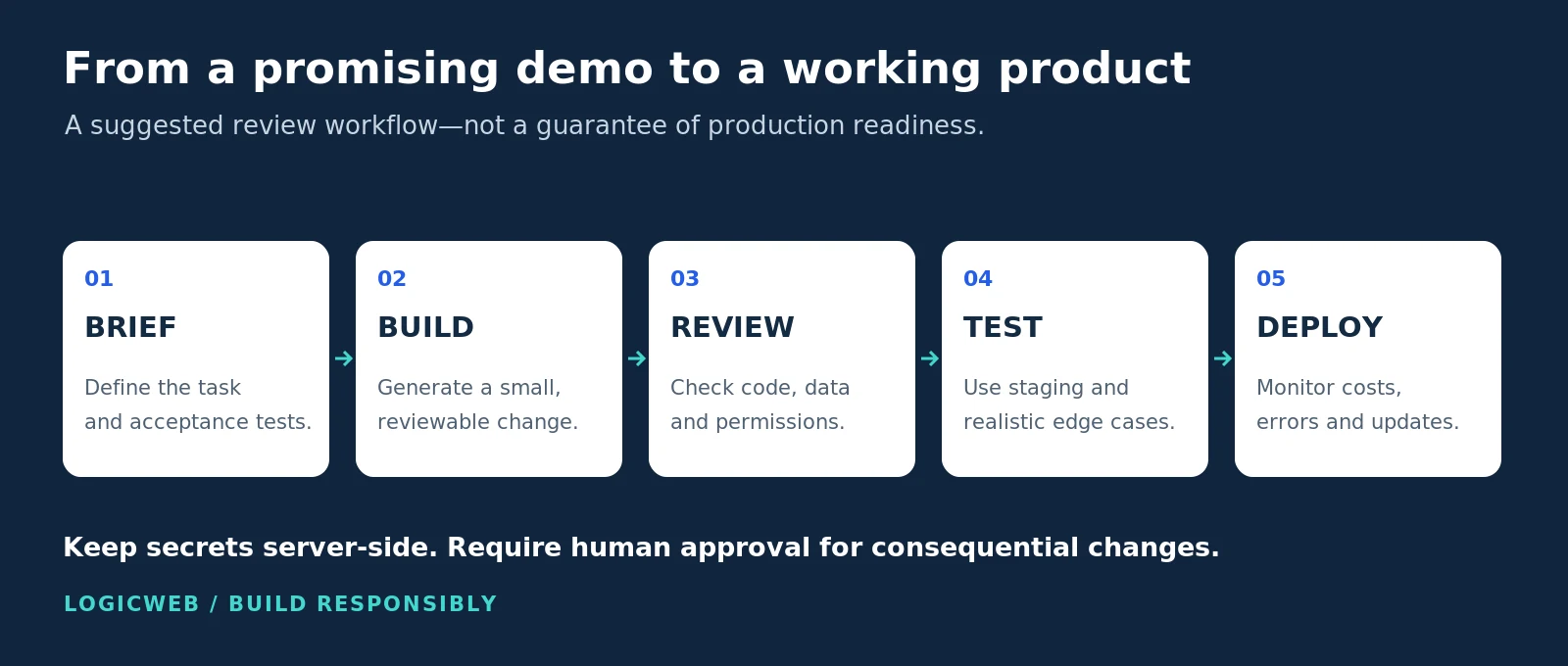
Keep control of the output. Our suggested release process is to review the generated code or configuration, test forms and authentication, check permissions, and give someone clear responsibility for maintenance. A working first screen does not establish that the entire application is reliable.
Separate browser code from secrets. For AI integrations, inspect where credentials are stored and which service pays for requests. Google’s AI Studio documentation, for example, describes server-side secret handling and explains that exported apps need the appropriate environment configuration. AI Studio deployment guidance.
Choose hosting for the exported application. Before purchasing infrastructure, identify the runtime, database, background processes and deployment method your project needs. A proprietary hosted builder may not export a complete, self-hostable application. Treat compatibility as something to verify with the builder and hosting provider—not something an AI-generated preview proves.
For a WordPress project, LogicWeb’s WordPress hosting describes staging and WordPress-management tools. For a custom application needing server-level control, compare the requirements with LogicWeb’s VPS hosting. Confirm the fit before migrating; choosing an AI model and choosing a hosting environment are separate decisions.
Frequently asked questions
Were all 40 products coded entirely by AI?
No. The evidence supports a mixture of AI-assisted building tools, AI-powered features, first-party AI products and model integrations. It does not establish complete AI authorship of all 40 products. That is why the article labels the relationship instead of presenting an unsupported “100% AI-built” claim.
Which examples actually help people build apps or websites?
The clearest building workflows in this collection include Claude Code, Lovable, Bolt, Figma Make, Gamma, Wix AI Website Builder, ChatGPT Canvas, Gemini Canvas and Google AI Studio Build. Their individual profiles link to the evidence and explain which model or subsystem the source names. See the Claude, OpenAI and Gemini profiles.
Does an OpenAI-powered app use ChatGPT?
Not necessarily. A company can integrate an OpenAI model into its own product without using the ChatGPT consumer interface. Read the exact disclosure: “GPT-4o” identifies a model, while “ChatGPT Canvas” identifies a product experience. The profiles deliberately preserve that difference.
Why do some examples list an older model or no version at all?
Because a dated, explicit disclosure is stronger evidence than a guess. Older model names document a historical deployment. “Version undisclosed” means the cited source names the provider or model family without identifying an exact release. Neither label guarantees the model currently serving a particular account.
Are all the demos free and immediately accessible?
No. Product pages and videos may be public, while interactive features can require an account, subscription, compatible device, supported region or sales-led trial. Check the access note and current product terms. The suggested tests are exploration ideas, not a report of 40 completed hands-on evaluations.
Will publishing AI-generated website content guarantee better SEO?
No. Google’s guidance emphasizes useful, reliable content created for people rather than material produced to manipulate rankings. A generated page still needs accurate information, a clear purpose and editorial review. Original examples and transparent sourcing are more useful than repeating an unsupported “best AI” claim. Google’s people-first content guidance.
The takeaway
The most useful AI examples explain what the model does, not just which famous name appears in the marketing. Use these 40 profiles as a starting point: open a real product, read its model evidence, try a small task and inspect the result. For anything you plan to publish or deploy, keep the claim modest and the testing thorough.
Editorial note: sources are linked beside the claims they support. Product interfaces, model catalogs and access rules change. Original diagrams are explanatory artwork; official interface images and videos retain their credited owners and are not presented as screenshots or tests performed by LogicWeb.