In today’s digital age, setting up a VOIP (Voice over Internet Protocol) system can revolutionize your business communications, offering cost savings, flexibility, and scalability. If you’re searching for a “how to start VOIP with Asterisk and FreePBX tutorial,” you’ve come to the right place. Asterisk, an open-source framework, powers robust telephony applications, while FreePBX provides a user-friendly GUI to manage it. This concise guide covers the essentials of VOIP server setup using Asterisk and FreePBX, including step-by-step instructions, visuals, and real-world examples.
Understanding Asterisk and FreePBX for VOIP
Asterisk is a powerful open-source software that turns a standard computer into a communications server, handling calls, conferencing, and more. FreePBX enhances this by offering a web-based interface for easy configuration, making it ideal for beginners in VOIP PBX setup. Together, they create a customizable IP PBX system compatible with SIP endpoints and hardware like IP phones.
For a visual overview, here’s a diagram of Asterisk’s architecture in a VOIP setup:
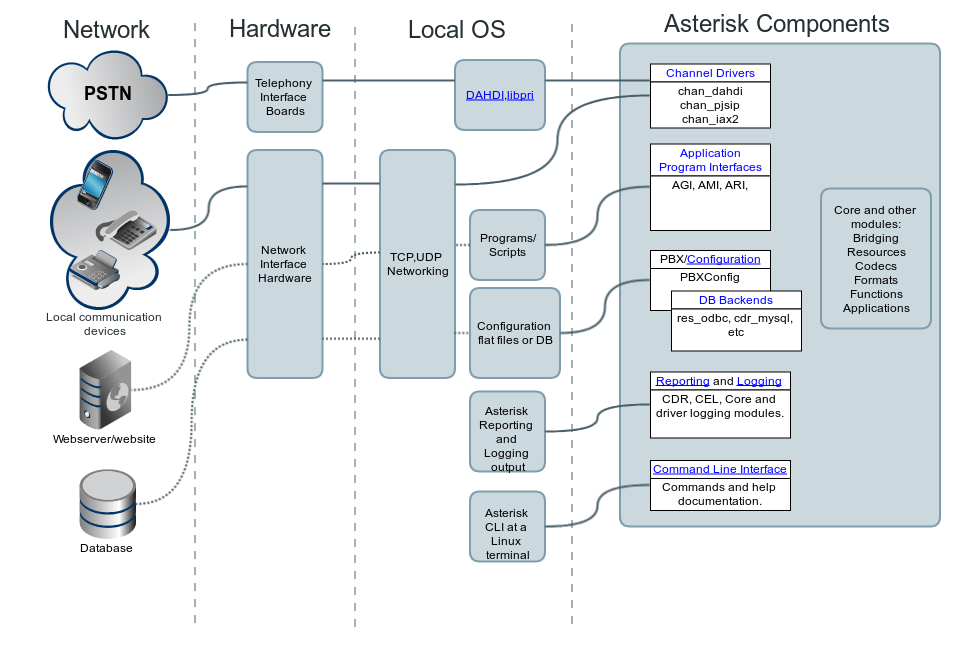
Asterisk Architecture, The Big Picture – Asterisk Documentation
Requirements for Asterisk FreePBX Installation
Before diving into the “Asterisk FreePBX tutorial,” ensure you have:
- A server or virtual machine (e.g., Ubuntu or Debian Linux).
- At least 2GB RAM and 20GB storage for basic setups.
- Internet connection for SIP trunks (e.g., from providers like VoIP.ms).
- Basic Linux knowledge; no advanced hardware needed for softphones.
Step-by-Step Guide: How to Install Asterisk and FreePBX
Follow this “VOIP setup with Asterisk” process on Ubuntu/Debian:
- Install Dependencies: Update your system and install prerequisites like Apache, MySQL, and PHP.text
sudo apt update && sudo apt upgrade sudo apt install apache2 mariadb-server php libapache2-mod-php php-mysql wget git ```<grok-card data-id="77ae83" data-type="citation_card" data-plain-type="render_inline_citation" ></grok-card> - Install Asterisk: Download and compile the latest version from source for optimal features.text
wget http://downloads.asterisk.org/pub/telephony/asterisk/asterisk-20-current.tar.gz tar -zxvf asterisk-20-current.tar.gz cd asterisk-20.*/ ./configure && make && sudo make install ```<grok-card data-id="a97999" data-type="citation_card" data-plain-type="render_inline_citation" ></grok-card> - Install FreePBX: Clone the repository and run the install script.text
git clone https://github.com/FreePBX/sng_freepbx_debian_install.git cd sng_freepbx_debian_install sudo ./installThis sets up the GUI and integrates with Asterisk. - Configure FreePBX: Access the web interface (e.g., http://your-server-ip/admin). Create extensions, trunks, and routes. For SIP trunks, add details from your provider like VoIP.ms.
- Set Up Phones: Add IP phones (e.g., Fanvil, Yealink) via the Extensions module. Use softphones for testing.
Here’s a screenshot of the FreePBX dashboard post-setup:
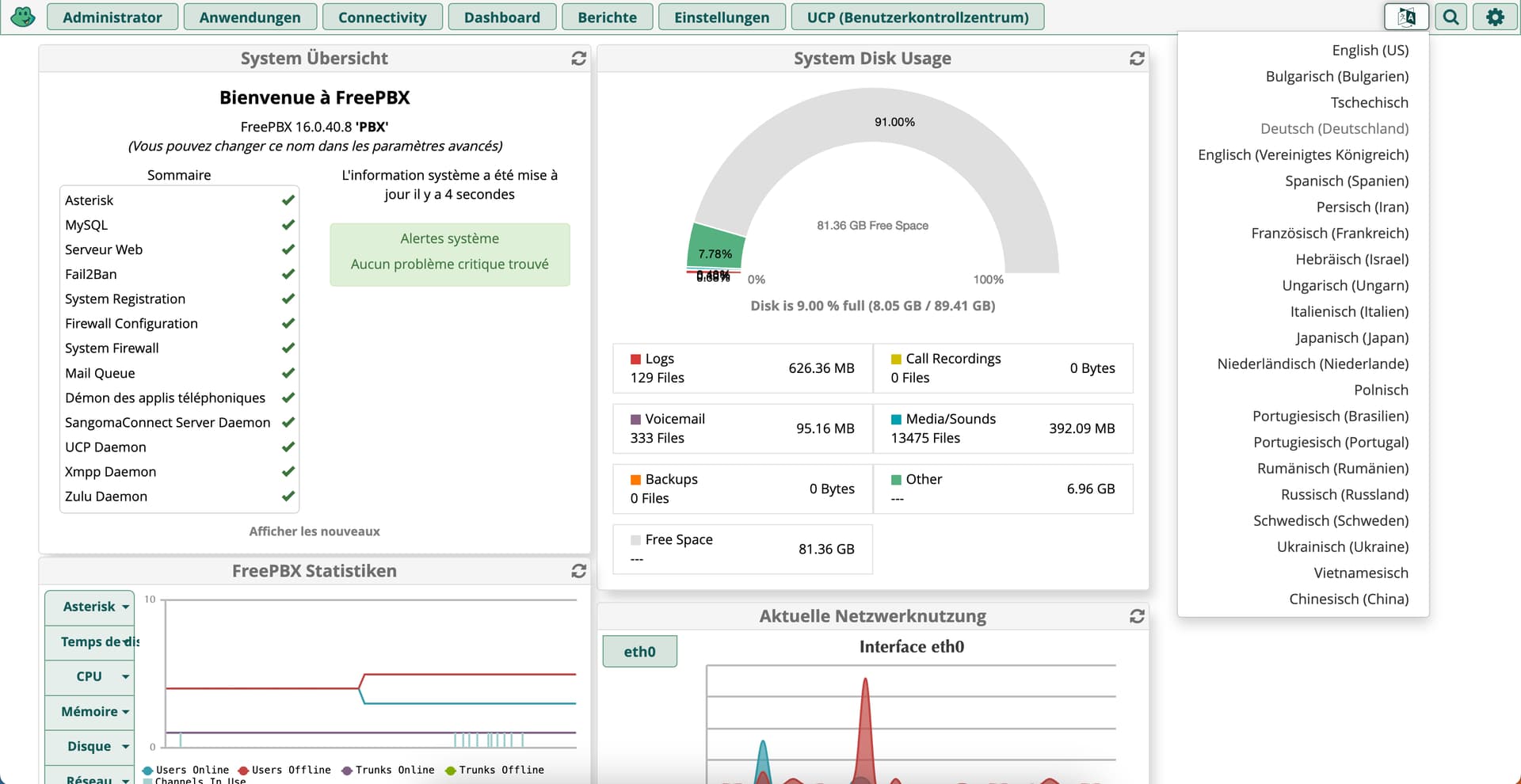
FreePBX16: Dashboard is displaying several widgets in french whatever language is selected – Applications / Modules – FreePBX Community Forums
For network security, enable firewalls, forward ports (e.g., UDP 5060, 4569), and use UPnP if needed.
Live Demos and Tutorials
To see “Asterisk FreePBX setup” in action, check these YouTube demos:
- Easily Set Up Your Own VoIP Server with Asterisk and FreePBX (Part 1) – Covers installation commands.
- Part 3: Connecting SIP Extensions – Demonstrates phone integration.
Real-World Examples: Companies Using Asterisk and FreePBX
Many businesses leverage this setup for reliable VOIP. Examples include:
- Healthcare Firms: A company with 30 offices and 500 users uses FreePBX for multi-site VOIP.
- INGENES (Mexico): Hospitals and health care provider utilizing FreePBX for communications.
- OEC Group (USA): Logistics firm employing it for global operations.
- Small businesses save thousands monthly by switching to Asterisk-based systems.
Sangoma, which owns FreePBX, powers solutions for enterprises like Switchvox.
Visualize a full VOIP architecture:
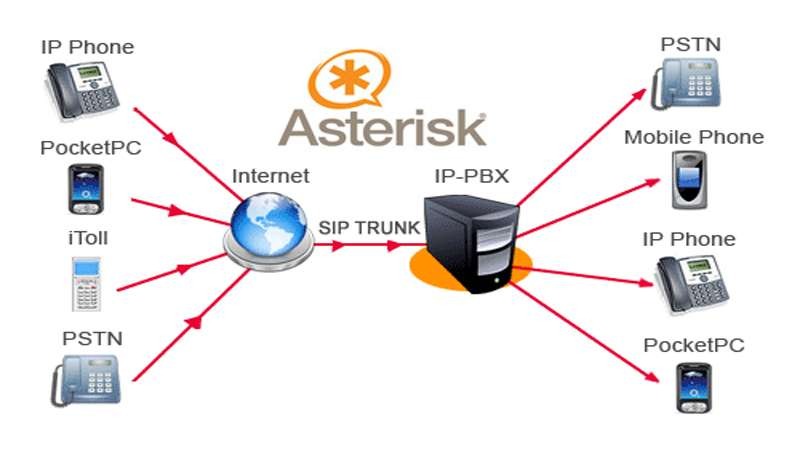
IP Telephony with ASTERISK – CSL Training | CISCO, Microsoft, Linux, Juniper, Asterisk, MikroTik, CCNA Training in Bangladesh
Tips for Optimizing Your VOIP PBX Setup
- Integrate Google Voice for free trunks if needed.
- Use tools like Fail2Ban for security.
- Scale by adding modules for IVR, voicemail, and call recording.
Starting a VOIP with Asterisk and FreePBX is accessible and powerful. For more advanced “Asterisk VOIP tutorial” resources, explore community forums or professional services. Get started today and transform your communications!
Check out LogicWeb’s VPS hosting to start your VOIP installation today!