
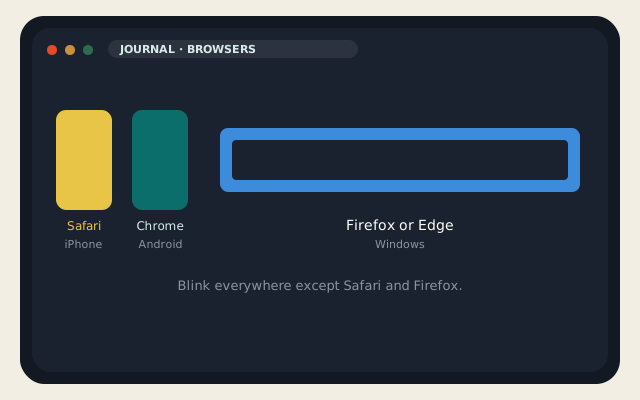
People search for the best web browsers as if one winner ships on iPhone, a Pixel, and a Windows laptop. That product does not exist. Safari is not on Android. Samsung Internet is not on iPhone. Zen is a Firefox fork for desktops. Chrome on iOS is still WebKit with a Google skin. This comparison is of ten web browsers you can actually install in September 2026, scored by platform, engine, and the job — not by a 100-point fantasy scale.
Statcounter’s worldwide numbers for mid-2026 are the backdrop, not a verdict: Chrome around 68–69 percent, Safari around 16 percent, Edge around 5.4 percent, Firefox around 3 percent, Samsung Internet around 2 percent, Opera just under 2 percent. Brave, Vivaldi, DuckDuckGo, and Zen are smaller than that and still worth a seat. Share is what web developers test. Your laptop is not the world.
On this page
The three engines, and why iPhone is different
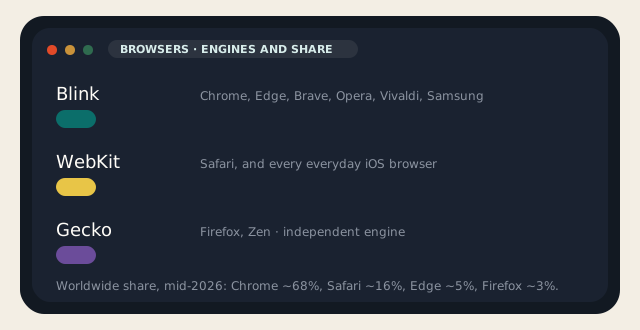
Almost every modern desktop browser is Chromium — Google’s open-source body — with a different UI and a different default privacy story. That engine is Blink. Chrome is Blink. Edge is Blink. Brave, Opera, Vivaldi, Samsung Internet: Blink. If a site “only works in Chrome,” it usually works in the rest of that list.
Two engines are not Blink. WebKit is Apple’s. Safari is WebKit. On iOS and iPadOS, Apple still requires everyday browsers to use WebKit outside a narrow EU entitlement that, years after the DMA, has not produced a Blink or Gecko iPhone browser you can recommend to a normal person. Chrome, Firefox, Brave, and Edge on iOS are WebKit apps with their own sync and UI. They cannot offer desktop-class extension stores. They cannot bring the real Blink to your iPhone. That is the sentence most “best web browsers” lists skip.
Gecko is Mozilla’s. Firefox is Gecko. Zen is a Firefox fork with an Arc-like sidebar, still Gecko, still on Windows, macOS, and Linux — not on iOS or Android as a daily driver. Gecko is the last widely installed independent engine. That matters if you care whether one company writes the web. It also means a handful of sites will be clumsy. You already knew that if you have ever filed a Firefox bug.
Ten web browsers, scored by platform
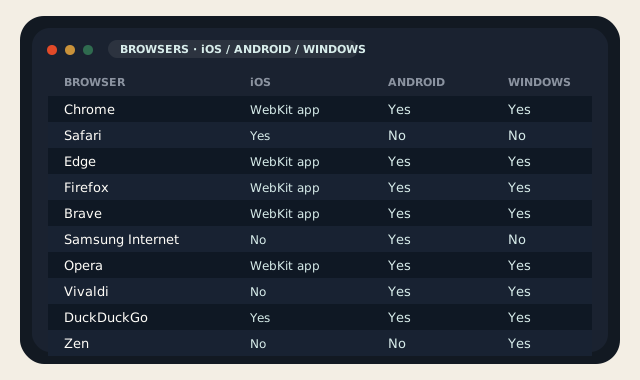
| Browser | Engine (desktop / Android) | iOS | Android | Windows | Why it is on this list |
|---|---|---|---|---|---|
| Chrome | Blink | Yes, WebKit | Yes | Yes | The default the web is tested against. Sync, extensions, RAM use to match. |
| Safari | WebKit | Yes (the OS) | No | No | Best iPhone browser because it is the OS. Passkeys, reader, privacy report. |
| Edge | Blink | Yes, WebKit | Yes | Yes | Windows default, Collections, PDF, IE mode for the one intranet that still needs it. |
| Firefox | Gecko | Yes, WebKit | Yes | Yes | Independent engine, containers, honest about telemetry. Extensions that still work. |
| Brave | Blink | Yes, WebKit | Yes | Yes | Shields on by default, Chrome extension ID on desktop, a crypto sidebar you can ignore. |
| Samsung Internet | Blink | No | Yes | No | Excellent Android browser if you own a Galaxy. DeX, secret mode, ad block add-on. |
| Opera | Blink | Yes, WebKit | Yes | Yes | Built-in VPN-lite, workspaces, GX for people who wanted RGB in the chrome. |
| Vivaldi | Blink | No real daily driver | Yes | Yes | Tabs on tabs, notes, a mail client. For people who missed Opera 12. |
| DuckDuckGo | WebKit / Blink | Yes | Yes | Yes | Tracker blocking as the product. Fine on phones. Thin as a desktop power browser. |
| Zen | Gecko | No | No | Yes | Firefox fork, Arc-style sidebar, Mods. Desktop only. Still in active development. |
Arc is not on the ten. The Browser Company stopped building it in May 2025, took Chromium security patches into 2026, and moved the team to Dia after Atlassian bought the company in October 2025. Arc still launches. It is not a browser I would install on a new Windows laptop in September 2026. Dia is macOS-only as of this writing. Neither belongs on an iOS / Android / Windows shortlist.
Orion, from Kagi, is the iOS and Mac footnote: WebKit, with a claim to run many Chrome and Firefox extensions on Apple platforms. It is interesting if you live in that ecosystem. It is not on Android or Windows, so it is not in the ten. UC Browser still shows up in some mobile share tables; I will not recommend it.
What “privacy” means in this table
Safari Intelligent Tracking Prevention, Firefox ETP, Brave Shields, and DuckDuckGo’s lock icon are real and different. Chrome is Google’s browser; it is fast and it reports to Google unless you fight it. Edge is Microsoft’s Blink skin; it is good at Windows and it will offer Bing. Opera’s “VPN” is a proxy, not the device tunnel in how a VPN works. None of these web browsers is a credit freeze. None of them patches a WordPress plugin for you.
Which browser to use on iOS, Android, and Windows
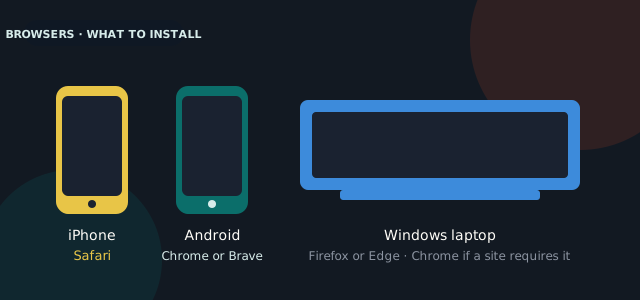
iPhone: Safari. It is the only web browser that is fully the platform — passkeys, extension-like web apps, reader, energy, the system share sheet. Brave or DuckDuckGo if you wanted extra blocking and could live without Safari’s extensions. Firefox on iOS is a sync bridge to your desktop Firefox, not a Gecko iPhone. Chrome on iOS is a sync bridge to your desktop Chrome. Pick Safari unless you had a specific sync reason.
Android: Chrome if you wanted the web other people test. Brave if you wanted that web with Shields on. Samsung Internet if you are on a Galaxy and liked secret mode and the Samsung add-on store. Firefox on Android is real Gecko with real add-ons (uBlock Origin still matters here). That is the one Android case where “install Firefox” is not nostalgia.
Windows: Firefox if you wanted Gecko and containers. Edge if you wanted the OS default that is no longer a joke — PDF, Collections, the one IE-mode tab for a timesheet. Chrome if your job is web development or the one SaaS that still sniffs for it. Brave if you wanted Chrome extensions without the Google account. Vivaldi if you missed having a browser that also thinks it is an IDE. Zen if you liked Arc’s sidebar and wanted it on Gecko, knowing it is a young fork.
- Do not run four Blink browsers “for privacy.” You multiplied RAM and still have one engine.
- uBlock Origin: desktop Firefox and Firefox on Android. Chrome’s Manifest V3 world is why people keep a Gecko browser around.
- A work Windows laptop that is MDM-managed: Edge, unless IT said otherwise. Fighting Group Policy with Brave is how tickets start.
- A site you host: test Chrome, Safari, and Firefox. That covers Blink, WebKit, and Gecko. The rest of the ten will follow.
If you run a site on our hosting, the visitor’s browser is not your origin. Mixed content, huge images, and a plugin that assumed Chrome’s GPU path will fail in Safari regardless of which web browsers you prefer at your desk. Fix the HTML. The comparison table is for the people in front of the glass, not for a CDN sticker.
Keep one browser as home, one as the spare for the site that failed, and stop collecting them. Ten web browsers exist so you can pick by platform and engine. They do not exist so your taskbar can look like a conference booth.
On a Windows 11 laptop, the browser is often the RAM bill. Chrome, Edge, Brave, Opera, and Vivaldi all spend like Chromium because they are Chromium. Running two of them with a dozen tabs each is how an 8 GB machine starts swapping, which is the other half of the Windows 11 performance piece. Firefox is usually lighter on many-tab sessions; Safari is the reason iPhones last a day. Pick one daily driver per device. Close the other. If a SaaS “requires Chrome,” keep Chrome for that origin and live in Firefox or Safari the rest of the time.
Set the default under Settings on each OS so links from mail open the browser you meant. iOS: Settings → Apps → Chrome (or Safari) → Default Browser App. Android: Settings → Apps → Default apps → Browser app. Windows: Settings → Apps → Default apps → pick the browser → Set default. Until you do that, every link from Slack is a vote for Edge or Safari regardless of what you installed. Web browsers you do not set as default are hobbies.
Reader discussion
Join the conversation.
Questions, corrections, and useful context are welcome.