
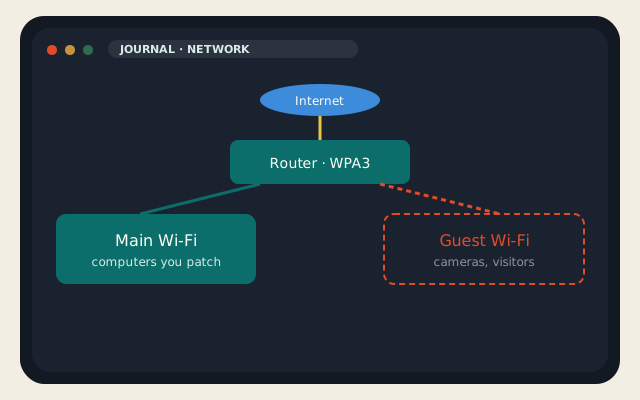
Network security is not a product you click Buy on. It is a set of hops: the laptop, the Wi-Fi, the router, the DNS lookup, and the firewall that faces the internet. Compromise any one of them and the rest of the drawing is decoration. Home and business use the same hops. A house needs a guest SSID and a router that still gets firmware. A company needs an inventory, MFA, segmentation, logs, and a restore that has been tested. This is 1 September 2026. The tools change names. The hops do not.
I will name free tools you can finish a weekend with, and paid tools that are worth the invoice when you have staff, compliance, or a threat model that includes someone other than a bored neighbor. LogicWeb will show up where a host belongs: the origin, the VPS, the DNSBL, not as a fake SOC. If you wanted identity rather than packets, that is the identity theft essay.
On this page
The five hops that actually matter
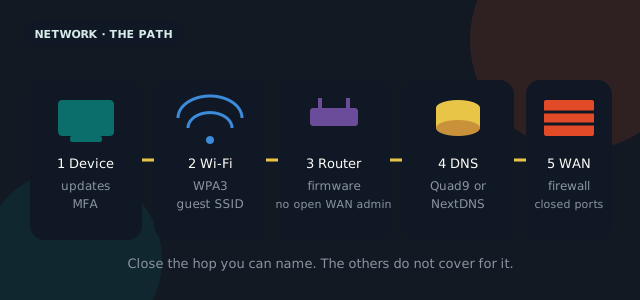
Device: current OS, disk encryption, a password manager, MFA on the accounts that can wire money. A patched Windows 11 laptop with BitLocker is network security. An unpatched phone on the guest Wi-Fi is also network security, just the other direction. You cannot buy a firewall that undoes a reused password.
Wi-Fi: WPA3-Personal at home, WPA3-Enterprise if you have a RADIUS box at work. A guest SSID that cannot see the NAS. No WPS. No default SSID that prints the router model to the street. Hide-SSID is not a control; it is a nuisance for your own devices.
Router / firewall: firmware from this year, admin on a password you did not leave as admin/admin, remote administration off unless you meant it and then only on a VPN. At home this is the box the ISP rented you or the UniFi mini you bought. At work this is pfSense, OPNsense, or a Palo Alto you pay someone to rule.
DNS: the lookup is how malware finds home and how kids find the internet. Quad9 (9.9.9.9) is a free resolver that drops known malicious names. NextDNS and Control D add a policy you can actually edit. Pi-hole is the homelab version. Cloudflare 1.1.1.1 is fast and not a filter unless you pick the malware variant. Your ISP’s resolver is convenient and is also a log.
Edge: the NAT, the firewall rules, the VPN concentrator, the thing that should not forward TCP/445 to a Windows box from the world. On a VPS this is nftables or the cloud security group. At a shop this is the firewall’s WAN interface. If you do not know what is forwarded, that is the first network security ticket.
A home network you can finish this weekend
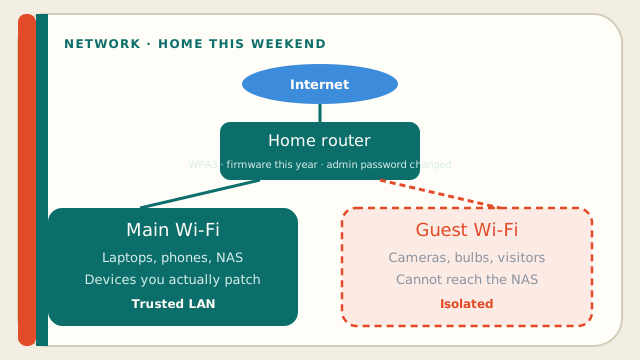
Start with the router. Log in. If you cannot, that is the problem. Change the admin password. Turn off remote admin. Set WPA3. Make a guest network for friends and for the cheap cameras that will never get a firmware update. Put IoT on that guest if the router will isolate it. Update the firmware. If the ISP router cannot do those things, buy one that can — a used UniFi, an OPNsense appliance, a Firewalla, even a current mesh that still ships patches. A 2016 ISP modem with WPA2-TKIP is the hole.
Point DNS at Quad9 or NextDNS on the router so every device inherits it, including the TV. Install a password manager (Bitwarden is free and good). Turn on MFA for email, the password manager, and the bank. Automatic updates on phones and laptops. That is a home network security baseline that beats 90 percent of the houses on the street.
- Guest Wi-Fi on. Main LAN for computers you patch. Cameras and lightbulbs do not sit next to the laptop that does taxes.
- No UPnP if you can live without it. Games will complain. So will a worm.
- A 3-2-1 copy of photos: disk, another disk, somewhere off-site. A NAS is not off-site. A VPS or a real backup vendor is.
- Tailscale (free for a handful of devices) if you wanted into the house without forwarding ports. This is the 2026 home VPN.
Skip: ISP “security suites” that install a toolbar, IP cameras with a default password on Shodan, and exposing Remote Desktop to the world instead of a VPN. A VPN for café Wi-Fi is a device hop. It does not replace WPA3 at home.
A business network: free tools first, paid tools when they pay
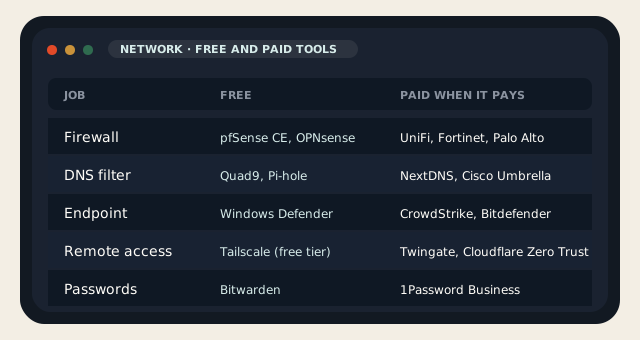
A ten-person shop can go a long way on free network security tools. pfSense CE or OPNsense on a small appliance is a firewall, a VPN, and a DHCP server you can explain. CrowdSec (free) is a collaborative IDS that will ban the scanners everyone else already saw. Wazuh is a SIEM you have to feed. Wireshark is how you see the packet. Nmap is how you see what you accidentally exposed. Suricata or Snort if someone on the team will write or subscribe to rules. Let’s Encrypt is the certificate. Windows Defender is the endpoint if you have not paid for EDR yet.
Paid starts to make sense when the cost of an afternoon outage exceeds the invoice. UniFi is paid hardware with a free controller and a vendor. Fortinet and Palo Alto are NGFWs with subscriptions that actually get you signatures and a phone number. CrowdStrike, Bitdefender GravityZone, Microsoft Defender for Business: EDR, which is how you catch the laptop that brought a token home. 1Password Business or Bitwarden Teams: shared vaults, not a spreadsheet. Cloudflare Zero Trust or Tailscale paid: identity-aware access without punching holes. NextDNS Teams: the DNS policy with an admin who is not you at midnight.
| Job | Free tool | Paid tool worth it when |
|---|---|---|
| Firewall / router | pfSense CE, OPNsense | You wanted a vendor, HA, or a store you can RMA — UniFi, FortiGate, PA |
| DNS filtering | Quad9, Pi-hole | You wanted policies per user and an audit — NextDNS, Cisco Umbrella |
| IDS / scanners | CrowdSec, Suricata, Nmap | You wanted a SOC-shaped feed — MDR on top of EDR |
| Endpoint | Defender, ClamAV on mail | You have Windows laptops that leave the building — CrowdStrike, Bitdefender |
| Remote access | Tailscale free, WireGuard on a VPS | You have contractors and an offboarding list — Tailscale paid, Twingate, Cloudflare ZT |
| Passwords | Bitwarden free | You needed shared vaults and SCIM — 1Password Business, Bitwarden Teams |
| Visibility | Wireshark, Wazuh | You needed a human to watch Wazuh — a retainer with an MSSP |
The business habits the tools cannot replace
Inventory: a spreadsheet of devices, owners, and whether they get patches is network security. MFA on email and the admin path is network security. A restore you have done, not a vendor badge, is network security. Segment the POS from the guest Wi-Fi. Do not let the smart TV on the VLAN that holds the accounting share. Log enough to answer “what happened at 2:14.” Paper the vendor defaults — the camera still on admin/1234 is how ransomware demos start.
Phishing is still the usual breach. Network security does not stop a user who pasted a password into a fake Microsoft page. It can stop the payload’s callback if DNS is filtered and the firewall is not a sieve. Train people on the second channel: if finance got a wire request, they call a number they already had. The AI-generated content piece is the cousin for the deepfake CFO.
- Turn off unused forwards. Scan yourself with Nmap from a VPS you own, not from hope.
- Patch the firewall on a calendar. “We will after the busy season” is how busy seasons get interesting.
- Separate admin accounts from mail accounts. The person who can change DNS should not live in the same session as Instagram.
- If you take cards, PCI is a network security standard, not a sticker. Ask the processor what they actually scan.
For the origin you host with us: keep SSH off the public port or behind WireGuard, keep the panel patched, keep mail authenticated, keep a snapshot. A WordPress site with a good WAF and a bad password is not network security. Our shared stack already runs Imunify; it will not save a reused admin password. A VPS you never patch is a public kernel with your name on the WHOIS.
Home or business, the order is the same: know the hops, close the ones you can this weekend, pay for a tool when the free one is missing a human. Network security that looks like a shopping list of logos is how companies buy four dashboards and still forward RDP. Pick the hop. Name the control. Test the restore. That is the whole job.
Reader discussion
Join the conversation.
Questions, corrections, and useful context are welcome.