
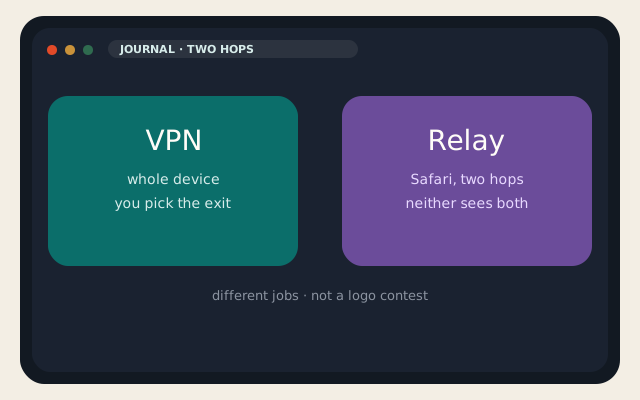
VPN vs iCloud Private Relay is the tab that opens after someone turns on iCloud+ and then asks whether they can cancel Mullvad. Different products. A VPN is a tunnel you aimed: every app, an exit country you picked, an operator you have to trust. iCloud Private Relay is a Safari (and some system) cloak that sends the request through two relays so that no single party — not even Apple — sees both who you are and which site you asked for.
Apple’s own support page is still the clean description on 1 September 2026. Hop one is Apple; it sees your IP and not the destination (DNS is encrypted, Oblivious DoH). Hop two is a partner such as Cloudflare or Akamai; it sees the site and a relay address, not your real IP. That split is why VPN vs iCloud Private Relay is not “which logo encrypts better.” It is which traffic, which apps, and who you are willing to trust with both halves.
Two hops versus one tunnel
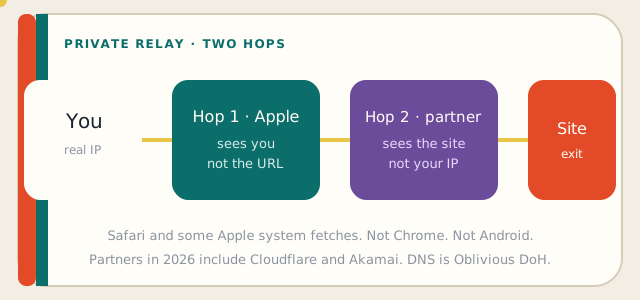
A commercial VPN is usually one hop you fully trust. The company can see your identity and your destinations if it logs. Some have been in court with empty disks. Some have not. VPN vs iCloud Private Relay on trust is the interesting column: Relay is designed so Apple cannot see the site and the partner cannot see you. That is better architecture than a single VPN operator if the threat was “one company holds the whole story.” It is worse architecture if you needed a specific exit in Frankfurt and Chrome.
How a VPN works is still the device-wide encrypted path to an IP you chose. Private Relay does not give you that IP menu. Apple assigns a rough region so weather and search do not think you live in a data center. You cannot “be in Tokyo” for a catalog. VPN vs iCloud Private Relay for streaming and geo is a VPN fight. Relay will not take it.
| VPN | iCloud Private Relay | |
|---|---|---|
| Requires | An app and an operator | iCloud+ and an Apple device |
| Traffic | Usually the whole device | Safari, DNS, some system fetches |
| Hops | One operator (typical) | Apple, then a partner |
| Who can see both halves | The VPN company, if it logs | Neither party, by design |
| Pick an exit country | Yes | No — approximate region only |
| Chrome / Android apps | Yes, if the VPN covers them | No |
| Kill switch | If the app has one | Not a tunnel; different failure |
| Good at | Hostile networks, chosen geo | Hiding Safari from the ISP and from Apple-as-logger |
HTTPS still sits on top of both. VPN vs iCloud Private Relay does not replace certificates. Mixed content on a WordPress origin is still a site bug. If the site is yours, fix it on WordPress hosting, do not argue about relays.
Safari, apps, and geo
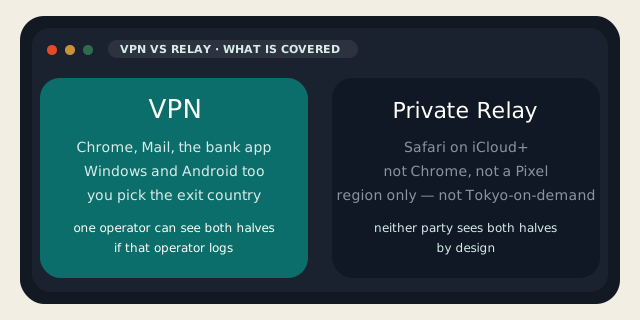
Private Relay is not Chrome. It is not Firefox. It is not the Windows laptop. Mail, Maps, and some Apple system calls can ride related privacy paths; your Android bank app cannot. VPN vs iCloud Private Relay on a two-phone household is often “Relay on the iPhone, nothing on the Pixel,” which is how people get a false sense of coverage. If the threat was the hotel Wi-Fi, put a VPN on every device that will join it, or do not join it.
Private Relay also breaks some captive portals, some corporate zero-trust, and some banks that still treat a relay prefix as a VPN. Turning it off for one SSID is normal. Turning it off forever because one bank was clumsy is how you lose the Safari cloak for no gain. VPN vs iCloud Private Relay in that ticket is: keep Relay, use a real VPN only when you needed the whole device or a chosen country.
iCloud+ is the paid drawer: 50 GB / 200 GB / 2 TB and the usual family sharing. Private Relay is included; it is not a separate SKU. A VPN is a separate invoice, often $3–$12 a month for a name-brand, or the cost of a $5 KVM VPS if you run WireGuard yourself. VPN vs iCloud Private Relay on price is not close if you already pay for iCloud+. It is close if you do not own Apple devices.
When to use which
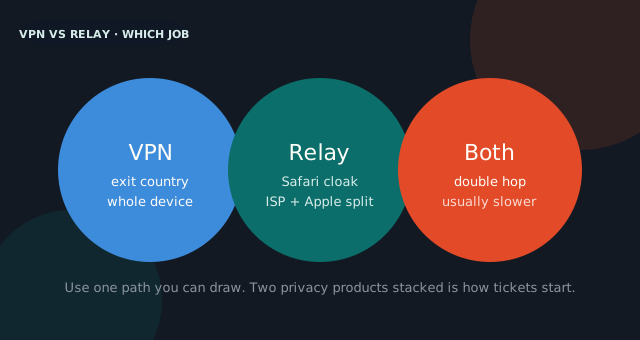
Use Private Relay when the job is Safari on an Apple device and you wanted the ISP and Apple-as-one-party out of the story. Use a VPN when the job is the whole device, a chosen exit, or a network you do not trust with any app. Use neither as antivirus. Use neither as a credit freeze.
- Safari-only privacy on iCloud+: Private Relay. Done.
- Hotel Wi-Fi plus a Windows laptop: VPN. Relay will not be there.
- Need a Frankfurt origin for a catalog: VPN (and hope the catalog has not blocked the exit).
- Self-host WireGuard on a VPS: you are the operator. Logs are yours. Snapshots too.
Running VPN vs iCloud Private Relay at the same time means the Safari request goes through the VPN and then Apple’s hops, or fights with the VPN for DNS. Sometimes it works. Sometimes you get a mystery geo and a slower first byte. If you cannot draw the path, turn one off. Two privacy products stacked is how tickets start, not how they end.
For a host, Private Relay shows up when a customer’s IP in the access log is a relay prefix, not the café they swear they are in. That is expected. It is not a hack. Confirm the prefix on an IP lookup before you ban a country. VPN vs iCloud Private Relay on the origin side is mostly “do not treat Apple’s partners as a botnet.”
If you only remember one line: VPN vs iCloud Private Relay is a coverage map, not a morality play. Relay splits the story across two companies for Safari. A VPN aims the whole device at an exit. Pick the map that matches the packets.
Reader discussion
Join the conversation.
Questions, corrections, and useful context are welcome.