
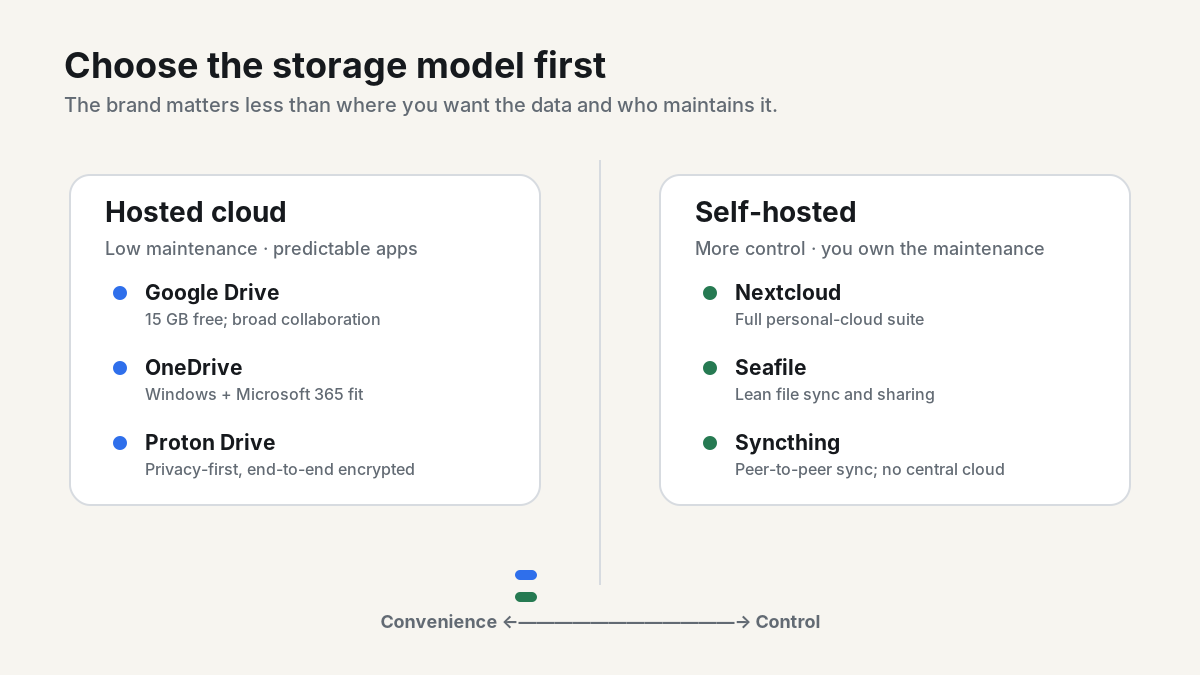
Dropbox and iCloud are convenient, but neither is the automatic best choice for every file library. The right alternative depends on what you are trying to fix: a small free tier, Apple or Microsoft lock-in, privacy concerns, collaboration limits, or the simple desire to keep the server under your control.
Pricing note: US list prices and free tiers below were checked September 10, 2026. Cloud pricing changes often, so verify the provider page before switching a large account.
Quick comparison: the best Dropbox and iCloud alternatives
| Service | Free tier | Typical paid step | Best for |
|---|---|---|---|
| Google Drive / Google One | 15 GB | 100 GB: $1.99/mo; 2 TB: $9.99/mo | Cross-platform sharing and collaboration |
| Microsoft OneDrive | 5 GB | 100 GB: $1.99/mo; 1 TB with Microsoft 365 Personal: $9.99/mo | Windows and Microsoft 365 users |
| Proton Drive | 5 GB | Paid Drive tier: 200 GB; check current price | End-to-end encrypted hosted storage |
| Nextcloud | Free/open-source software | Your server or hosting cost | A full self-hosted personal cloud |
| Seafile Community Edition | Free/open-source software | Your server cost; Pro licensing available | Fast, focused self-hosted file sync |
| Syncthing | Free/open source | None | Peer-to-peer device sync without a central cloud |
For context, Dropbox Basic currently includes 2 GB and up to three connected devices. iCloud includes 5 GB free; iCloud+ is $0.99/month for 50 GB, $2.99 for 200 GB and $9.99 for 2 TB in the US.
1. Google Drive: the easiest free upgrade from Dropbox
If your main complaint is Dropbox Basic’s 2 GB ceiling, Google’s 15 GB free tier is the simplest jump. That storage is shared across Drive, Gmail and Google Photos, so the headline number is not 15 GB reserved only for files.
The stronger reason to choose it is collaboration. Drive, Docs and Sheets remain an easy default when files need to move between Windows, macOS, Android, iPhone and a browser without much setup. The downside is that it is still a large hosted ecosystem; switching from Dropbox to Google does not give you self-hosting or zero-knowledge storage.
2. OneDrive: the natural Windows choice
OneDrive makes the most sense when your PCs already live in Microsoft 365. The free tier is 5 GB, Microsoft 365 Basic adds 100 GB, and the Personal plan includes 1 TB plus the desktop Office apps.
Windows integration is its real advantage: known folders, Files On-Demand and Office collaboration fit the operating system naturally. If you are leaving iCloud because Windows access feels secondary, OneDrive is usually less friction than building a new workflow around a separate sync client.
3. Proton Drive: hosted storage with stronger privacy defaults
Proton Drive is the clearest hosted option here for people who want end-to-end encrypted cloud files without operating a server. Its free plan currently includes 5 GB, and Proton says files are protected so the service itself cannot read them.
That privacy model is the attraction. The trade-off is ecosystem maturity: if your work depends on the deep collaborative editing and integrations of Google Workspace or Microsoft 365, compare those workflows before moving everything.
4. Nextcloud: the closest thing to running your own iCloud
Nextcloud is free and open source and can run on a Linux server, NAS or hosting provider. Files are only the start: it can also handle photo uploads, calendars, contacts, sharing and browser-based collaboration. Desktop and mobile clients make it feel much closer to a conventional cloud service than a folder mounted over SFTP.
Self-hosting changes the responsibility boundary. You gain control over where the data lives, but you also own updates, TLS, access control, monitoring and backups. If you do not want that job, a managed Nextcloud provider is the better version of the same idea.
5. Seafile: self-hosted sync without the full groupware stack
Seafile’s Community Edition is free and open source. It is a good fit when the goal is mostly file sync, versioning and sharing rather than turning one server into files, calendars, chat and an office suite. The narrower scope can be an advantage for a small server and a simple migration.
6. Syncthing: skip the cloud entirely
Syncthing continuously synchronizes selected folders between your own computers. There is no required central storage provider: data lives on the devices you choose, and connections are encrypted. That makes it excellent for keeping a desktop, laptop and home server in sync.
It is not a Dropbox replacement in every sense. There is no hosted web drive waiting for you when every device is offline, and sharing with nontechnical users is less straightforward. Think of it as private synchronization, not a full cloud portal.
What about replacing iCloud Photos and iPhone backup?
This is where “replace iCloud” gets nuanced. File storage is easy to replace; Apple’s device-level integration is not. Nextcloud and Proton can take over photo uploads, and other services can store documents, but they do not become a drop-in replacement for every iCloud function.
If you rely on iPhone device backups, iCloud Keychain, Messages sync or Apple-specific app data, it can be sensible to keep a small iCloud plan while moving bulk photos and files elsewhere. A partial migration is often cleaner than forcing one provider to imitate the whole Apple stack.
Hosting Nextcloud or Seafile on a VPS
A general-purpose Linux VPS is a practical place to run Nextcloud or Seafile when you do not want a NAS online at home. For example, LogicWeb’s KVM VPS range is self-managed and currently starts at $5/month with 4 GB RAM and 25 GB NVMe; the $15 tier has 6 GB RAM and 100 GB NVMe. That is enough compute for a small personal cloud, but the storage figure should drive the choice. A 25 GB server is a test box, not a sensible home for a 200 GB photo library.
Whichever VPS provider you use, keep an independent backup outside that VPS. Snapshots and RAID can improve recovery, but one provider account or one server should never be the only copy of important files.
A migration plan that does not create a data-loss story
- Inventory first. Check how much data you actually have, including shared folders and deleted-file retention you still depend on.
- Export before deleting. Pull down a complete local copy from Dropbox or iCloud.
- Test the new client with one folder. Confirm upload, download, conflict handling and mobile access.
- Move photos separately from documents. They have different metadata, sharing and backup requirements.
- Verify the destination. Compare file counts and spot-check large files before cleaning up the old account.
- Keep two independent copies during the transition. Migration is the worst time to discover that sync was mistaken for backup.
Which alternative should you choose?
Pick Google Drive for the most useful free tier and broad collaboration. Pick OneDrive if Windows and Office are already your daily environment. Pick Proton Drive when hosted convenience matters but end-to-end encryption is a priority. Pick Nextcloud when you want a private cloud platform you control; Seafile when you mainly need efficient file sync; and Syncthing when you do not need a central cloud at all.
FAQ
What is the best free Dropbox alternative?
For general cloud storage, Google Drive’s 15 GB free tier is the most generous option in this comparison. For privacy, Proton Drive offers 5 GB with end-to-end encryption. For users willing to self-host, Nextcloud and Seafile Community Edition are free software, but the server and backups still cost money.
Can Nextcloud replace iCloud?
It can replace a large part of file, photo, calendar and contact storage, but it does not replace every Apple-specific service or iPhone backup workflow. Many people are better off moving bulk data while retaining iCloud for features that depend on Apple’s platform integration.
Is self-hosted cloud storage cheaper?
Sometimes, but not automatically. Self-hosting exchanges subscription simplicity for server cost and admin time. It is most compelling when control, data location or customization matters more than having the absolute lowest monthly bill.
Reader discussion
Join the conversation.
Questions, corrections, and useful context are welcome.