
ChatGPT Astra levels are effort and workflow choices, not six separate subscriptions. The six-setting vocabulary in Work and Codex is Light, Medium, High, Extra High, Max, and Ultra, where supported. The practical question is not “Which sounds smartest?” but “Which is enough for this job?” [1]
Scope and freshness: Reviewed September 21, 2026. This guide concerns Astra in ChatGPT Work and Codex; not every account exposes every setting. In ordinary Chat, Astra is offered as GPT-6 Pro, with separate availability and limits. [2]
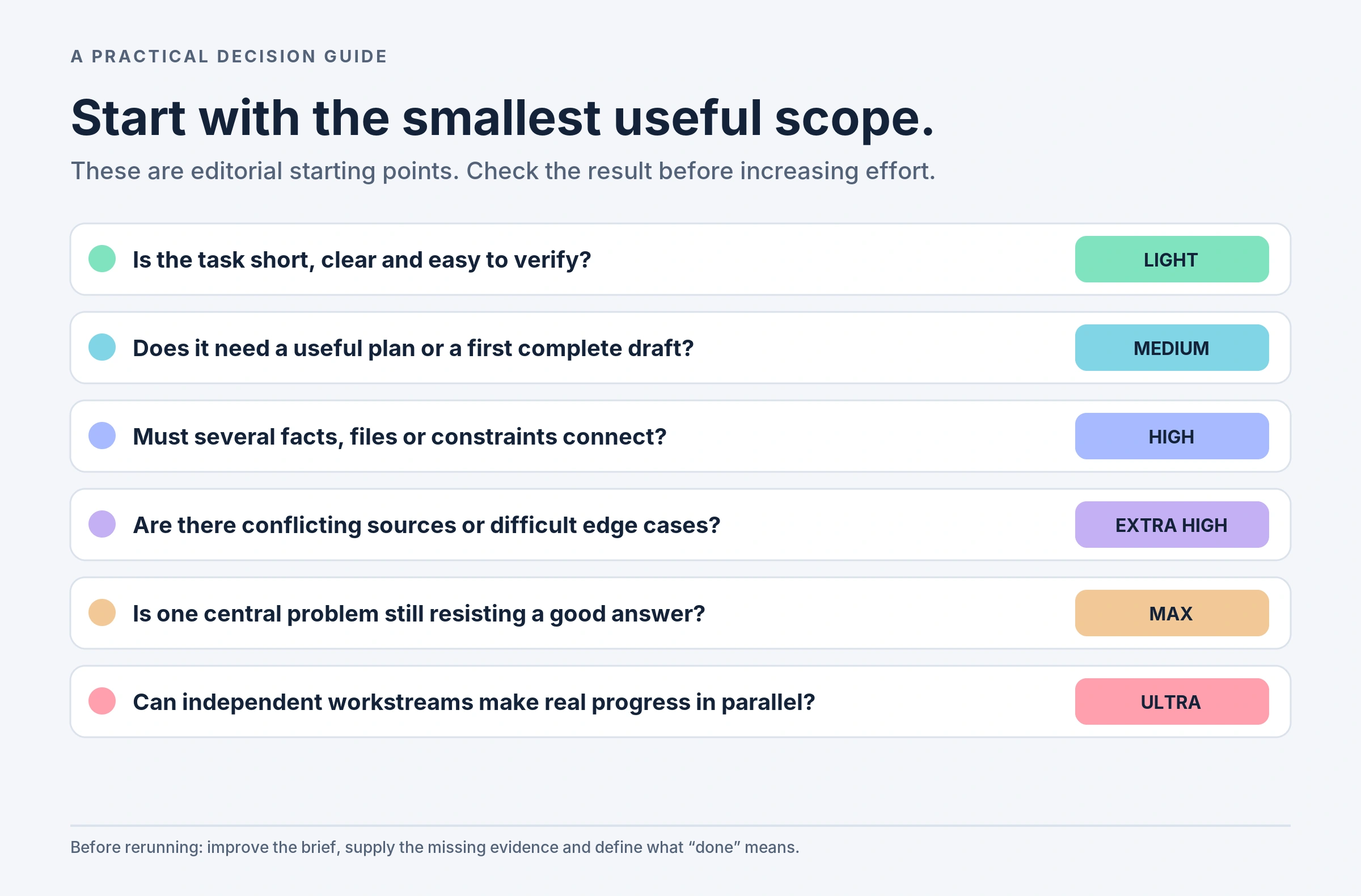
The useful rule: try Light for tightly bounded work, Medium for a first complete deliverable, and higher effort for problems that need more checking. Reserve Max for a difficult bottleneck and Ultra for work that genuinely benefits from parallel streams. The examples below are editorial recommendations, not hands-on benchmark results.
In this guide: Comparison · Light · Medium · High · Extra High · Max · Ultra · Usage and costs · Choose a level · FAQ
What changes between ChatGPT Astra levels?
Keep model, effort, and speed separate. Astra is the model. Effort controls how much deliberation you request. Fast mode is a separate processing option with its own usage implications. A six-position Power slider may mix models; do not assume every position is an Astra setting. Check the selected model in Advanced. [1][6]
More effort is not an instruction to write more words. A difficult analysis may deserve substantial work and still end in a five-sentence answer. Conversely, a long but mechanical rewrite may need little reasoning. Define the outcome, evidence and checks before reaching for the highest setting.
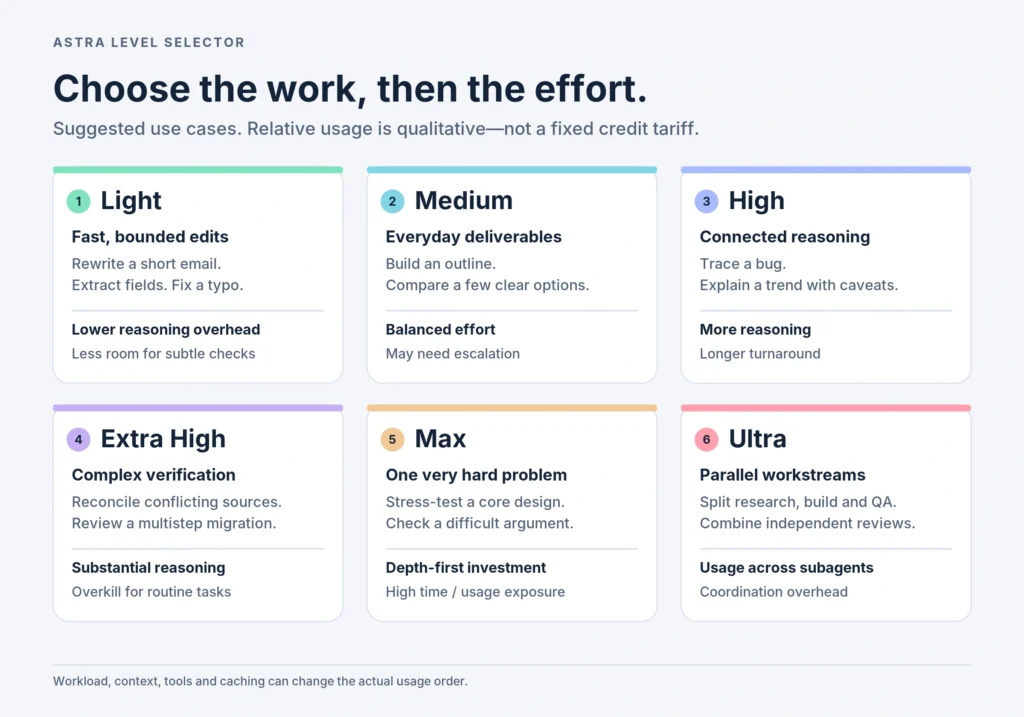
The six Astra levels at a glance
| Level | Suggested use | Usage tendency* | Main downside |
|---|---|---|---|
| Light | Short edits, extraction, tiny fixes | Lower reasoning overhead | Less investment in subtle checks |
| Medium | Outlines, comparisons, everyday plans | Balanced effort | Hard cases may need escalation |
| High | Debugging, connected analysis, design tradeoffs | More reasoning work | Slower, potentially more usage |
| Extra High | Conflicting evidence, complex reviews | Substantial reasoning work | Often excessive for routine work |
| Max | One stubborn, tightly connected problem | Depth-first; high usage exposure | Extra deliberation may not help |
| Ultra | Parallel research, implementation and review | Variable usage across subagents | Coordination and duplicated work |
1. Astra Light: quick, well-scoped work
Try it for: shortening an email, extracting dates from a supplied document, converting notes into a checklist, or correcting a small code error with a clear test. Light is a sensible starting point when the input is complete and you can quickly recognize a correct result.
For a WordPress workflow, use it to propose alternative headings or trim an introduction without changing the supplied facts. For administration, ask it to turn a known procedure into a clean checklist. Keep the assignment bounded rather than adding an open-ended research brief.
Pros: a practical fit for frequent small iterations. Cons: not the first setting I would choose for ambiguous evidence or a hard-to-detect mistake. Usage: plan for relatively little reasoning overhead, but do not assume a huge input file becomes cheap because the level is Light.
Example prompt: “Rewrite this introduction in 120 words. Preserve every factual claim, add no new claims, and give me two alternatives.”
2. Astra Medium: everyday work with some planning
Try it for: article outlines, a small project plan, a comparison of supplied options, a spreadsheet explanation, or a modest coding task. My suggested use is the first complete attempt at work that needs organization but not an unusually deep investigation.
For example, ask for a content brief that connects an audience, search intent, headings and reader questions. For operations, turn a defined objective into milestones, dependencies and risks. The goal is a usable deliverable that you can review—not the longest possible answer.
Pros: an approachable starting point for mixed writing and analysis. Cons: a plausible draft can still miss a hidden constraint. Usage: budget for balanced effort and keep follow-up requests specific. Escalate a weak section rather than automatically regenerating the whole deliverable at Max.
Example prompt: “Using these customer notes, create a launch brief with audience, promise, three messaging options and unresolved questions. Separate evidence from assumptions.”
3. Astra High: connected analysis and troubleshooting
Try it for: tracing a bug across several functions, explaining a business trend with caveats, comparing technical designs, or synthesizing several supplied sources. Choose it when a useful answer depends on connecting details rather than simply restating them.
A useful editorial assignment is to reconcile multiple source documents into an article plan while identifying disagreements. A development assignment might ask for likely causes of a failing integration, a minimal fix and tests that would falsify the diagnosis. Make the checks part of the brief.
Pros: a reasonable escalation for dependent steps and tradeoffs. Cons: extra deliberation is wasted when the missing ingredient is an unavailable log or document. Usage: expect more reasoning work than a lighter attempt, while remembering that fewer failed retries could make the complete workflow more economical.
Example prompt: “Review these logs and functions. Rank three possible root causes, cite the supporting evidence, and propose the smallest patch plus tests.”
4. Astra Extra High: complex work that needs checking
Try it for: reconciling conflicting research, planning a multi-system migration, reviewing a substantial technical proposal, or checking a solution against difficult edge cases. My recommendation is to use this level for a defined review objective, not a vague request to “make everything better.”
For a migration plan, name the systems, dependencies, rollback requirements and unacceptable failure modes. For a research synthesis, provide the documents and require a table separating agreements, contradictions and unanswered questions. That gives the additional effort something concrete to test.
Pros: a useful starting point for demanding verification. Cons: routine editing rarely justifies the additional work. Usage: allow for substantial reasoning and larger intermediate material. A clear stopping rule—such as resolving three specified risks—helps keep the task from expanding unnecessarily.
Example prompt: “Stress-test this migration plan against data loss, downtime and rollback failure. Prioritize the risks, identify missing evidence and propose validation tests.”
5. Astra Max: more depth for one hard problem
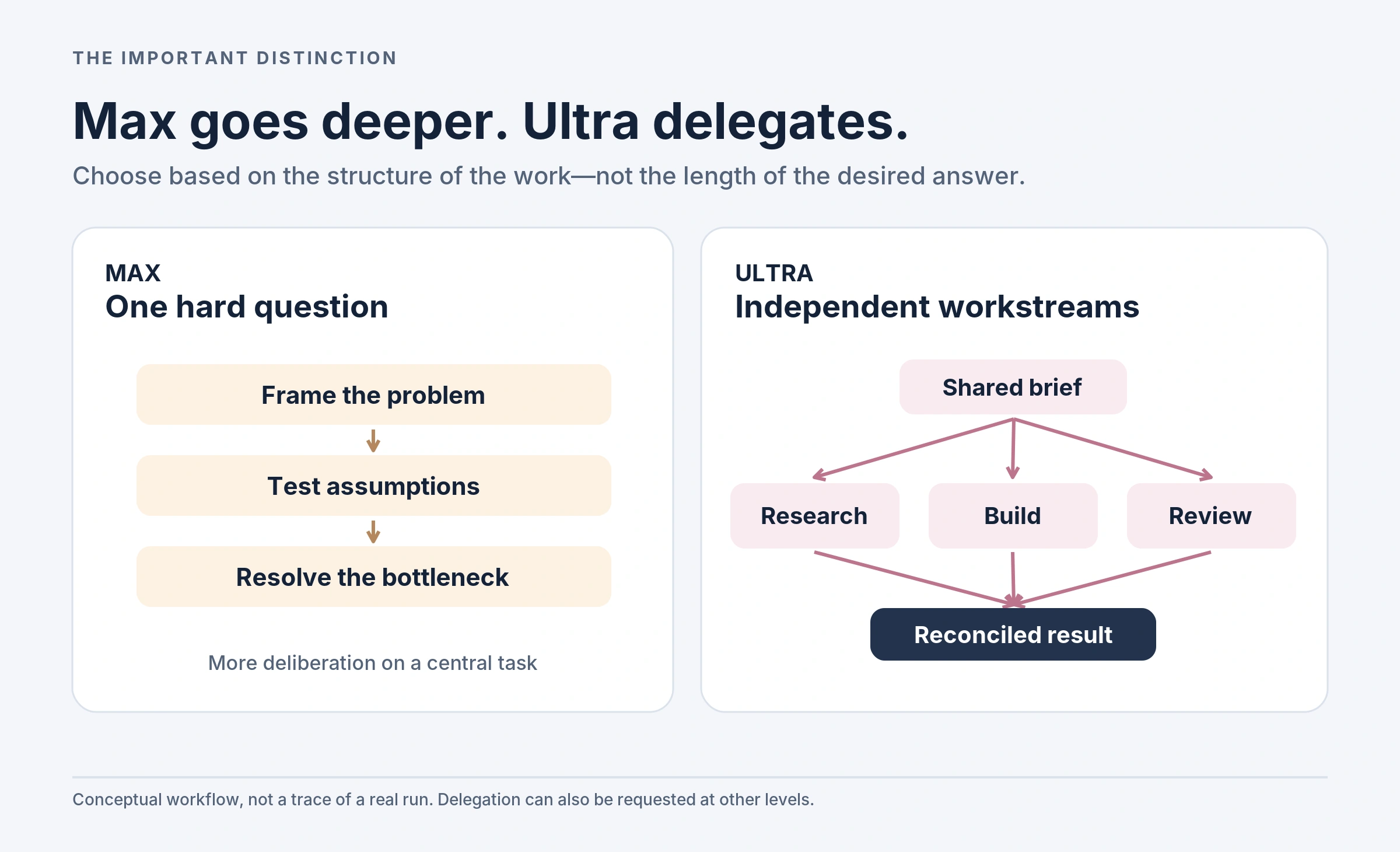
OpenAI describes Max as giving the selected model more time for a difficult task. Treat it as a depth option, not an automatic quality guarantee. [1]
Try it for: a stubborn root-cause problem, a tightly coupled architecture decision, a difficult mathematical argument, or an optimization problem with interacting constraints. These are jobs where the central reasoning bottleneck matters more than producing several independent pieces.
Before escalating, write down exactly what earlier attempts failed to resolve. Ask for counterexamples, failure conditions or tests rather than a more confident rewrite. For technical claims, require reproducible checks wherever possible.
Pros: a focused investment when one unresolved issue dominates the work. Cons: more time cannot supply missing evidence, and additional analysis can reach diminishing returns. Usage: plan for high exposure to reasoning tokens and elapsed time; there is no universal “Max uses N times Light” rule.
Example prompt: “Find a counterexample to this proposed algorithm, or explain the conditions needed for correctness. Supply executable tests and state any unresolved uncertainty.”
6. Astra Ultra: complex work with parallel streams
Ultra can proactively delegate useful independent work to subagents. Delegation is not exclusive to Ultra: other levels can use subagents when explicitly requested. Each worker performs its own model and tool work, which adds token consumption. [3]
Try it for: a research project with separate source reviews, a codebase assessment split by component, or a deliverable with distinct research, implementation and testing tracks. These are editorial examples; success depends on the available tools, permissions and the quality of the shared brief.
For example, separate a website review into accessibility, performance and content checks. Ask the coordinating agent to merge duplicate findings, surface disagreements and produce one prioritized action plan. Do not let parallel workers silently operate under different assumptions.
Pros: independent investigations can progress together. Cons: coordination, overlap and inconsistent outputs still need management. Usage: budget across the parent task and its workers. Parallelism may reduce waiting, but it does not imply a cheaper task. For one inseparable question, I would try Max before Ultra.
Example prompt: “Split this review into independent evidence, implementation and test-design tasks. Reconcile the findings, flag disagreements and deliver one acceptance checklist. Do not deploy changes.”
How much usage do ChatGPT Astra levels consume?
There is no published fixed per-level consumption table. Do not confuse a level label with a guaranteed number of credits, tokens or seconds. OpenAI’s usage guidance identifies model choice, context, reasoning, tool use, retrieval and caching as factors. The amount of visible text alone is not a reliable estimate. [5]
Work and Codex: token-based credits
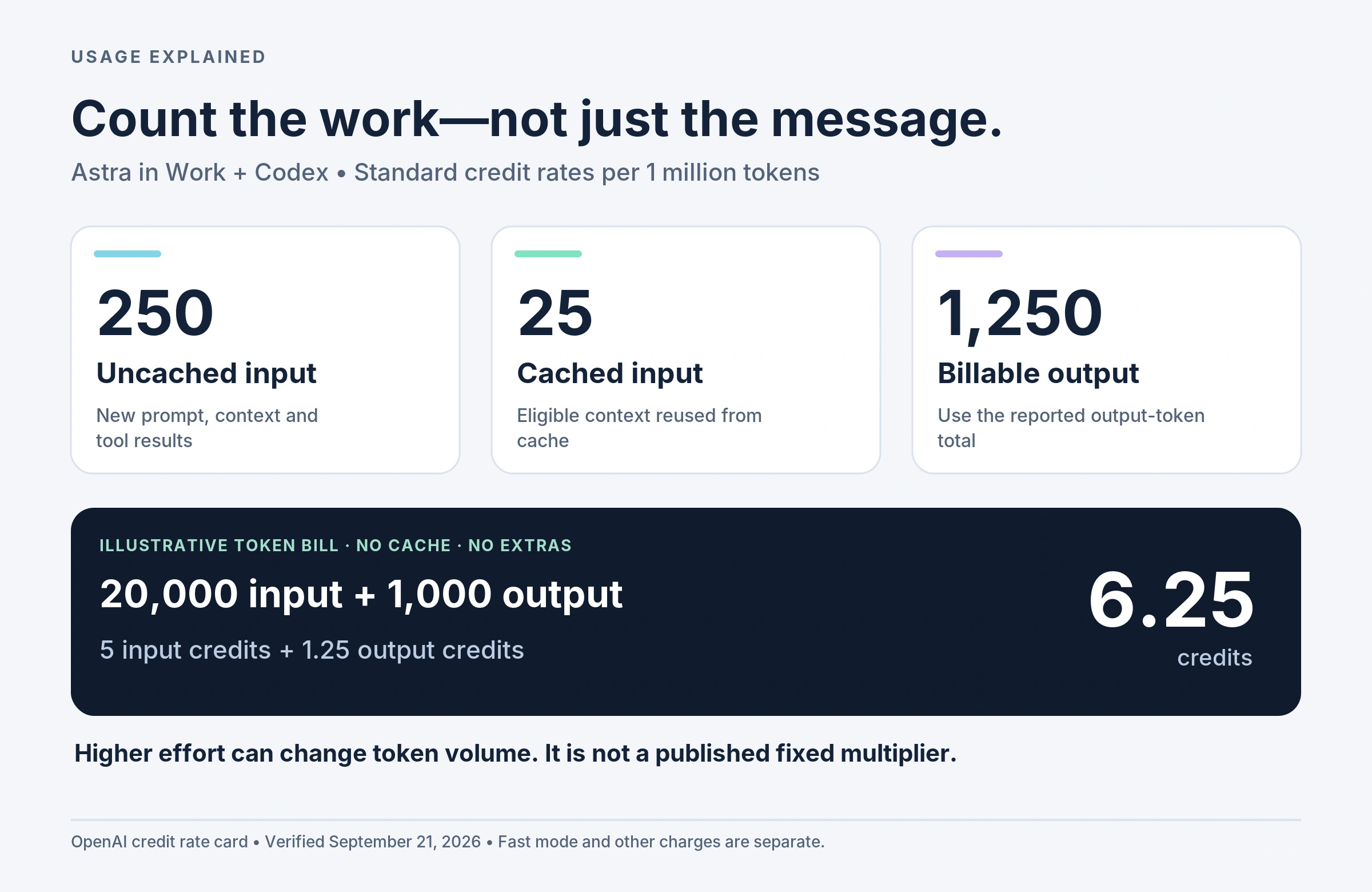
For Astra in Work and Codex, the published Standard credit rates are 250 credits per million uncached input tokens, 25 per million cached input tokens, and 1,250 per million output tokens. Supported delegated-worker activity is included in token-based metering. These are token-category rates, not six separate level prices. [4]
Calculation: credits = (uncached input ÷ 1,000,000 × 250) + (cached input ÷ 1,000,000 × 25) + (billable output ÷ 1,000,000 × 1,250). Keep cached and uncached input separate so that reused tokens are not counted twice.
| Illustrative workload | Uncached input | Billable output | Standard credits |
|---|---|---|---|
| Small token bill | 20,000 | 1,000 | 6.25 |
| More output / reasoning work | 20,000 | 9,000 | 16.25 |
| Larger combined workload | 80,000 | 24,000 | 50.00 |
The lesson is the arithmetic: more billable work changes the total even when the selected model stays the same. A failed Light attempt followed by several retries could cost more overall than one successful higher-effort attempt; that is a workflow possibility, not a measured promise.
Fast mode is separate: Astra Fast mode in Work/Codex consumes credits at 2.5 times the Standard rate, where available. That is a published speed-option multiplier—not a multiplier for High, Max or Ultra. API billing follows different rules. [6]
Included allowances are not a universal message count
Work and Codex share usage. OpenAI currently estimates 5–45 local Astra messages per five-hour period on Plus, 25–225 on Pro 5x, and 100–900 on Pro 20x. These are estimates, not fixed entitlements or six-level quotas. Check the usage dashboard for your actual allowance and reset time. [5]
Eligible personal-plan credits can fund supported work after included usage is exhausted. They are not API credits, and purchase options vary by account and region. [9]
Ordinary Chat: GPT-6 Pro has separate limits
Do not apply Work/Codex estimates to ordinary Chat. The published GPT-6 Pro allowance is 200 messages per week on Pro $200 and 50 per week on Pro $100. Sharing rules with GPT-5.6 Sol Pro also apply. A Pro subscription is not unlimited GPT-6 Pro usage. [2]
For eligible business credit-based Chat billing, GPT-6 Pro is listed at 50 credits per message. That is a different metering system from the Work/Codex token examples above; your agreement and workspace controls determine what applies. [4]
API costs: count reasoning, not only visible text
Astra’s published Standard API price is $10 per million input tokens and $50 per million output tokens, with separate cache rates. An illustrative 20,000 uncached input tokens plus 1,000 output tokens therefore costs $0.25, before tools or other charges. This is not a conversion rate for ChatGPT credits. [8]
The API bills reasoning tokens as output tokens. They are already part of the reported output total, so do not add the reasoning subtotal again. A brief final answer can therefore represent a much larger token bill. Use the returned usage data rather than estimating cost from answer length. [7]
How to choose the right Astra level without wasting usage
Start by writing a small acceptance checklist: what must be delivered, what evidence is available, and how will you check it? Then choose the least elaborate setting that seems capable of meeting that brief. My default workflow is a bounded first attempt followed by targeted escalation.
When a result is weak, diagnose the weakness first. Missing context calls for better input; an unverified claim calls for a source; a reasoning error may justify more effort. Independent workstreams may justify Ultra. A single stubborn bottleneck may justify Max. Changing the setting is only one possible fix.
For recurring work, compare your own representative tasks. Record accepted outputs, correction time, total usage and elapsed time across the whole workflow. The best level is the one that meets your quality target efficiently—not the one with the most impressive name.
Watch: the Astra levels in 48 seconds
This original, text-led recap illustrates the suggested use cases. It is not a product demonstration or performance test. There is no audio, and every point is covered in the article.
Frequently asked questions about ChatGPT Astra levels
Are Light and Low the same label?
OpenAI uses Light in the desktop app, Work on the web and the IDE extension, and Low in the CLI. Check the model as well as the effort label. [1]
Why can’t I see Max or Ultra?
Options depend on your account, client and rollout. OpenAI says Max may need enabling in app settings; Ultra can be enabled under Settings → Configuration → Ultra in model picker slider when supported. [1]
Does a higher setting guarantee a correct answer?
No setting should replace verification. My recommendation is to ask for evidence, test cases and uncertainty, then check the result independently. For consequential decisions, treat the output as assistance rather than approval to act.
Does Ultra always cost more than Max?
There is no universal fixed ordering for complete tasks. Subagents add token work, but the final bill also depends on workload and context. Compare actual usage for equivalent accepted outcomes rather than assuming either label determines the price. [3][5]
Should I use Ultra for a long blog post?
Not merely because the post is long. I would start with Medium for an outline and draft, then escalate specific research or verification problems. Ultra is more relevant when independent investigations can be assigned clear boundaries and reconciled into one coherent article.
Bottom line: match effort to the bottleneck
Use Light for bounded tasks, Medium for everyday deliverables, and higher effort when the reasoning needs it. Choose Max for depth and Ultra for useful parallelism. Most importantly, judge ChatGPT Astra levels by the quality and total usage of the finished work—not by the setting alone.
Sources and update notes
Official documentation checked September 21, 2026. Labels, access and rates can change. Use the linked rate cards and your account dashboard before budgeting. The use cases, prompts and diagrams are original editorial guidance; the cost examples are transparent calculations, not measured performance results.
[1] OpenAI: Models and reasoning settings.
[2] OpenAI: GPT-5.6 and GPT-6 Pro in ChatGPT.
[3] OpenAI: Subagents in ChatGPT Work and Codex.
[4] OpenAI: ChatGPT credit-based rate card.
[5] OpenAI: Work and Codex pricing and usage limits.
[6] OpenAI: Speed and Fast mode.
[7] OpenAI: Reasoning models and token accounting.