
Updated September 24, 2026. Prices below are a dated USD snapshot. Examples are calculated scenarios, not measured benchmarks or estimates of your account balance.
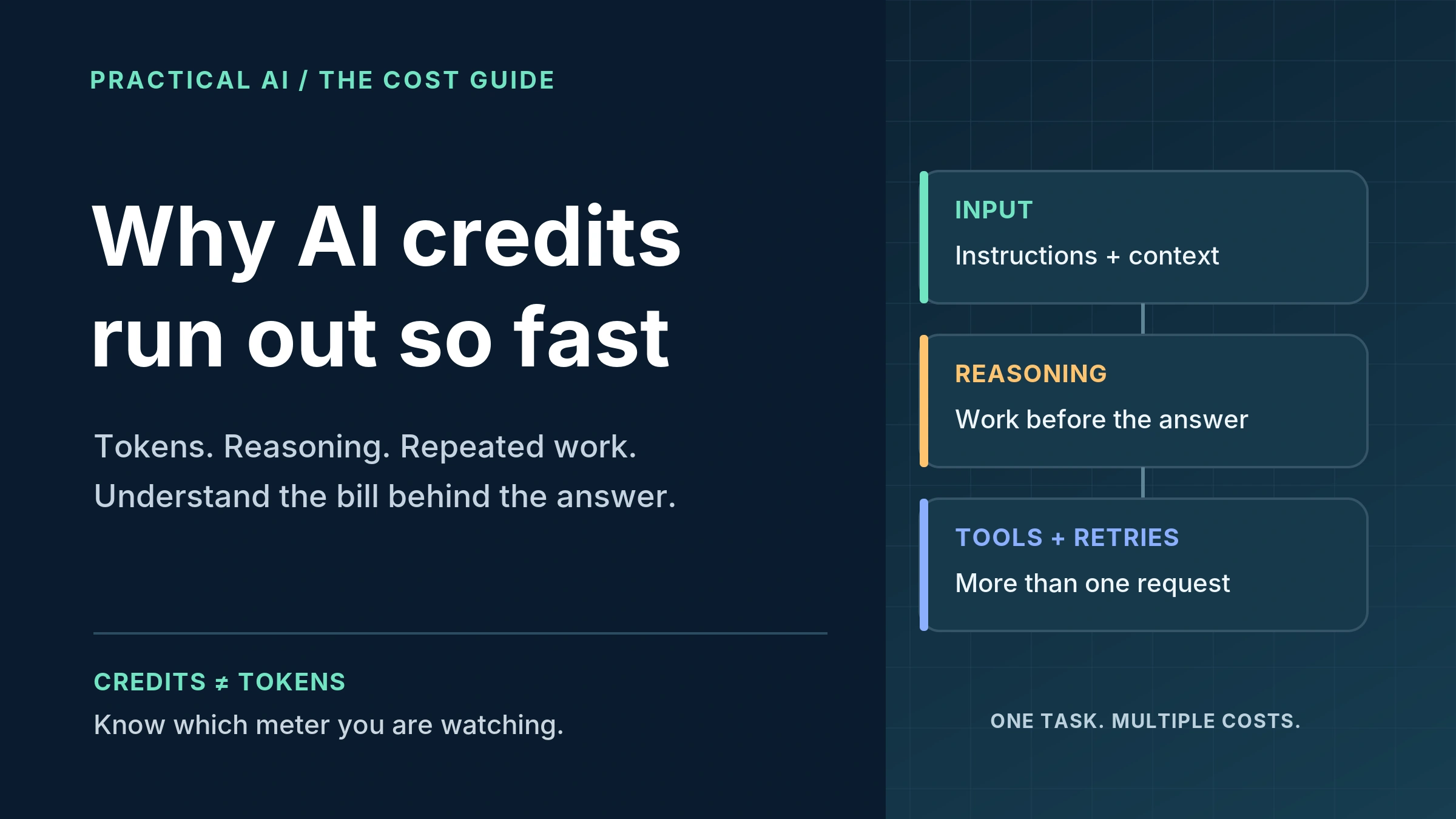
Your AI credits can disappear quickly even when you send only a handful of messages. The reason is that the visible chat is not always the whole workload: a request can include earlier context, internal reasoning, retrieved information and several tool-assisted steps. [5], [7], [9]
The useful question is not simply, “How many prompts did I send?” It is, “What was processed, how many times, and which balance paid for it?” This guide explains the different meters, shows the arithmetic and gives you a practical way to investigate unexpected usage before buying more credits.
The central distinction: a token is a processing unit; a credit is a product-defined billing unit; a subscription allowance is permission to use a service within its rules. Do not treat them as interchangeable.
In this guide
Credits, tokens and limits · Nine reasons usage rises · Worked cost examples · Provider differences · Ways to spend less · Audit checklist · FAQs
AI credits vs. tokens vs. usage limits
A token is a unit a model uses to process content. In text, it may be a word, part of a word, punctuation or another fragment. There is no exact words-to-tokens conversion that works across all languages and models. A short prompt in characters is not a reliable cost estimate. [1]
AI credits belong to a particular product or account. Their meaning comes from that service’s rate card. For example, ChatGPT usage credits are not OpenAI API credits, and ChatGPT and API billing are managed separately. A paid chat subscription should not be assumed to fund an API key. [2], [3]
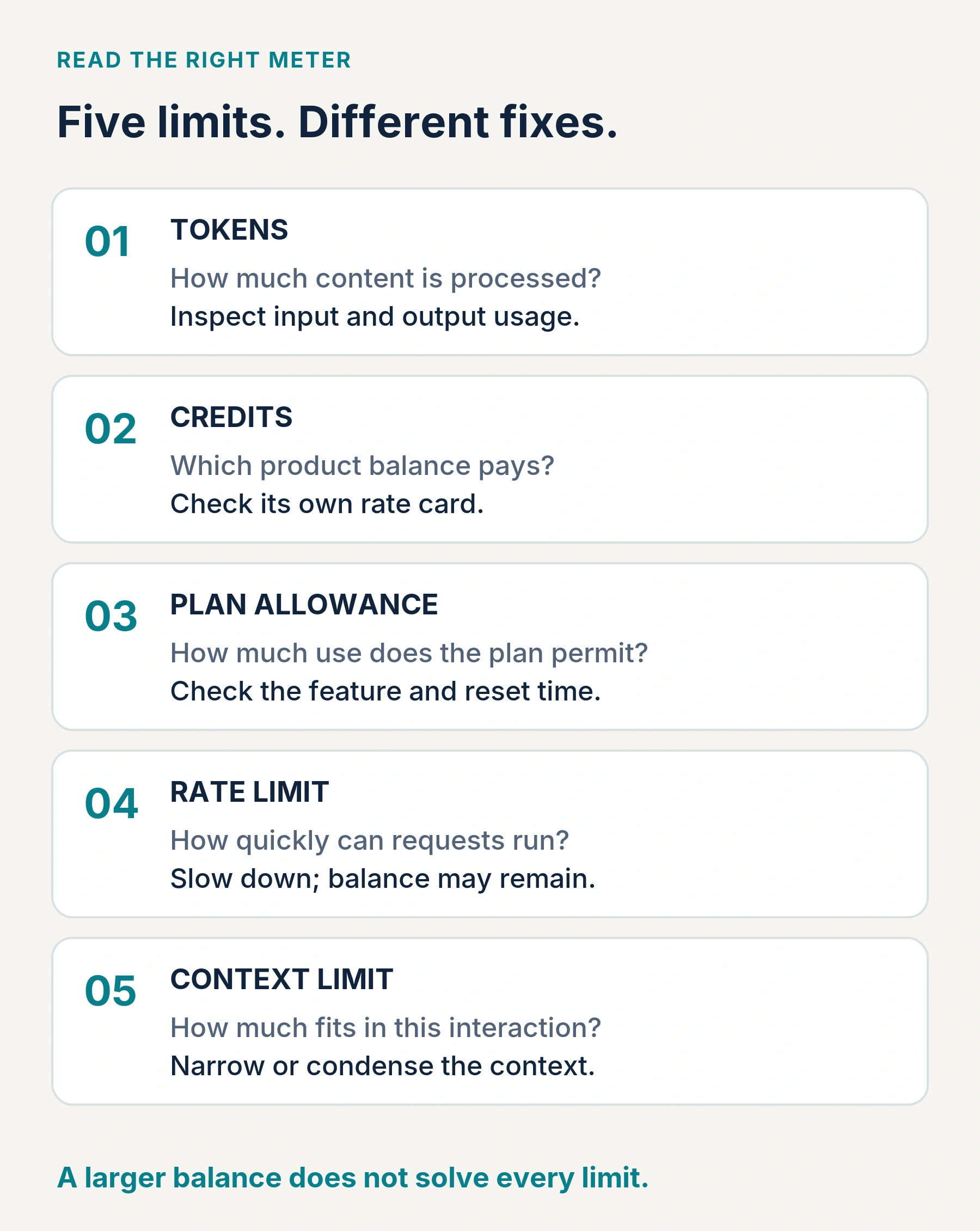
| Meter | What it measures | What to check |
|---|---|---|
| Tokens | Content processed or generated. | Input, cached input, cache writes and output categories. |
| Credits or balance | An allowance or prepaid value under product-specific rules. | Eligible features, conversion rules, expiration and overage settings. |
| Usage allowance | How much work a plan permits over a period. | The affected feature, shared usage and the reset shown in your account. |
| Rate limit | How quickly requests or tokens may be submitted. | Whether you need to slow down rather than purchase more. |
| Context limit | How much content fits in a model interaction. | Whether to narrow the task or reduce the working context. |
This distinction changes the remedy. Buying more balance is not a universal fix for a request-per-minute error. Starting a fresh conversation may reduce its context, but it does not refill an account-wide allowance. [4], [14]
Why AI credits disappear so quickly: nine common causes
1. Your new prompt is small, but its context is not
“Make that shorter” looks inexpensive. In a continuing workflow, however, the model may also receive the earlier draft, your instructions and previous exchanges. OpenAI documents that earlier input in a Responses API chain remains billable even when you refer to it with previous_response_id. Caching can change the rate, not necessarily remove the charge. [7], [8]
Practical fix: keep related revisions together, but start a focused thread when the subject changes. Carry forward a compact brief with the facts, constraints and current draft you still need. Do not throw away essential context merely to make the token count look smaller.
2. The model or processing tier is more expensive
Model choice affects the price of each unit of work. Processing tiers and long-context bands can also change rates. At the rates used later in this article, the three listed models do not charge the same amount for identical token counts. [11]
Practical fix: test routine extraction, formatting and straightforward rewriting with a lower-cost model. Reserve stronger reasoning for tasks where the cheaper option fails a defined quality check. Do not use labels such as “High” or “Ultra” as universal price multipliers: a label alone is not a bill.
3. You are paying for reasoning, not just the visible answer
A reasoning model can generate internal reasoning before delivering its response. OpenAI bills that reasoning as output tokens; Gemini’s API pricing also identifies output rates that include thinking tokens. A brief final answer can therefore represent more output-side work than its visible length suggests. [5], [6]
Practical fix: select the effort appropriate to the task and ask for a concise deliverable. These are separate controls. Asking for 150 words limits the requested presentation; it does not guarantee that internal reasoning will be minimal.
4. Attachments introduce more work than the question suggests
A question about one clause does not necessarily need every page of a manual. File retrieval can bring selected results into the working context; it is not safe to assume every upload is fully resent, or that uploads are always free to process. OpenAI’s file-search tooling supports limiting the number of retrieved results. [10]
Practical fix: identify the relevant document, section, date range or worksheet. Ask for targeted extraction before requesting a full synthesis. For coding tasks, Anthropic recommends pointing to relevant files or functions rather than pasting large amounts of unrelated content. [15]
5. One agent task can contain many model and tool calls
A research assignment may involve search, reading, comparison and revision. In an API workflow, those stages can create multiple requests, and search actions can have their own tool costs. One button press is not proof that only one billable operation occurred. [9]
Practical fix: define an endpoint: “Compare these three products using official documentation and deliver one table.” For application developers, enforce maximum tool calls and iterations in code. A natural-language instruction to stop is useful guidance, not a guaranteed spending control.
6. Revisions and retries repeat paid work
Five complete rewrites are five attempts, not one answer with four free edits. Where a retry actually processes another request, it can incur more usage; error handling and refunds depend on the service. Do not assume every error is billable—or that every abandoned result is refunded.
Practical fix: request a targeted change rather than regenerating an entire report. In applications, avoid blind retry loops: inspect the error, limit attempts and record request IDs. Evaluate cost per acceptable result, including the attempts you discard. Reducing unnecessary requests is also an explicit OpenAI cost-optimization recommendation. [18]
7. Caching is being misunderstood
Prompt caching reuses eligible, unchanged input prefixes. A cache hit usually has a different input rate, not a zero price. Some models charge for writing reusable content, and a maintained session does not guarantee a hit. In OpenAI’s documented accounting, each input token takes the applicable uncached, cached-read or cache-write rate—not all three. [8]
Practical fix: keep reusable instructions stable, place changing material after them where the API’s rules allow, and inspect recorded cache usage. Do not claim a whole-task discount from the cached-input discount alone: output and tools may remain the largest expenses.
8. Several features or automated jobs share the allowance
For eligible ChatGPT Plus and Pro accounts, several supported work features can share an agentic usage allowance. Anthropic likewise documents shared usage across Claude product surfaces. Looking only at your visible chat messages can miss work performed elsewhere on the same account. [3], [4]
Recurring jobs are another place to look: Claude Cowork supports scheduled tasks that can run research, briefings and reports. That is actual work occurring without a fresh typed message—not evidence of a charge just for leaving an app open. [19]
Practical fix: review active jobs, concurrent sessions and team activity before concluding that a credit deduction is unexplained. Pause unnecessary recurring work during your audit.
9. A balance change is not always new consumption
Expiration and accounting delays can also explain a surprise. Purchased ChatGPT usage credits currently have a 12-month validity period. Separately, OpenAI warns that prepaid API access may stop after a delay, allowing a negative balance that is deducted from a later purchase. [3], [12]
Practical fix: separate the usage ledger from purchases, adjustments and expired balances. Check timestamps and the account involved. Never generalize one provider’s expiration policy to another product, promotion or monthly allowance.
How to calculate AI costs without double-counting
For a token-priced API, use the actual usage breakdown and the applicable rates. The calculation below treats the three input categories as mutually exclusive. Its output figure is the provider’s billed output total, including reasoning where the provider counts it there. [5], [8]
Estimated cost =
  (uncached input tokens × uncached rate
 + cached-read tokens × cached-read rate
 + cache-write tokens × cache-write rate
 + billed output tokens × output rate) ÷ 1,000,000
 + applicable tool, storage and other fees
Avoid two traps: do not charge cached tokens again as ordinary input, and do not add reasoning a second time when it is already included in reported output. A consumer app may not expose enough detail to reproduce this formula; use its own usage page and rate card instead.
A real rate card, followed by illustrative workloads
| Model | Input | Cache read | Cache write | Output |
|---|---|---|---|---|
| GPT-6 Astra | $10.00 | $1.00 | $12.50 | $50.00 |
| GPT-6 Sol | $2.00 | $0.20 | $2.50 | $10.00 |
| GPT-6 Luna | $0.10 | $0.01 | $0.125 | $0.50 |
The next examples use Astra’s listed rates solely to make the arithmetic concrete. Token counts are invented, controlled scenarios. They are not typical-use estimates, model-quality comparisons, or a conversion into ChatGPT credits. Assume no tools, storage fees, tax or surcharges unless stated.
Example 1: Same visible answer, different reasoning cost
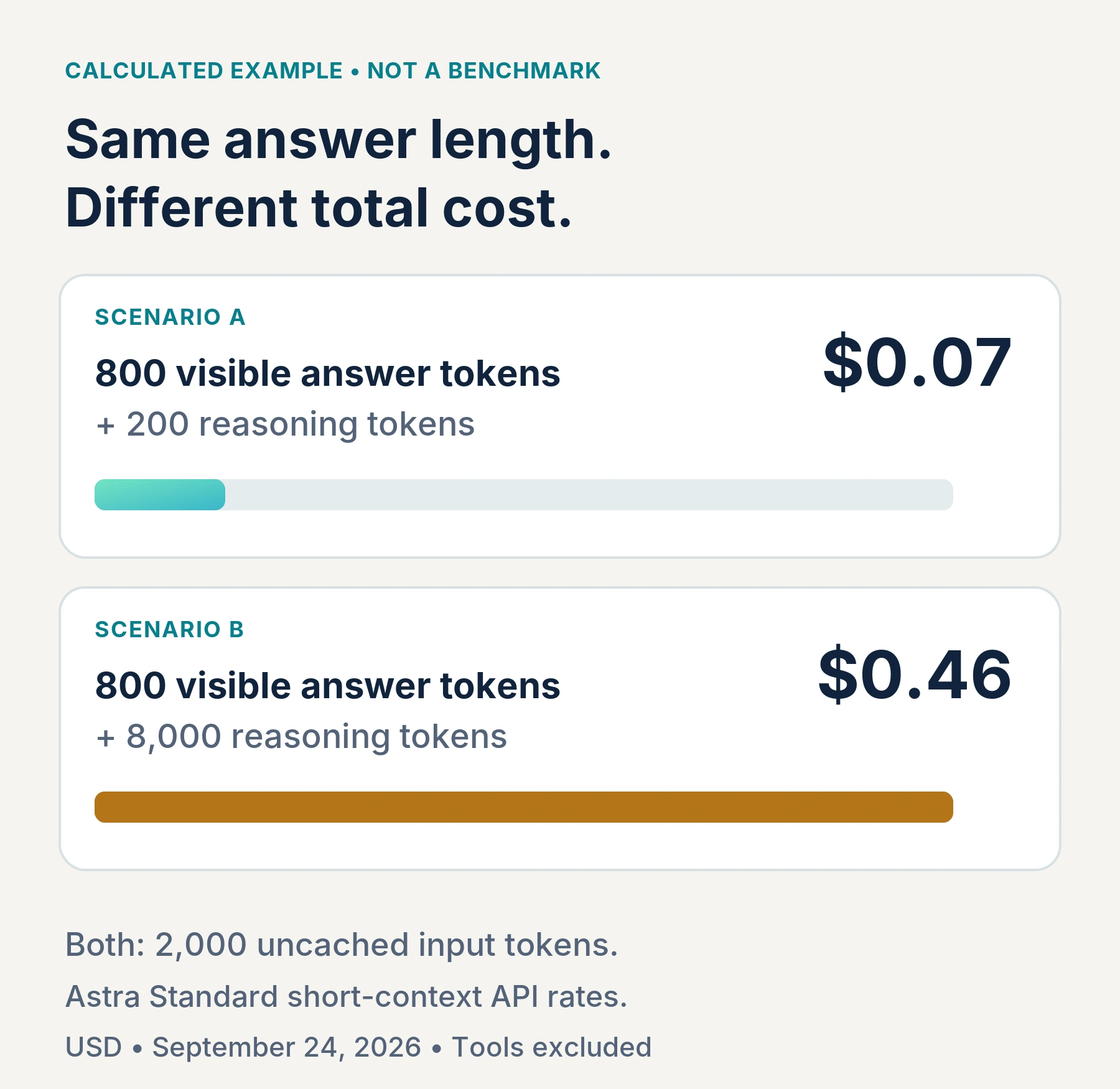
Assume both requests use 2,000 uncached input tokens and produce 800 visible answer tokens. In Scenario A, internal reasoning adds 200 tokens; in Scenario B, it adds 8,000. For this example, those are the only output components.
| Calculated scenario | Billed output | Input + output cost |
|---|---|---|
| A: 800 visible + 200 reasoning | 1,000 tokens | $0.020 + $0.050 = $0.070 |
| B: 800 visible + 8,000 reasoning | 8,800 tokens | $0.020 + $0.440 = $0.460 |
Scenario B costs about 6.6 times as much, although both visible answers contain 800 tokens. This does not prove that a named effort setting costs 6.6 times more, or that the second answer is better. It demonstrates why visible length alone is an unreliable estimator.
Example 2: Reusing a long document across five requests
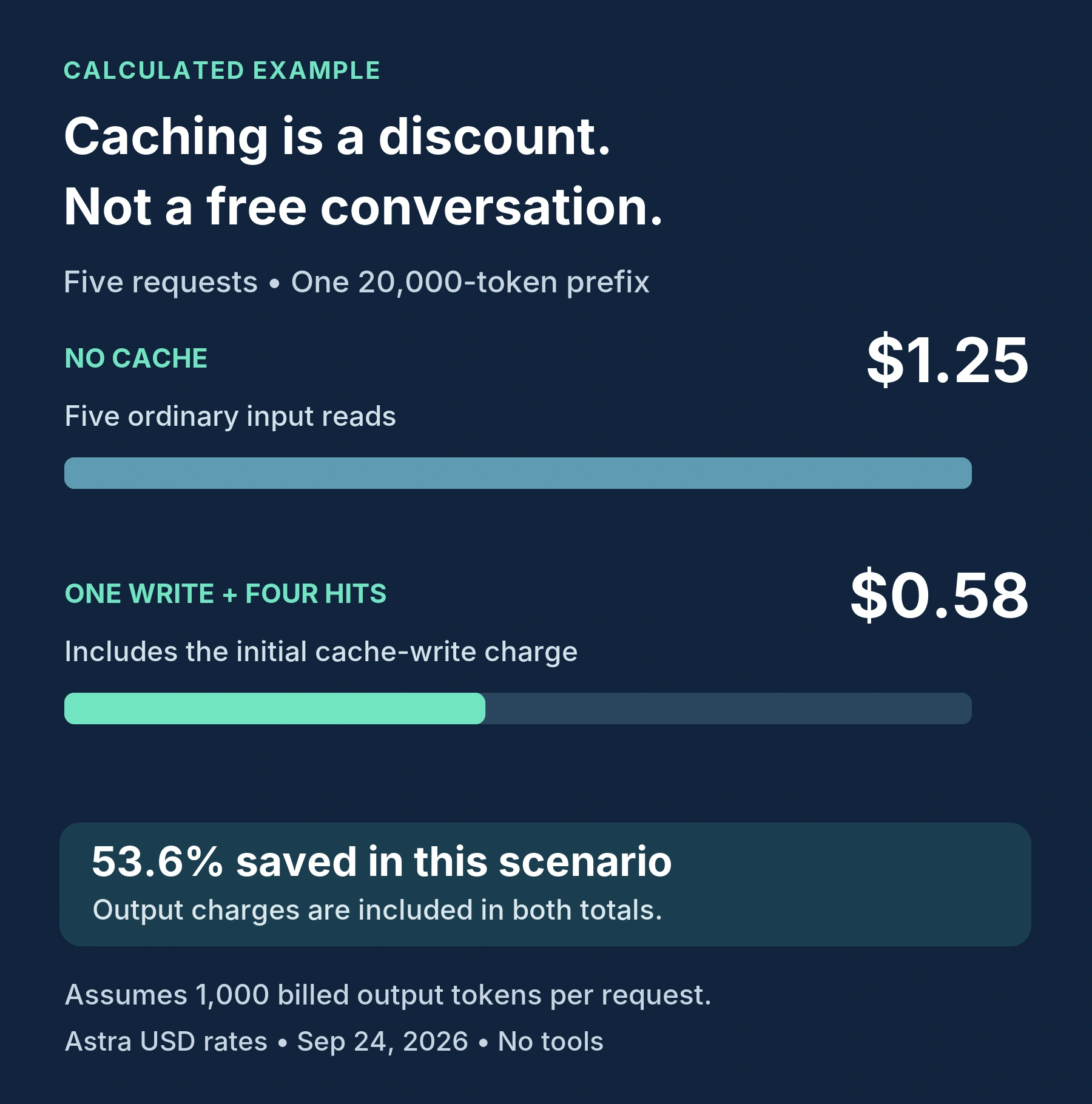
Now isolate a fixed 20,000-token document prefix used in five requests. Each produces 1,000 billed output tokens. Ignore all changing prompts and conversation growth so the comparison measures only that prefix and output.
| Assumption | Input cost | Output cost | Total |
|---|---|---|---|
| No caching: five ordinary reads | $1.00 | $0.25 | $1.25 |
| One cache write, then four full cache hits | $0.25 + $0.08 | $0.25 | $0.58 |
The cached scenario saves $0.67, or 53.6%, on this simplified workload. It does not save 90% of the whole bill: the initial cache write and all output still cost money. In a real workflow, add changing input, further reasoning and tools.
Example 3: Rework can erase a cheaper per-call price
Imagine one setup costs $0.10 per attempt and another costs $0.30. The first needs four attempts to produce something you accept; the second needs one. Their model costs are $0.40 and $0.30 respectively. These are hypothetical figures, not claims about any provider.
The lesson is to measure cost per accepted result, not just price per million tokens. Include your review time separately. A cheaper model that meets your quality requirement is a saving; a cheaper model that repeatedly fails may not be.
How ChatGPT, Claude, Gemini and coding apps differ
| Product or billing surface | What matters for your budget |
|---|---|
| ChatGPT personal-plan usage credits | Eligible work features draw on purchased credits after included usage. Availability depends on the account and plan; these are not API credits. [3] |
| Claude paid-plan usage credits | When enabled, continued usage beyond included limits can be charged at standard API rates, separately from the subscription. Review the configured monthly spend limit. [16] |
| Gemini Developer API | Check the exact model and processing tier. Published output prices can include thinking; cache storage and grounding may be separate line items. [6] |
| Cursor | Check included pools, model pricing and on-demand settings. Plan-specific application charges can matter; raw provider token rates are not necessarily your complete app bill. [17] |
A “credit” is therefore not a portable unit for comparing brands. For a fair comparison, define a fixed task, count every attempt, record the actual charge and judge whether the result meets the same acceptance standard. Compare the consumer subscription with another consumer subscription—or compare APIs with APIs.
How to reduce AI spending without losing useful results
Start with the work you repeat most often. Test a narrower prompt, a suitable lower-cost model and a clear acceptance check before changing everything at once. The options below are recommendations to evaluate, not promised savings percentages.
| Change to test | Potential benefit | Tradeoff to watch |
|---|---|---|
| Use a lower-cost model for routine work | Lower price for successful extraction, formatting or drafting. | More corrections can outweigh the saving. |
| Lower reasoning effort for simple tasks | Less unnecessary deliberation. | Difficult tasks may need deeper reasoning. |
| Trim irrelevant context; preserve essential facts | Less repeated reading. | Over-trimming can remove a critical constraint. |
| Request targeted edits and a defined output length | Less regeneration and fewer unwanted deliverables. | An overly rigid limit can omit useful detail. |
| Use retrieval or reusable cached context | Avoid repeatedly processing an entire changing bundle. | Retrieval can miss material; cache writes and misses still matter. |
| Set task limits and review points | Reduce uncontrolled retries and tool loops. | Stopping early can interrupt useful work. |
For a blogger, this could mean approving an outline before generating a complete article, then correcting only the affected sections. For a developer, it could mean naming the failing test and relevant function before authorizing a repository-wide investigation. For document analysis, extract the specified facts first, then synthesize the findings.
A cost-aware prompt you can adapt
Complete this task using the attached brief and the specific files listed. Return only the requested deliverable. Use outside research when needed to verify material facts; do not expand the scope. Avoid full rewrites when a targeted edit is sufficient. Pause for approval before additional research rounds, image or video generation, or a broader task. State any important uncertainty.
This prompt clarifies scope; it does not set a real monetary cap. Developers should implement controls outside the prompt. Keep enough output capacity for a complete result: on OpenAI reasoning models, max_output_tokens covers reasoning as well as the answer, and an insufficient limit can produce an incomplete response. [5]
Audit your usage before buying more credits
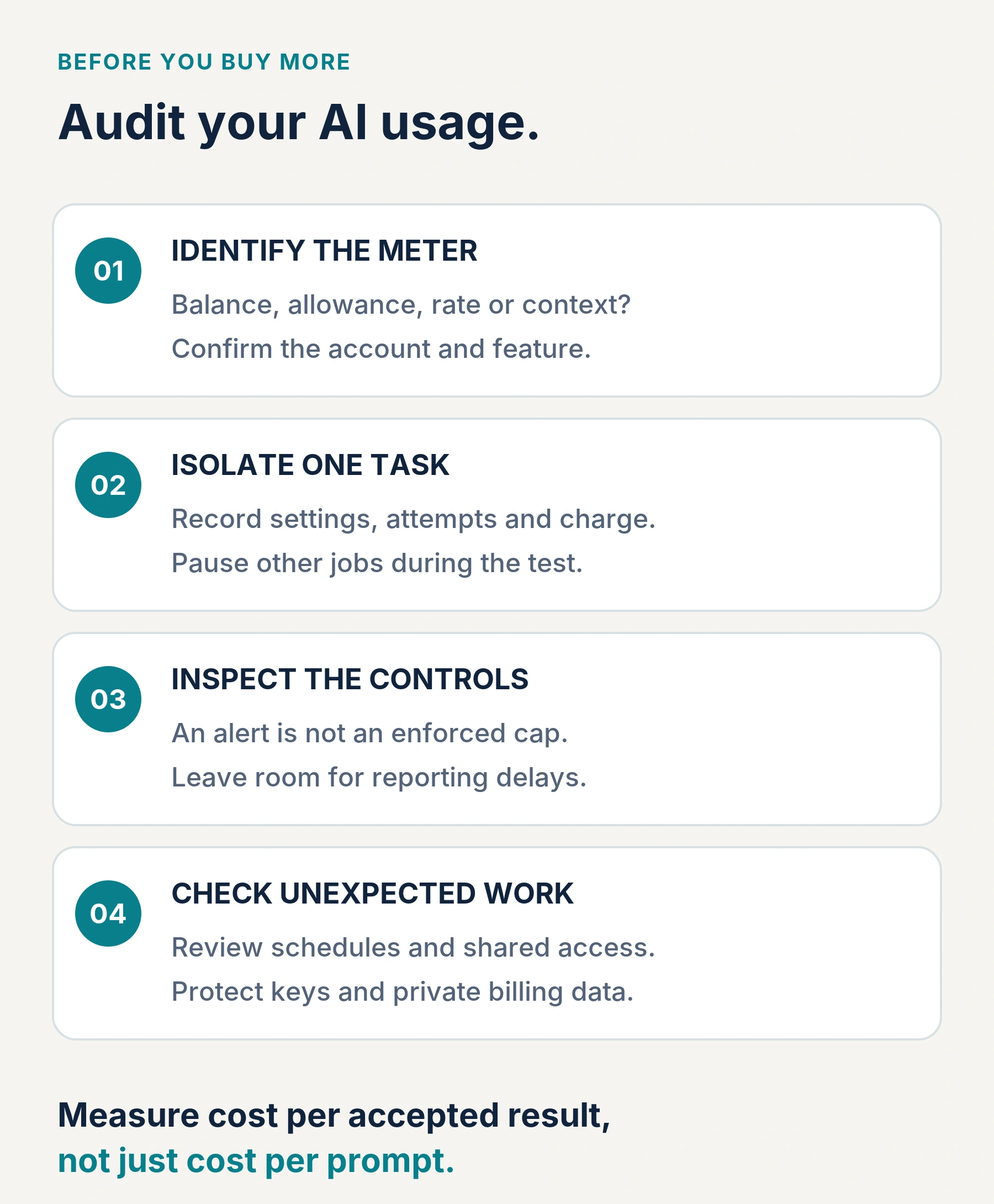
First, identify the account and meter. Confirm whether the warning concerns included usage, purchased credits, a context limit or a rate limit. Check the model, selected effort, billing period, reset time and any shared workspace. A screenshot of a single percentage is rarely enough to explain the whole account.
Next, isolate one representative task. Record the balance or usage immediately before and after, leaving time for reporting to settle. Pause other jobs during the comparison where possible. Save the prompt, settings, number of attempts and result quality. For APIs, retain request IDs and usage details; do not store secrets in your test notes.
Then, inspect spending controls. Current OpenAI API documentation distinguishes alerts from enforced organization or project hard limits. An alert notifies; a hard limit can reject further affected traffic. Enforcement can lag, so leave a buffer rather than treating the threshold as an exact transaction boundary. [13]
Finally, look for activity you did not authorize. Check recurring jobs, shared users and application credentials. Revoke suspicious access and contact the provider with timestamps and request IDs. Redact API keys, payment details and private files from screenshots sent to others.
A useful test log has six fields: task, model/settings, billed usage, total charge, number of attempts and accepted/not accepted. Run several representative tasks. A single easy question cannot establish what a month of research, coding or document work will cost.
Frequently asked questions
How many tokens are in one AI credit?
There is no cross-provider conversion. Use the rate card for the exact product and model. ChatGPT usage credits and API credits, for example, are separate. [3]
Why can a short answer use a lot of AI credits?
The final text may represent only part of the work. Earlier context, internal reasoning and tool activity can increase the processed workload even when the answer is brief. [5], [7], [9]
Does starting a new chat reset my usage limit?
No account-wide reset should be assumed. A new chat can reduce the context carried into that conversation; a plan allowance follows its own reset rules. [4]
Does “be concise” guarantee a cheaper response?
No. It is a useful output instruction, not a billing guarantee. Measure the result alongside the context supplied, effort setting and actual usage returned.
Are cached tokens free?
Not generally. A cache hit can use a discounted read rate, while writes and other work may still be charged. The rules depend on the model and service. [8]
Will a spending alert stop API charges?
Not by itself. In OpenAI’s current API controls, you must distinguish an alert from an enforced hard limit; even hard-limit enforcement can allow a small overshoot. [13]
Should I upgrade my subscription or buy additional usage?
Base that decision on measured demand. Compare the extra subscription cost with the additional usage you actually need, and verify which features the upgrade covers. Do not upgrade simply to compensate for avoidable retries, oversized context or unwanted automated work.
The bottom line
AI credits become easier to manage once you stop treating every prompt as an equally sized purchase. Identify the meter, make the task specific, choose an appropriate model and measure the complete path to a usable result.
The goal is not the fewest tokens at any cost. It is the lowest total cost for a result you can trust and use. Investigate unexpected activity, keep essential verification and put real spending controls around automation.
Sources and methodology
This is a research-based explainer, not a hands-on product review. Official documentation was checked on September 24, 2026. Prices and feature availability can change. All example token counts and workflow costs are explicitly hypothetical; the rate card is a dated published-price snapshot. Original diagrams are explanatory illustrations, not screenshots of private accounts.
[1] OpenAI: Understanding and counting tokens.
[2] OpenAI: Managing billing for ChatGPT and the API platform.
[3] OpenAI: Using Credits for Flexible Usage in ChatGPT (Personal plans).
[4] Anthropic: How do usage and length limits work?.
[6] Google: Gemini Developer API pricing.
[7] OpenAI: Conversation state.
[12] OpenAI: Setting up and managing prepaid API billing.
[15] Anthropic: Models, usage, and limits in Claude Code.
[16] Anthropic: Manage usage credits for paid Claude plans.
[17] Cursor: Models & Pricing.