
Outlook alternatives for Windows 11 are worth comparing before you replace a desktop workflow that already works. This guide concerns classic Outlook for Windows—the installed Office/Microsoft 365 application—not Outlook on the web, and not the old Windows Mail app.
The important questions are practical: Where does your email travel? Will local archives survive? Do calendars and shared mailboxes still work? And what does a replacement cost after the introductory offer ends?
Research checked: September 23, 2026. Prices are the displayed USD offers at review time. These are research-based editorial reviews, not laboratory benchmarks or claims of hands-on testing. Screenshots are credited vendor material; historical or composite images are labeled.
Start here: Shortlist Thunderbird for a free, configurable desktop client and eM Client for an Outlook-style all-in-one workspace. Consider Betterbird for a Thunderbird-derived power-user workflow, Mailbird for a unified-inbox approach, and Mailspring for an IMAP-focused alternative. An Exchange-heavy workplace needs a compatibility pilot before any switch. [6], [10], [18], [16], [22]
In this guide: Microsoft’s transition · Cloud privacy · Comparison · Reviews · Exchange checks · Real costs · Migration · FAQ
Is Microsoft retiring classic Outlook for Windows?
Microsoft’s published migration model has three stages: opt-in, opt-out, and eventual cutover. During opt-out, new Outlook becomes the default but switching back remains possible. Cutover is the later stage at which that return path ends. Microsoft says existing classic Outlook installations, including subscription and perpetual versions, will remain supported until at least 2029. That is not a universal shutdown date, nor does it override the lifecycle of an already-obsolete Office release. [1]
Enterprise opt-out was reported as moving from April 2026 to March 2027. Treat this as a change in migration timing, not proof that classic Outlook disappears in March. The applicable plan, update channel and administrator controls matter; business users should verify their organization’s current Message Center notices. [5], [1]
There is a legitimate reason to evaluate alternatives now, but no reason to discard a working installation just because a toggle appears. Microsoft also documents administrative controls for new Outlook. Keep security updates enabled and make a deliberate migration decision rather than using an unsupported old build as a permanent workaround. [25]
Avoid another outdated claim: new Outlook is no longer accurately described as having no offline or PST support. Microsoft’s September 23, 2026 comparison lists both as partially available. It still lists COM add-ins, VBA macros and the Outlook Object Model as unsupported. A feature marked “partial” deserves a workflow test, not an assumption of either total absence or full parity. [4]
Why new Outlook’s Microsoft cloud synchronization matters
Microsoft documents that supported non-Microsoft accounts can be synchronized to its cloud, creating a copy of account data in Microsoft data centers. Its Windows-specific guidance highlights Gmail and Yahoo; companion guidance explicitly includes Gmail, Yahoo, iCloud, IMAP and POP in new Outlook for Windows. The data types depend on the account: mail-only protocols should not be confused with full calendar/contact synchronization. [2], [3]
This is different from a conventional direct connection between a desktop client and your existing mail provider. For someone who deliberately chose another provider, introducing Microsoft into the processing path is a meaningful change—not merely a cosmetic redesign. Microsoft says its terms and privacy statement apply alongside those of the original provider. [2]
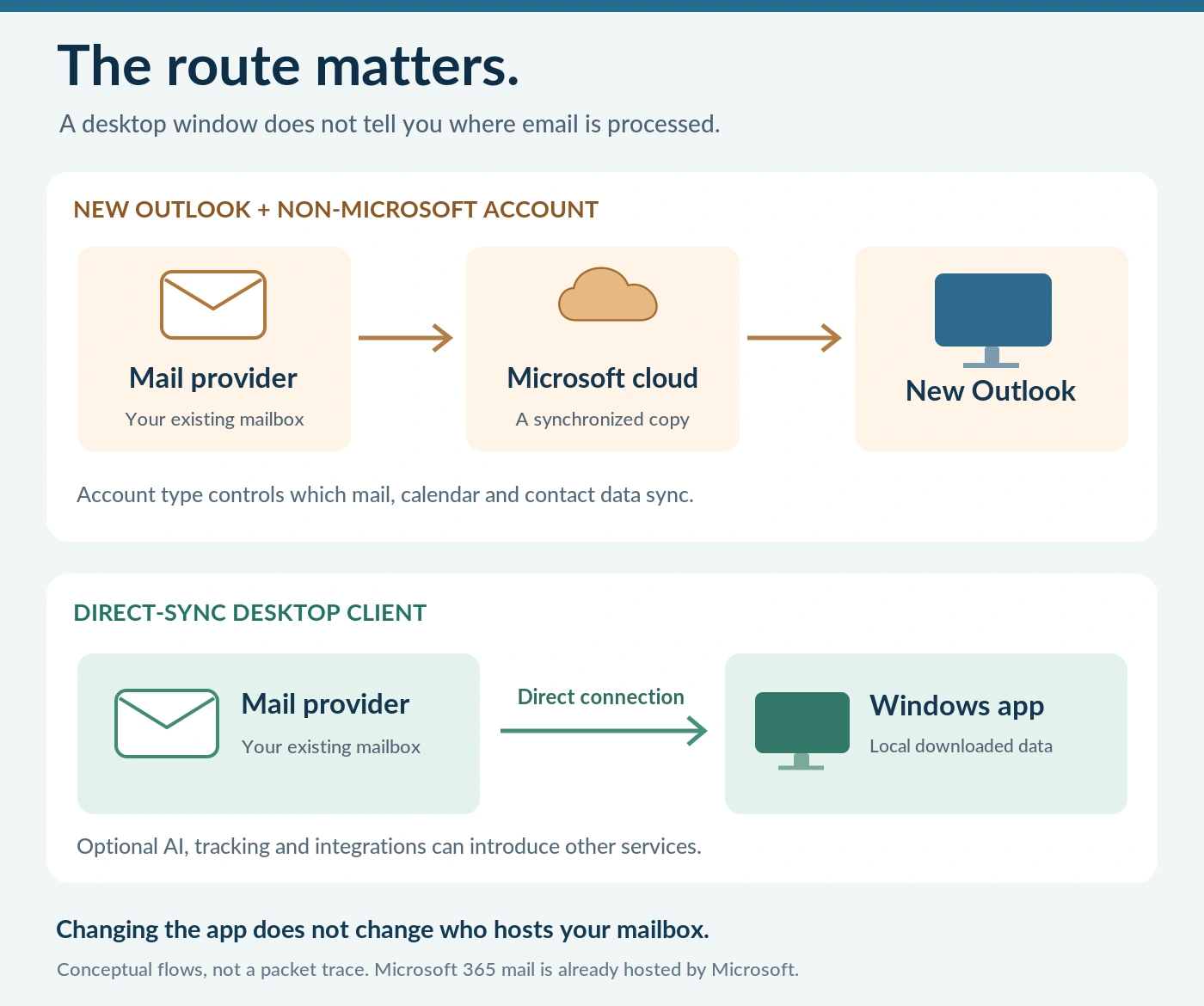
The distinction that prevents most confusion: changing the mail application does not change the mail host. Connecting Thunderbird to an Exchange Online mailbox does not remove that mailbox from Microsoft. A different client can change the connection and local workflow; moving hosting is a separate project.
Likewise, “local client” does not mean “nothing ever leaves this PC.” Your provider still handles delivery. Licensing, diagnostics, remote images, AI writing, translation, contact enrichment and shared-thread features can involve additional services. eM Client, for example, describes server-side translation and Azure OpenAI processing for its optional AI feature; Mailspring describes optional thread sharing and contact lookups. [11], [23]
Judge each enabled feature separately. A useful privacy question is: Which organization receives which data, for what purpose, and can I turn that feature off? Cloud storage alone is not evidence of a particular advertising or AI-training practice. Nor do Microsoft’s connected-account documents establish that every unrelated PST file on a computer is uploaded. [3]
Outlook alternatives for Windows 11 compared
| App / editorial fit | Who should shortlist it | Displayed price | Main limitation |
|---|---|---|---|
| Thunderbird · 4.5/5 | Free desktop mail and local control | $0; donations optional | Native Graph/EWS support is mail-only. [6], [7] |
| eM Client · 4.5/5 | Traditional mail, calendar, tasks and contacts | Free limited plan; Personal $39.95/year or $59.95 once | Graph transition is in the reviewed v11 beta. [9], [12] |
| Betterbird · 4/5 | Thunderbird-style layout and search specialists | Free; donation-supported project | ESR fork: check exact version and account support. [18], [19] |
| Mailbird · 4/5 | Multiple inboxes and integrated work tools | Free one-account plan; paid plans below | Lifetime updates are a separate Pay Once option. [14], [15] |
| Mailspring · 3.5/5 | IMAP email across different desktop systems | Free; Pro $8/month or $85/year | No native Exchange protocols or POP. [20], [22] |
How these reviews and ratings were prepared
The five-point fit rating is a holistic editorial judgment, using half-point increments. It considers the documented data path, traditional Outlook-style functions, account compatibility, licensing clarity and migration constraints. It is not a mathematical security score, a speed test, a reliability benchmark or an aggregate star rating from customers.
The recommendations prioritize keeping existing mail accounts on a Windows desktop. A product can score lower here and still be excellent for a narrower job. Published documentation and current release notes carry more weight than marketing claims. No app’s response time, memory consumption, support quality or failure rate was independently measured for this article.
1. Thunderbird: the strongest free starting point
Editorial fit: 4.5/5. Thunderbird is the first trial I would suggest for someone whose main requirement is to manage existing accounts without paying for another desktop license. It combines mail, calendars, contacts and tasks, offers unified or separate inboxes, and supports an add-on ecosystem. It is free and open source. [6]
Useful for: a personal mailbox plus a custom-domain account; a household consolidating inboxes; or an experienced user who wants to keep local data and customize the workspace. Its breadth makes it a better candidate for replacing a longstanding desktop workflow than simply pinning a webmail tab.
Pros. There is no paid-license decision before testing. The documented local profile makes backup planning tangible. Its configurable desktop approach provides room to grow rather than forcing every account into the same browser-centric routine. Mail, contacts and scheduling can live in one application, provided the account protocols support the functions you need. [6], [8]
Cons. Customization creates decisions, and add-ons create dependencies you must maintain. A familiar-looking inbox does not recreate Outlook’s automation or an employer’s Exchange environment. Large archive imports, special add-ins and shared access deserve individual tests; none should be inferred from the existence of a mail account setup screen.
The 2026 Exchange caveat: Thunderbird’s September announcement says Microsoft Graph email support is available in Release 154 and later, but not in ESR 153. Its native Graph and EWS integrations are currently email-only, without Exchange calendar or address-book support. Choose the channel intentionally; “latest ESR” and “latest Release” are not interchangeable. [7]
Price and verdict. The desktop application is $0. It is the most compelling first experiment for a privacy-conscious, cost-conscious individual using ordinary mail accounts. For an executive assistant managing delegated calendars, that same recommendation does not automatically apply. [6]
2. eM Client: the closest all-in-one Outlook-style option
Editorial fit: 4.5/5. eM Client is the most natural shortlist for readers who want a traditional productivity suite rather than email alone. Its product offering brings together mail, calendars, contacts, tasks, notes and chat. Its desktop design and broad feature scope make it worth evaluating before changing an established Outlook routine. [10]
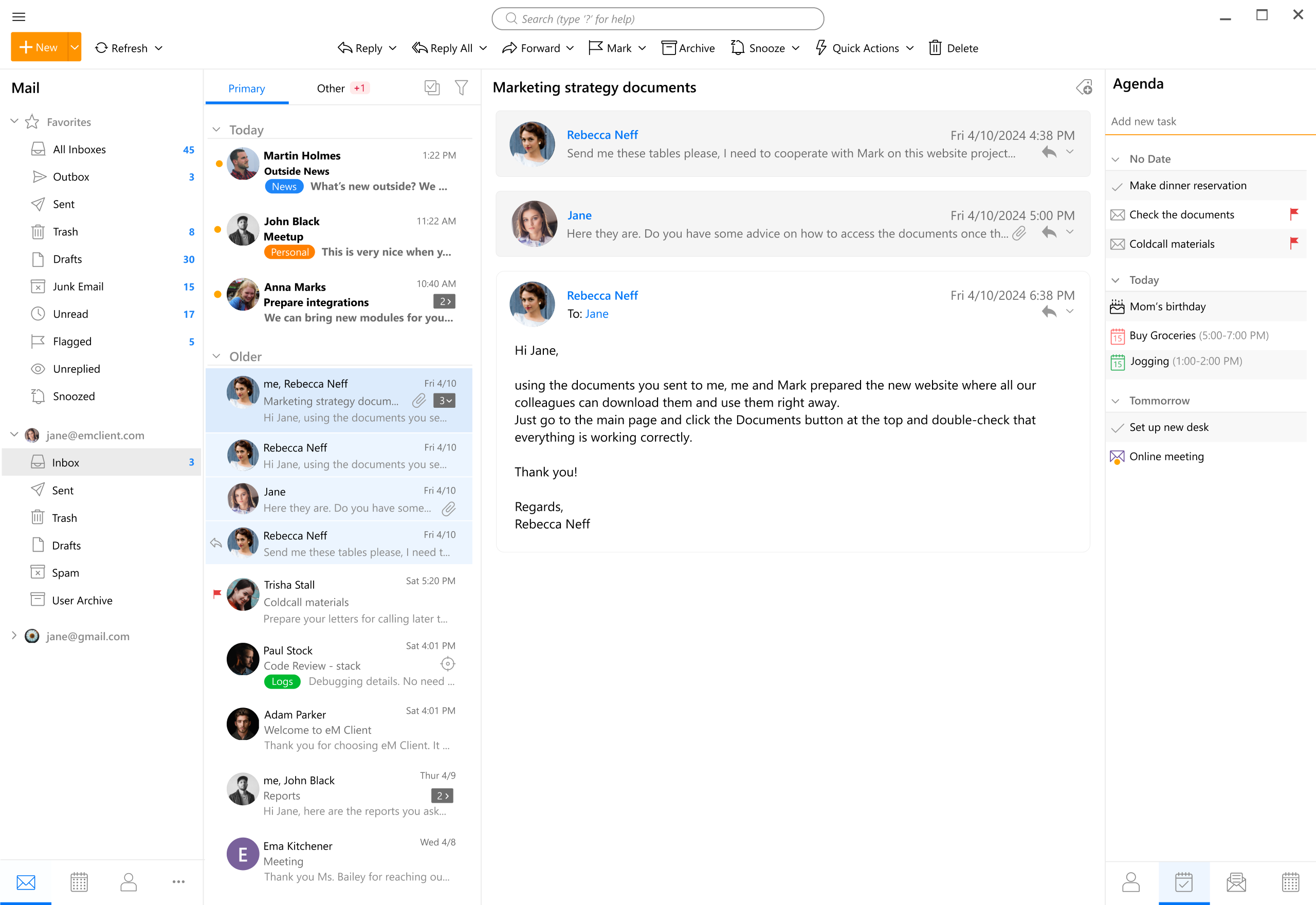
Useful for: an independent professional organizing client mail and appointments; a small office wanting paid licenses and a vendor-supported product; or a home user who needs two accounts and conventional scheduling. The best trial is your actual working week, including reminders, invitations, contact searches and offline reading—not an empty demo inbox.
Pros. The integrated scope reduces the need to assemble several unrelated applications. A 30-day trial provides a defined evaluation window. The choice between subscription and one-time licensing allows different budgeting preferences. This is a better fit than a minimalist mail-only program when the calendar is central to the job. [10], [9]
Cons. The free license is restricted to two accounts and non-commercial use. Future-version rights require attention with a one-time purchase. More importantly, the reviewed Windows release history still labels version 11.0.473.0, dated September 14, 2026, as beta; it adds an assisted EWS-to-Graph migration wizard. Do not present that as a fully released, already-proven Exchange migration. [9], [12]
Privacy caveat. The vendor says it has no access to ordinary mailbox contents or account credentials. Optional features are a separate question: its privacy policy describes email text being sent to its translation service and prompts processed through Azure OpenAI. Someone avoiding additional Microsoft processing should review or leave AI features disabled, rather than assuming every function is local. [10], [11]
Price and verdict. Personal is $39.95/year or $59.95 one-time, for one user on up to three devices. Business is $49.95/year per device or $79.95 one-time per device. Lifetime Upgrades is a separate option. Shortlist it for the all-in-one workflow, but require an exact-build Exchange test before committing a workplace. [9]
3. Betterbird: for Thunderbird power users
Editorial fit: 4/5. Betterbird is a modified Thunderbird distribution, not an unrelated new mail platform. The project follows Thunderbird’s Extended Support Release line and concentrates on refinements such as multiline message views and more advanced search. At review time it lists 153.3.0esr-bb9, released September 16, 2026. [18], [19]

Useful for: someone who already likes Thunderbird but wants denser message presentation, more control over search, or a particular Betterbird fix. It makes more sense as a targeted improvement to an understood workflow than as the default recommendation to someone who has never used either application.
Pros. The desktop workflow remains recognizable to Thunderbird users. The project’s published feature differences make a focused trial possible: identify the improvement you need, then verify it with a copy of your data. Being able to evaluate a free application before committing an archive is a meaningful advantage. [18]
Cons. Following ESR can mean different feature availability from Thunderbird’s faster Release channel. A smaller, specialized project also creates a different maintenance dependency from choosing the upstream product directly; that is a procurement consideration, not evidence that it is insecure. Betterbird’s own FAQ notes that some add-ons can be blocked or incompatible. [19]
Profile warning. Do not interpret profile compatibility as permission to alternate arbitrary versions against one live profile. Betterbird documents compatibility for corresponding versions. Make a separate backup or test copy, close the other application, and follow the version-specific guidance before switching. Never use concurrent access as a migration shortcut. [19], [8]
Price and verdict. Betterbird is a free, donation-supported option. Choose it because a documented refinement solves your problem, not because “fork” automatically means better privacy. Its parity with Thunderbird Release 154’s Graph implementation was not verified here; confirm the exact Betterbird build before choosing it for Exchange Online. [18], [7]
4. Mailbird: for a unified inbox and integrated tools
Editorial fit: 4/5. Mailbird emphasizes gathering multiple accounts and work tools into one desktop workspace. Its site advertises common providers, IMAP/SMTP and Exchange, while its plans cover IMAP and POP3. That makes it worth testing for inbox consolidation—but an Exchange logo alone is not a protocol or feature-parity guarantee. [16], [14]
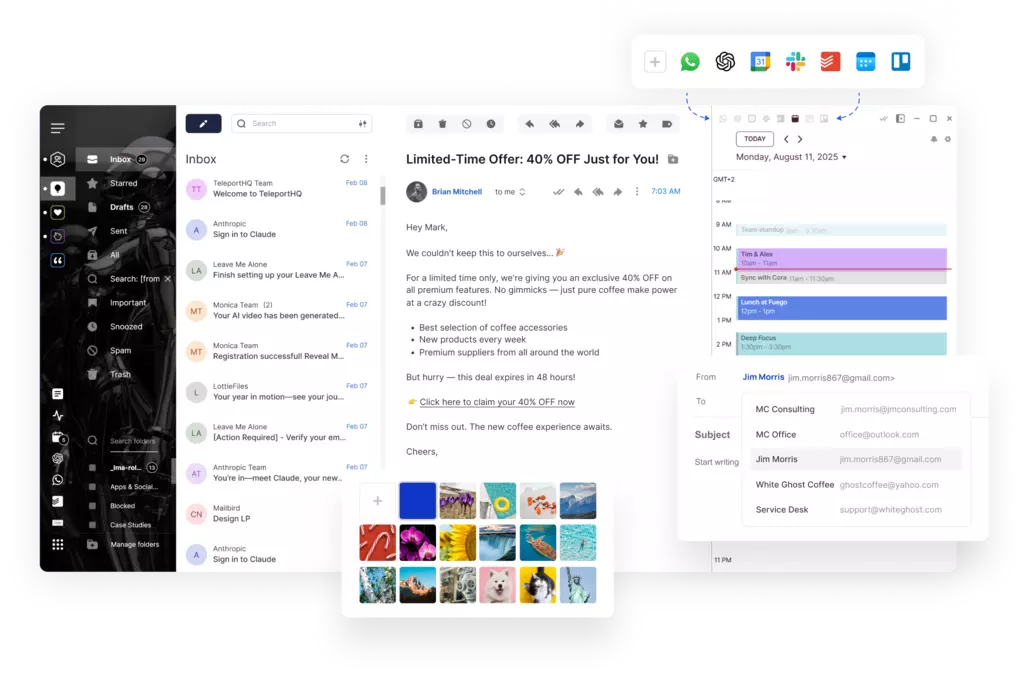
Useful for: a freelancer moving between several identities; someone who wants mail beside supported productivity integrations; or a user who finds a unified inbox more useful than recreating every classic Outlook function. Try the arrangement with your actual number of accounts and the services you already use.
Pros. The unified-workspace approach can reduce application switching. Paid plans advertise unlimited accounts, templates, rules and tracking. A 14-day money-back guarantee supplies a defined purchase-review period. These are concrete features to evaluate rather than reasons to assume it will be faster or more reliable on every PC. [16], [14]
Cons. The free tier permits only one account. Integrated services may have their own connectivity and privacy requirements. A web-based tool displayed beside mail is not necessarily an offline equivalent of Outlook’s native functionality. This research did not establish Mailbird’s exact Graph migration coverage, so require written confirmation for an Exchange Online deployment.
Privacy caveat. Mailbird describes core mail storage as local and provides information about usage reporting and opt-out choices. That should not be expanded into a claim that licensing, telemetry, message tracking or every connected service is offline. Review the enabled integrations, not just the inbox screen. [17]
Price and verdict. At review time the yearly plan shows a promotional $4.03/user/month, paid yearly, against a displayed $5.75 standard monthly equivalent. Pay Once shows $99.75 against $399, with Lifetime Updates an optional $69. These are displayed offers, not permanent prices. Mailbird is a reasonable workflow-led choice, but read the checkout carefully: paying once for a version and buying all future upgrades are different purchases. [14], [15]
5. Mailspring: for an IMAP-first, cross-platform workflow
Editorial fit: 3.5/5. Mailspring is most attractive when the job is principally email. It has a unified inbox, search, themes and Windows desktop integration, with paid productivity features available. It is not the safest assumption for replacing an Outlook setup built around Exchange-specific collaboration. [24]
Useful for: an individual using Gmail, a custom IMAP host, or multiple supported accounts; a user who moves between Windows and another desktop operating system; or someone who wants a free mail workspace without paying merely to add another account.
Pros. Current documentation says the free edition has unlimited accounts, along with core search, rules, templates, contacts and themes. A Mailspring ID is not required for basic functionality. Weekly allowances let free users try selected Pro functions before subscribing. Older comparisons that describe a four-account free limit should not be used as the current buying guide. [21]
Cons. The provider documentation says no native Exchange protocols and no POP/POP3. An Exchange-hosted account may work through IMAP when the organization permits it, but that is not full Exchange support. The current homepage describes invitation RSVPs while positioning a fuller calendar as forthcoming, so do not buy on the assumption that every Outlook scheduling workflow already exists. [22], [24]
Privacy caveat. Its published policy describes local mail synchronization, with optional sharing and contact-enrichment features that send data to its servers. The displayed policy date is March 8, 2019. Given the newer feature set, privacy-sensitive buyers should ask about current processing for every enabled service rather than treating an old blanket description as an audit. [23]
Price and verdict. Core use is free. Pro costs $8/month or $85/year. Do not read “Pro” as literally uncapped everything: the current allowance page retains limits for translation, grammar checks and profile lookups. Mailspring belongs on an IMAP-first shortlist, but not as a presumed substitute for a complex Exchange or POP-based installation. [20], [21]
Exchange support: check the protocol, not the logo
There is a second migration clock besides the new Outlook application. Thunderbird’s current transition guidance says Microsoft is phasing out Exchange Web Services in Exchange Online starting in October 2026 and completing in 2027. It distinguishes that cloud service from on-premises Exchange. A client that works through EWS today therefore needs a credible continuation path; this does not mean all email protocols or classic Outlook stop working on the same date. [7]
| Candidate | What the reviewed evidence establishes | What to verify |
|---|---|---|
| Thunderbird | Release 154+ supports Graph email; native Exchange calendar/address book are not included. | Correct release channel; required collaboration features. [7] |
| eM Client | Graph transition and a migration wizard appear in the reviewed v11 beta. | Production release status, tenant consent and real workflow results. [12], [13] |
| Betterbird | Thunderbird ESR-derived product; Graph parity was not verified here. | Exact release notes and vendor confirmation. [19] |
| Mailbird | Provider support is advertised; exact Graph migration coverage was not established. | Protocol used by your account and continued support after EWS changes. [16] |
| Mailspring | IMAP/SMTP alternative, not a native Exchange-protocol client. | Whether the tenant permits the required access at all. [22] |
For a managed account, ask IT to test sign-in and consent, shared mailboxes, delegate sending, recurring meetings, resource booking, directory lookup and any retention or sensitivity-label workflow you actually require. These are acceptance-test suggestions, not claims that every app supports them. If one is indispensable and fails, the replacement is not ready for that user.
Pricing: compare the real cost, not just the headline
A free tier, a perpetual license and a subscription solve different budgeting problems. Free may restrict commercial use or accounts. A one-time license may not include future major versions. Subscriptions typically need a renewal decision, and discounted checkout prices can obscure the amount due later. Compare the license unit—user versus device—as carefully as the dollar amount. [9], [15]
| Example | Calculation | Illustrative total |
|---|---|---|
| eM Client Personal, three years of the current annual rate | $39.95 × 3 | $119.85 |
| Mailspring Pro, three years of the current annual rate | $85 × 3 | $255 |
| Mailspring Pro, 36 months at the current monthly rate | $8 × 36 | $288 |
| Mailbird displayed Pay Once promotion plus optional Lifetime Updates | $99.75 + $69 | $168.75 |
Do not turn these examples into a guaranteed three-year bill. Taxes, local currency, promotions, renewal terms and later licensing changes are determined by the seller. Nor should a freelancer assume that a home-only free license covers commercial work. Save the license terms and final checkout summary with the purchase record.
How to migrate from classic Outlook without losing your workflow
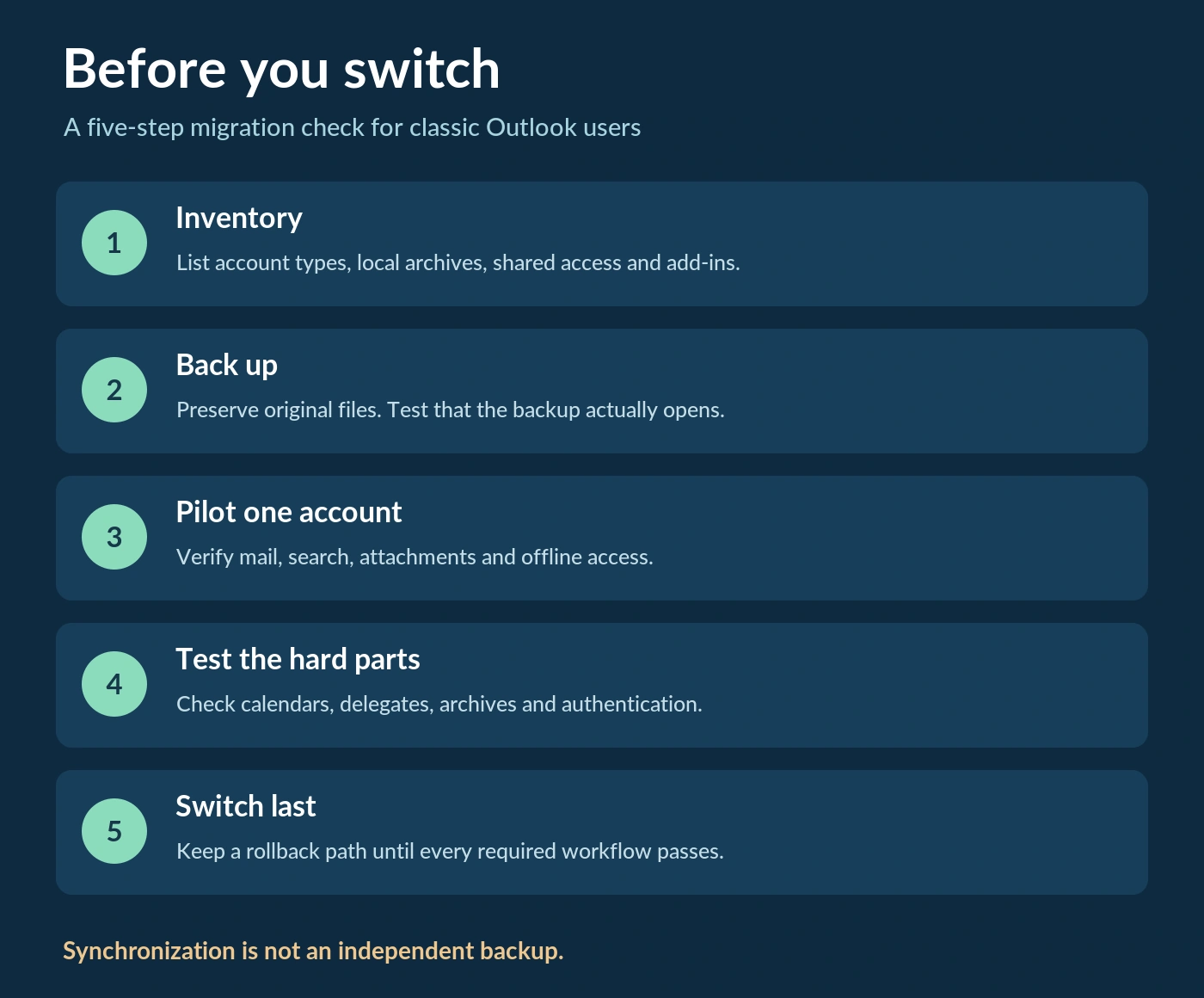
1. Inventory before installing
Write down every account and distinguish Microsoft 365/Exchange Online, on-premises Exchange, IMAP and POP. Then inventory local archives, contact lists, signatures, rules, templates, shared access and add-ins. “Email works” is too vague an acceptance criterion; identify the five or ten actions your work depends on.
2. Preserve the originals
Make separate, verified backups before converting or importing archives. Close applications before copying their active data stores. Keep original PST files rather than treating a successful conversion message as proof of completeness. For Thunderbird, Mozilla documents the profile that contains messages and other user data, including backup and restore guidance. [8]
A synchronized folder is not an independent historical backup. Deleting or reorganizing server mail can be reflected in connected clients. Keep a separate retained copy when the purpose is preservation, and test restoration before it matters. Do not delete a POP account or its data store merely because a new inbox appears populated.
3. Pilot one account and one sample archive
Use a test profile or limited pilot rather than moving everything on day one. Test old and new mail, attachments, search, sent-folder mapping, drafts and the correct From address. Check archive item counts and spot-check representative messages, dates and attachments. A client’s ability to read new server mail does not establish its ability to import your local archive.
4. Test offline work and collaboration separately
Allow required folders and attachments to download, then disconnect the network and verify what actually opens. Test meetings, contacts and delegation independently of mail. Do not accept the appearance of a calendar tab as proof that it synchronizes the account you use. Check provider policy and authentication without disabling security controls to make a client work.
5. Change defaults only after acceptance
Keep a rollback window with the old installation and backups intact. Change the default mail application only after the required tasks pass. Recheck optional AI, tracking and remote-content settings before everyday use. For a workplace account, obtain IT approval before revoking app access, deleting profiles or removing the original software.
Frequently asked questions
What is the best free Outlook alternative for Windows 11?
Thunderbird is the strongest general starting point in this editorial comparison because it combines a free desktop license with broad mail and organizer functions. Betterbird is more specialized, while Mailspring suits IMAP-first use. “Best” changes when Exchange calendars, delegation or a specific archive format is non-negotiable. [6], [19], [22]
Does new Outlook upload third-party mail to Microsoft?
Microsoft documents a synchronized cloud copy for supported non-Microsoft account integrations in new Outlook. The exact account type determines which data syncs. This is why selecting a direct-sync alternative can matter to someone using a non-Microsoft provider; it is not the same question as whether their existing host stores email. [2], [3]
Can I keep using classic Outlook instead of switching immediately?
Microsoft’s roadmap says classic Outlook remains supported until at least 2029, subject to the relevant product lifecycle and migration arrangements. The presence of new Outlook is not itself a universal immediate retirement notice. In a managed environment, follow your organization’s supported configuration and deployment policies. [1], [25]
Will an alternative remove my Microsoft 365 mailbox from Microsoft’s cloud?
No. Replacing a client does not relocate the mailbox it connects to. An Exchange Online account remains with its existing host until hosting is migrated separately. Decide whether the goal is a different interface, a different processing path for another provider, or a different mail host; these are three distinct projects.
Can all these applications replace Outlook calendars and shared mailboxes?
No such universal equivalence was established. Native Thunderbird Graph/EWS support is currently mail-only, and Mailspring explicitly lacks native Exchange protocols. Even a broader all-in-one application needs account-specific testing. Use the Exchange checklist rather than treating “supports Microsoft 365” as shorthand for every Outlook collaboration feature. [7], [22]
Which paid alternative avoids a mandatory subscription?
eM Client offers one-time Personal and Business licenses, and Mailbird offers Pay Once. Future-version rights differ from the right to keep using a purchased version, so check upgrade coverage. A one-time payment is not a promise of perpetual compatibility with every future mail-server change. [9], [15]
The practical recommendation
For ordinary personal or custom-domain email, start with Thunderbird and a reversible pilot. For a fuller Outlook-like organizer, compare eM Client using the same real account and tasks. Choose Betterbird for a specific refinement, Mailbird for its unified workspace, or Mailspring for an IMAP-first approach. These are scenario-based editorial recommendations, not claims that one product wins every workload.
The decisive test is simple: Does the replacement preserve the work you need, with a data path and license you understand? A different icon is easy. A controlled migration is what protects your time and your archive.
Sources and update notes
Primary vendor documentation is linked throughout. Source [5] is a separately identified news report about enterprise timing; it is not a substitute for tenant-specific Microsoft notices. Prices and protocol support can change after the review date. Screenshots illustrate interface concepts and are not evidence of current feature parity.
[1] Microsoft: stages of migration to new Outlook
[2] Microsoft: sync an Outlook account to the Microsoft Cloud
[3] Microsoft: cloud synchronization, including new Outlook for Windows
[4] Microsoft: new versus classic Outlook feature comparison
[5] TechRadar: reported enterprise opt-out delay to March 2027
[6] Thunderbird: desktop features and free license
[7] Thunderbird: Microsoft Graph support, September 2, 2026
[8] Mozilla Support: Thunderbird profiles and backup
[9] eM Client: pricing and license limits
[10] eM Client: product overview and media kit
[11] eM Client: privacy policy, translation and AI
[12] eM Client: Windows release history
[13] eM Client: EWS retirement and Graph transition
[14] Mailbird: pricing, promotions and optional upgrades
[15] Mailbird: differences between licenses
[16] Mailbird: supported accounts and desktop features
[17] Mailbird: local storage and usage reporting
[18] Betterbird: current releases and distinctive features
[19] Betterbird: ESR, profiles and add-on compatibility
[20] Mailspring: free and Pro pricing
[21] Mailspring: free-plan limits and Pro allowances
[22] Mailspring: supported providers and protocol limitations
[23] Mailspring: privacy policy and optional server features