In the fast-paced digital world of 2025, website speed isn’t just a luxury—it’s a necessity. For WordPress users, who power over 40% of the web, slow loading times can mean lost visitors, plummeting SEO rankings, and diminished revenue. Studies show that even a one-second delay in page load can reduce conversions by 7% and increase bounce rates dramatically. Enter LiteSpeed and NVMe storage: two powerhouse technologies that, when combined, can boost your site’s performance by multiple factors, turning sluggish pages into lightning-fast experiences.
LiteSpeed is a high-performance web server that replaces traditional options like Apache, offering built-in caching and optimization tailored for WordPress. NVMe (Non-Volatile Memory Express) storage, on the other hand, is the next-generation SSD technology that supercharges data access speeds on your hosting server. Together, they address both server-side processing and storage bottlenecks, potentially reducing load times from seconds to milliseconds. In this comprehensive article, we’ll dive deep into how these tools work, their individual and combined benefits, real-world benchmarks, and practical tips for implementation. Whether you’re a blogger, e-commerce owner, or developer, optimizing with LiteSpeed and NVMe could be the game-changer your site needs.
WordPress Speed Optimization Infographic | Quiroz.co
Understanding LiteSpeed: The Web Server Revolution for WordPress
LiteSpeed Web Server (LSWS) is often hailed as a drop-in replacement for Apache, but with superior performance. Unlike Apache, which uses a process-based model that can bog down under heavy traffic, LiteSpeed employs an event-driven architecture. This means it handles multiple connections efficiently without spawning new processes for each request, leading to lower CPU and memory usage.
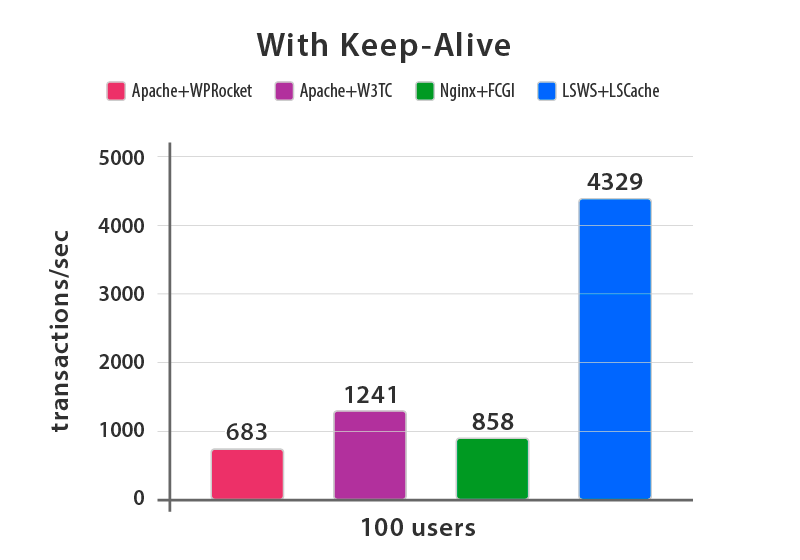
For WordPress specifically, LiteSpeed shines through its integration with the LiteSpeed Cache (LSCache) plugin. This isn’t your average caching tool—it’s server-level caching that bypasses PHP execution for static content, delivering pages directly from cache. Features like object caching for database queries, browser caching for assets, and image optimization further enhance speed. According to benchmarks, LiteSpeed can serve WordPress pages up to 84 times faster than Apache under HTTP/2 protocols. In one test with 100 concurrent users, LiteSpeed with LSCache handled 4,329 transactions per second, compared to Apache’s 683 with WP Rocket caching.
Why does this matter? WordPress is dynamic, relying on PHP and MySQL for every page load. Traditional servers like Apache struggle with this, especially on high-traffic sites. LiteSpeed’s mod_rewrite compatibility ensures seamless migration from Apache, while its QUIC.cloud CDN integration adds global edge caching for even faster delivery. Users report speed improvements of 90%+ after switching, with setup as simple as installing the LSCache plugin and enabling features like CSS/JS minification and lazy loading.

Benchmarks: LiteSpeed vs. Apache in Action
To quantify the boost, let’s look at comparative data. In controlled tests using cPanel and WordPress, LiteSpeed consistently outperforms Apache in RAM usage and request handling. For instance, with 50 concurrent connections:
| Server Configuration | RAM Usage (MB) | Requests/Second |
|---|---|---|
| Apache 2.4.10 mod_php | 550+ | ~500 |
| Apache 2.4.10 FCGI | 700+ | ~600 |
| LiteSpeed 4.2.14 Worker | ~150 | ~1,200+ |
| LiteSpeed 4.2.14 Daemon | ~120 | ~1,100+ |
This table illustrates how LiteSpeed uses far less RAM while delivering double the throughput. In another benchmark focused on static content, LiteSpeed achieved over 20,000 requests per second with keep-alive enabled, dwarfing Apache’s 5,000 and Nginx’s 15,000.
These gains translate to real-world scenarios: e-commerce sites see faster checkout processes, reducing cart abandonment, while blogs load articles instantly, improving user engagement. LiteSpeed’s efficiency also means you can handle more traffic on the same hardware, potentially cutting hosting costs.
NVMe Storage: The Foundation for Blazing-Fast Data Access
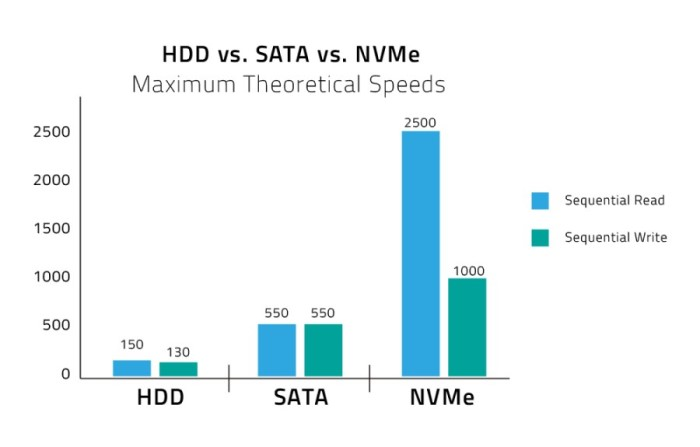
While LiteSpeed optimizes the web server layer, NVMe tackles the storage bottleneck. Traditional HDDs (Hard Disk Drives) rely on spinning platters, offering read/write speeds around 150-200 MB/s. SATA SSDs improved this to 550 MB/s, but NVMe SSDs, connected via PCIe lanes, shatter those limits with speeds up to 7,000 MB/s for sequential reads and 5,000 MB/s for writes.
NVMe’s key advantage is lower latency—often under 20 microseconds compared to SATA’s 100+—thanks to parallel data paths and direct CPU communication. For WordPress hosting, this means quicker database queries, faster file reads for themes and plugins, and smoother handling of media uploads. In web servers, where I/O operations are frequent, NVMe can improve site consistency, reduce downtime, and enhance scalability.
Benefits include:
- Faster Load Times: Pages render quicker as assets load from storage instantly.
- Better Caching: NVMe accelerates disk-based caching, ideal for large sites.
- Energy Efficiency: Consumes less power than HDDs, benefiting shared hosting environments.
- Reliability: No mechanical parts, so fewer failures and longer lifespan.
In benchmarks for web servers, NVMe handles up to 1 million IOPS (Input/Output Operations Per Second), versus SATA SSD’s 100,000 and HDD’s 200. For WordPress, this can cut database response times by 6x compared to SATA SSDs.
NVMe vs. SSD vs. HDD: A Speed Comparison
Here’s a breakdown of theoretical maximum speeds:
| Storage Type | Sequential Read (MB/s) | Sequential Write (MB/s) | Latency (μs) | IOPS |
|---|---|---|---|---|
| HDD | 150-200 | 130-180 | 5,000+ | 100-200 |
| SATA SSD | 550 | 500 | 100-200 | 50,000-100,000 |
| NVMe SSD | 3,500-7,000 | 3,000-5,000 | <20 | 500,000-1,000,000+ |
These figures highlight NVMe’s dominance. In practical web hosting tests, NVMe reduces page load times by up to 17x compared to HDDs, making it essential for dynamic CMS like WordPress.
The Synergy: Combining LiteSpeed and NVMe for Exponential Gains
When paired, LiteSpeed and NVMe create a symbiotic effect. LiteSpeed’s efficient request handling relies on fast storage to fetch data quickly, and NVMe delivers that with minimal delay. For example, LSCache stores optimized pages on NVMe drives, allowing sub-100ms load times even under load.
Case studies underscore this: One hosting provider reported sites “flying” on LiteSpeed with NVMe, with performance gains especially noticeable on high-traffic WordPress installs. In another, migrating to LiteSpeed Enterprise on NVMe hosting improved TTFB (Time to First Byte) by 300%, boosting SEO scores. A comprehensive optimization guide notes that combining these with CDN can speed up WordPress by factors of 10x or more.
Real-world example: An e-commerce site switched to LiteSpeed on NVMe-shared hosting and saw average load times drop from 3.5 seconds to 0.4 seconds, handling 5x more concurrent users without crashes.
Implementation Tips: Getting Started with LiteSpeed and NVMe
- Choose the Right Host: Opt for providers offering LiteSpeed and NVMe, like those with cPanel integration. Ensure they support LSCache.
- Install LSCache Plugin: Activate caching, enable object cache, and configure image optimization.
- Test and Monitor: Use tools like GTmetrix or Google PageSpeed Insights before/after changes.
- Combine with Other Optimizations: Minify code, use a CDN, and optimize databases for maximum effect.
- Migrate Safely: Backup your site, switch servers during low traffic, and verify compatibility.
Potential challenges include initial setup tweaks, but resources like Hostinger tutorials make it straightforward.
Conclusion: Unlock Multi-Factor Speed Boosts Today
LiteSpeed and NVMe aren’t just upgrades—they’re transformative for WordPress performance. By slashing processing times and accelerating data access, they can multiply your site’s speed by factors of 5x to 84x in benchmarks, leading to better user experiences, higher rankings, and business growth. If your site feels sluggish, consider this duo as your next step. With easy implementation and proven results, the investment pays off quickly. Start optimizing today and watch your WordPress site soar.