Hey there, if you’re like me, you’ve probably accumulated a drawer full of tiny storage devices over the years—those little lifesavers for backing up photos, transferring files, or expanding your phone’s memory. But when it comes to choosing between a MicroSD vs USB-C flash drives (sometimes called a USB-C thumb drive or key drive), things can get confusing. Both are compact, use flash memory, and serve similar purposes, but they shine in different scenarios. In this article, we’ll break down the key differences, pros and cons, security considerations, performance metrics, and even some real-world benchmarks. Whether you’re a tech enthusiast, a photographer on the go, or just someone looking for the best portable storage solution, I’ve got you covered with insights from reliable sources.
Let’s start with the basics: MicroSD cards are those super-small, flat chips you slot into phones, cameras, drones, or even some laptops. USB-C flash drives, on the other hand, are stick-like devices with a USB-C connector that plugs directly into modern ports on computers, tablets, or smartphones. Both rely on non-volatile flash memory, meaning they hold data without power and have no moving parts, making them durable for everyday use.
![Amazon.com: SanDisk 1TB Ultra microSDXC UHS-I Memory Card with Adapter - Up to 150MB/s, C10, U1, Full HD, A1, MicroSD Card - SDSQUAC-1T00-GN6MA [New Version] : Electronics](https://m.media-amazon.com/images/I/710dc2WY1gL._AC_UF894,1000_QL80_.jpg "MicroSD vs USB-C Flash Drives: A Deep Dive into Portable Storage Options 1")
Amazon.com: SanDisk 1TB Ultra microSDXC UHS-I Memory Card with Adapter – Up to 150MB/s, C10, U1, Full HD, A1, MicroSD Card – SDSQUAC-1T00-GN6MA [New Version] : Electronics
That’s a typical MicroSD card—tiny but mighty.
Key Differences of MicroSD vs USB-C Flash Drives: Form Factor, Compatibility, and Use Cases
At first glance, the physical design sets them apart. MicroSD cards measure about 11mm x 15mm x 1mm, making them incredibly portable and ideal for devices with built-in slots like Android phones or action cameras. USB-C flash drives are a bit bulkier, often around the size of a house key, but they connect via USB-C ports, which are now standard on most new laptops, phones, and tablets.

Amazon.com: SanDisk 1TB Ultra Dual Drive Go USB Type-C Flash Drive, Black – SDDDC3-1T00-GAM46 : Electronics
This direct plug-and-play feature makes USB-C drives more versatile for quick file transfers between computers.
Compatibility is another big differentiator. MicroSD cards often require an adapter or reader to connect to a PC without a built-in slot, which can be a hassle. USB-C drives? Just plug them in—no extras needed, as long as your device has a USB-C port. For older USB-A ports, you might need an adapter, but that’s less common these days. In terms of capacity, both can hit impressive highs: MicroSD cards go up to 2TB (SDXC standard), while USB-C drives can match or exceed that, with some models reaching 1TB+ easily.
If you’re expanding storage on a smartphone or camera, MicroSD wins hands down. For shuttling files between laptops or as a backup drive, USB-C feels more seamless.
Pros and Cons: Weighing the Trade-Offs
No storage device is perfect, and these two have their strengths and weaknesses. Let’s break it down honestly—I’ve lost count of how many times I’ve misplaced a MicroSD card because of its size!
MicroSD Cards
Pros:
- Ultra-portable: Their tiny size means they fit anywhere, perfect for mobile devices like phones, tablets, or drones.
- Device-specific expansion: Great for adding storage to gadgets without USB ports.
- Cost-effective for high capacity: Often cheaper per GB at larger sizes, especially for photography or video.
- No bulk: They don’t stick out like a sore thumb (pun intended).
Cons:
- Fragile: Easier to damage or lose due to their small, flat design—bending or exposure to elements can kill them.
- Adapter dependency: Need a reader for most computers, which slows things down.
- Slower in some scenarios: Speed can vary based on the card’s class rating (e.g., Class 10 for basic use, UHS-I for faster).
- Limited durability for heavy writes: Write cycles are finite (3,000–100,000), and they’re not ideal for constant data churning.
USB-C Flash Drives
Pros:
- Universal connectivity: Plugs into almost anything with USB-C, no adapters required for modern devices.
- Faster transfers: Often leverage USB 3.0/3.1/3.2 speeds for quicker file moves.
- More robust: Slightly better shock resistance and easier to handle without breaking.
- Keychain-friendly: Many come with loops for attaching to bags or keys.
Cons:
- Bulkier: Not as slim as MicroSD, so they might protrude from devices.
- Higher cost for speed: Premium models with fast USB standards can be pricier.
- Port wear: Frequent plugging/unplugging can stress USB ports over time.
- Heat buildup: During heavy use, they can get warm, though this rarely causes issues.
Overall, if portability and integration with small devices matter most, go MicroSD. For ease of use across computers, USB-C edges it out.
Everything About USB Storage – Newsoftwares.net Blog
Here’s a handy infographic summarizing some of these pros and cons for visual learners.
Performance and Benchmarks: Speed Demons or Slowpokes?
Performance is where things get technical, but I’ll keep it real—speed matters when you’re transferring gigs of vacation photos or 4K videos. Both devices use flash memory, but their interfaces dictate the pace.
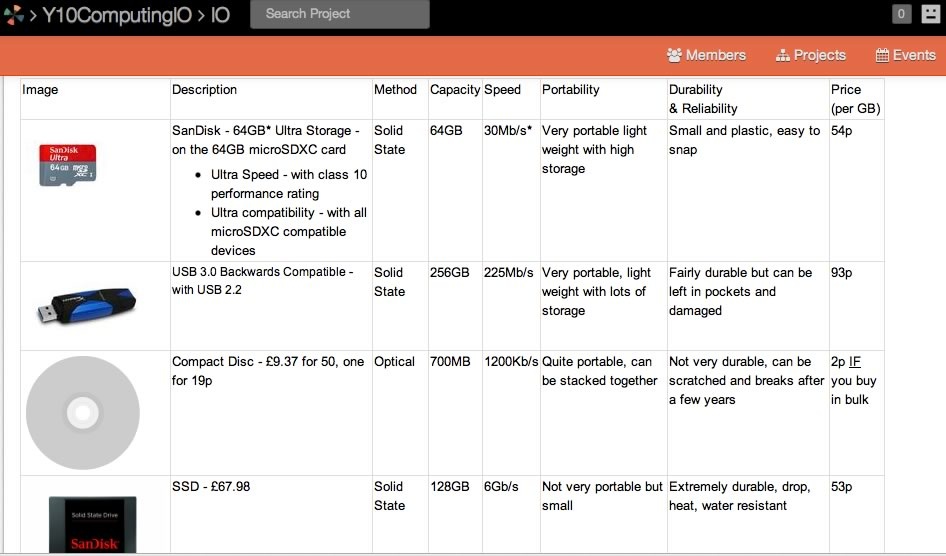
MicroSD cards are rated by speed classes: A basic Class 10 hits 10MB/s minimum write, while top-tier UHS-II or V90 cards can reach 90–300MB/s reads/writes. In benchmarks, a SanDisk Extreme Pro MicroSD might clock 95MB/s read and 90MB/s write, but real-world use (like in a phone) often drops to 50–70MB/s due to device limitations.
USB-C flash drives shine here, especially with USB 3.1 or higher. They can theoretically hit 400MB/s reads and 100–200MB/s writes, far outpacing older USB 2.0 (which caps at 60MB/s). For example, a SanDisk Ultra USB-C drive benchmarks at around 130MB/s read and 30MB/s write, while premium ones like Samsung’s can push 245MB/s read. In side-by-side tests, USB-C often transfers a full movie in under 30 seconds, versus longer waits with MicroSD via adapters.
From extensive benchmarks on sites like Tom’s Hardware and user forums, USB-C drives generally offer better sequential speeds for large files, but MicroSD excels in random reads/writes for apps or cameras. Here’s a chart comparing storage speeds in general—note how flash-based devices like these vary widely.
![For Video Editing Storage – How Fast is Fast Enough? [u] | Larry Jordan](https://wpmedia-lj.s3.amazonaws.com/wp-content/uploads/2022/12/SSD_Update_02.jpg "MicroSD vs USB-C Flash Drives: A Deep Dive into Portable Storage Options 3")
Security: Protecting Your Data on the Go
Security isn’t just about hackers—it’s also about physical reliability and data integrity. Both MicroSD and USB-C drives are susceptible to data loss from wear, but they’re non-volatile, so no power means no data wipe. MicroSD cards might be slightly less reliable long-term due to their fragility; users report higher failure rates from bending or static. USB-C drives fare better with shock resistance, but cheap models can fail after 1–2 years of inactivity.
For digital security, neither is inherently more secure—it’s up to you. Use encryption software like BitLocker or VeraCrypt for sensitive files. Both can be formatted with secure file systems like exFAT or NTFS, but avoid leaving them unencrypted if they hold personal data. In comparisons, USB-C’s direct connection might expose it more to malware via ports, but MicroSD’s adapter use adds a layer of isolation. Overall, reliability leans toward USB-C for heavy use, with plug cycles up to 10,000+ versus MicroSD’s slot wear concerns.
Final Thoughts: Which One Should You Choose?
In the battle of MicroSD vs USB-C flash drives, it boils down to your needs. If you’re all about mobile expansion and don’t mind adapters, MicroSD is your compact buddy. For seamless, speedy transfers across devices, USB-C takes the crown. Both offer great value in portable storage, with capacities soaring and prices dropping. Just remember to back up regularly—flash memory isn’t forever!
If you’re shopping, check out brands like SanDisk or Samsung for reliable options. Have you had experiences with either? Drop a comment—we’d love to hear your take. For more on portable storage comparisons, tech benchmarks, or data security tips, stay tuned!
Check out LogicWeb’s top rated web hosting services.