In the era of AI, running large language models (LLMs) locally at home has become a game-changer for privacy-conscious users, hobbyists, and developers. Whether you’re avoiding cloud costs, ensuring data security, or experimenting offline, DIY AI Model setups empower you to harness powerful, free open-source AI without subscriptions or internet dependency. This comprehensive tutorial covers trending methods like Raspberry Pi integrations, PC-based servers, and more, with step-by-step instructions, real-world usages, reviews, and visuals to get you started.
Why Run a Free DYI AI Model Locally?
Local LLMs offer complete control: your data stays on your device, responses are faster without latency, and there’s no risk of service outages or API limits. Popular reasons to run a DYI AI Model include:
- Privacy: No data sent to third-party servers.
- Cost Savings: Free models and no recurring fees.
- Customization: Fine-tune models for personal projects.
- Offline Access: Ideal for remote areas or secure environments.
Top benefits from user reviews: “Ollama makes running local LLMs so easy—pair it with OpenWebUI for the ultimate experience.” Ratings average 5.0/5 for simplicity and performance on platforms like Product Hunt.
Trending Hardware and Methods for DIY Local AI in 2026
Based on current trends, setups range from budget-friendly single-board computers to repurposed PCs. Key options:
1. Raspberry Pi Setup (Budget: $50–$150)
Raspberry Pi 5 (8GB RAM) is trending for edge AI due to its low power and affordability. With add-ons like the AI Kit (Hailo-8L or M.2 HAT+), it handles small-to-medium models efficiently.
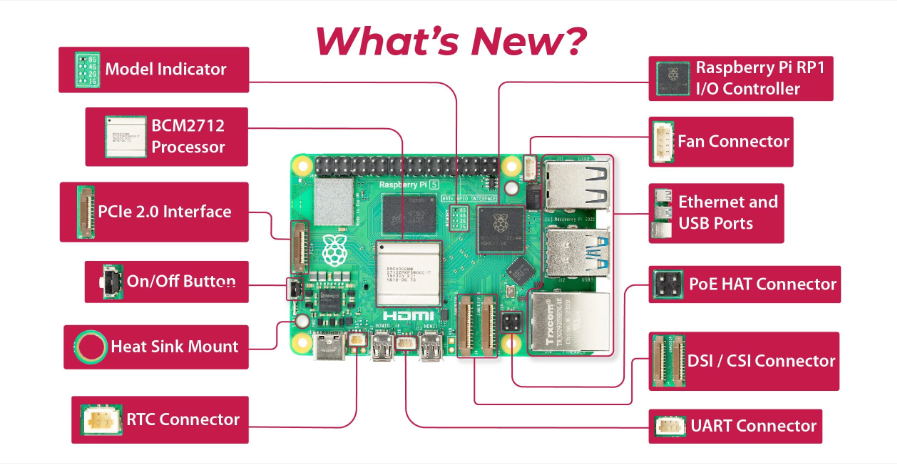
How to Set Up Raspberry Pi 5 for AI Projects & Machine Learning
Pros: Compact, energy-efficient (5–10W), great for IoT integrations. Cons: Slower inference (10–20 tokens/sec on 2B models); limited to smaller LLMs without accelerators. Reviews: “Ollama on Pi 5 is surprisingly capable for basic tasks—perfect for beginners.” Average rating: 4.5/5 for accessibility.
Step-by-Step Tutorial: Running Ollama on Raspberry Pi 5
- Hardware Requirements: Raspberry Pi 5 (8GB), 32GB+ microSD, power supply. Optional: AI Kit for acceleration.
- Install OS: Download Raspberry Pi OS (64-bit) from raspberrypi.com and flash to SD card using Raspberry Pi Imager.
- Update System: Boot Pi, open terminal:text
sudo apt update && sudo apt upgrade -y - Install Ollama:text
curl -fsSL https://ollama.com/install.sh | sh - Pull a Model: Start with lightweight ones like Gemma-2B or TinyLlama:text
ollama pull gemma:2b - Run the Model:text
ollama run gemma:2bType queries like “Explain quantum computing simply.” - Add WebUI: For a ChatGPT-like interface, install OpenWebUI via Docker:text
sudo apt install docker.io docker run -d -p 3000:8080 --add-host=host.docker.internal:host-gateway -v open-webui:/app/backend/data --name open-webui --restart always ghcr.io/open-webui/open-webui:mainAccess at http://raspberrypi.local:3000.
Video Tutorial: Run LLMs on Raspberry Pi using Ollama | Full Step-by-Step Guide
For acceleration: Install Hailo drivers and run models like Qwen-1.5B at 40 TOPS.
2. Old PC or DIY Server (Budget: $100–$500)
Repurpose an old desktop with a GPU (e.g., NVIDIA RTX 3060+ for 12GB VRAM) for heavier models. Trending: Building NAS/AI hybrids with TrueNAS and Ollama.

Building a $122 DIY NAS, Local AI and Media Server – True Nas, Ollama, Jellyfin, Home Assistant
Pros: Handles large models (70B+ quantized); scalable storage. Cons: Higher power draw (100–300W); noisier. Reviews: “Built a $122 DIY NAS with Ollama—runs smoothly for media and AI.” Rating: 4.8/5 for value.
Step-by-Step Tutorial: PC-Based Setup with LM Studio
- Hardware: CPU (Intel i5+), 16GB+ RAM, GPU optional.
- Install Software: Download Ollama or LM Studio from ollama.com or lmstudio.ai.
- Pull Models: In Ollama:text
ollama pull llama3.1:8bOr use LM Studio’s GUI to search/download from Hugging Face. - Run and Interact: In terminal: ollama run llama3.1:8b. For API access: ollama serve.
- Optimize: Use quantization (e.g., Q4_K_M) for efficiency: Download quantized versions from Hugging Face.
Video Tutorial: I Ran AI Locally for FREE Using Ollama & LM Studio
3. Other Methods
- Smartphone/Edge Devices: Run tiny models like Phi-3 Mini on Android via MLX or Ollama mobile ports.
- Cloud-Free Clusters: Use old laptops in a Kubernetes setup for distributed inference.
- Browser-Based: Extensions like WebLLM run models in Chrome (limited to 4B params).
Best Free Open-Source LLMs for Home Use in 2026
From benchmarks, top picks (download via Ollama or Hugging Face):
| Model | Parameters | Best For | VRAM Needed (Q8) | Rating (Out of 5) |
|---|---|---|---|---|
| GLM-4.7 | 355B | Reasoning/Coding | 48GB+ | 4.9 |
| DeepSeek V3.2 | 57B | General/Chat | 24GB | 4.8 |
| Qwen3-235B | 235B | Multilingual | 48GB+ | 4.7 |
| Llama 3.1 | 8B–70B | Versatile | 8–24GB | 4.6 |
| Mistral-7B | 7B | Fast Inference | 8GB | 4.5 |
Reviews: “DeepSeek V3.2 beats GPT-4o locally on coding tasks.” GLM-4.7 tops leaderboards for quality.
Various Usages of Local AI Models at Home
Local LLMs aren’t just chatbots—here’s how to apply them:
- Personal Assistant/Chatbot: Query recipes, schedules, or trivia offline. Example: Integrate with Home Assistant for voice control.
- Coding Helper: Generate code snippets or debug. Top model: DeepSeek-Coder-V2.
- Content Creation: Write stories, emails, or blogs. Usages: RP, creative writing.
- Home Automation: Control IoT devices (e.g., lights via Raspberry Pi). Build agents with OpenClaw.
- Data Analysis: Summarize documents or convert PDFs to podcasts.
- Privacy Tools: Local transcription (Whisper), image generation (Stable Diffusion).
- Gaming/Entertainment: AI NPCs or meme generators.
- Education: Tutoring in math, languages, or science.
Example Project: Video search agent—summarize home videos locally.
Tools and Software Recommendations
- Ollama: Easiest for beginners. Rating: 5/5 for setup speed.
- LM Studio: GUI-focused, great for experimentation. “Stable and accurate.”
- vLLM: For high-throughput (3x faster than Ollama).
- OpenWebUI: ChatGPT-like interface.
Tips, Troubleshooting, and SEO Optimization
- Performance Boost: Use GPU acceleration (CUDA for NVIDIA). Quantize models to reduce size.
- Common Issues: Low RAM? Start with 2B models. Slow? Add cooling.
- SEO Tip: For your own projects, host on GitHub with keywords like “local AI tutorial 2026”.
- Community: Join r/LocalLLaMA for tips.
Explore more: Self-Hosted LLMs in 2026. Start small, scale up—your home AI awaits!