LiteSpeed Cache (LSCache) is a free, all-in-one performance plugin for WordPress sites hosted on LiteSpeed servers. It handles caching, minification, image optimization, and more to boost speed. Prerequisites: WordPress site on LiteSpeed-compatible hosting (e.g., via QUIC.cloud or providers like FastComet). Test changes on a staging site and use tools like Google PageSpeed Insights for validation.
Step 1: Install and Activate
- Install from WordPress dashboard: Plugins > Add New > Search “LiteSpeed Cache” > Install and Activate.
- Navigate to LiteSpeed Cache in the sidebar for settings.

Step 2: General Settings
- Go to LiteSpeed Cache > General.
- Enable “Automatically Upgrade” for updates.
- Set “Domain Key” if using QUIC.cloud CDN for advanced features (apply via QUIC.cloud dashboard).
- Use presets: Start with “Advanced” for balanced optimization.
Example: For a blog, apply the “Advanced” preset to auto-configure caching and minification.
Step 3: Cache Settings
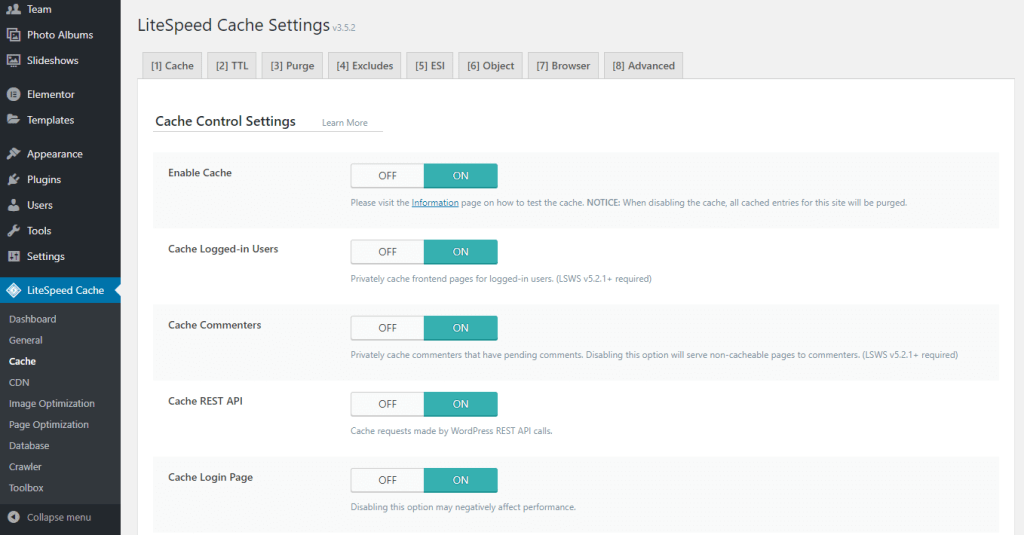
- Navigate to LiteSpeed Cache > Cache.
- Enable Cache: ON (caches public pages as static HTML).
- Cache Logged-in Users: OFF (avoids issues with dynamic content).
- Cache Commenters: ON (for sites with comments).
- Cache REST API: ON (if using APIs).
- Browser Cache: ON, TTL: 31536000 seconds (1 year for static files).
- Purge rules: Enable auto-purge on post updates/comments.
- Excludes: Add URLs like /wp-admin/ or checkout pages.
This reduces server load by serving cached pages. For high-traffic sites, enable “Serve Stale” to deliver outdated cache during purges.
Step 4: Page Optimization
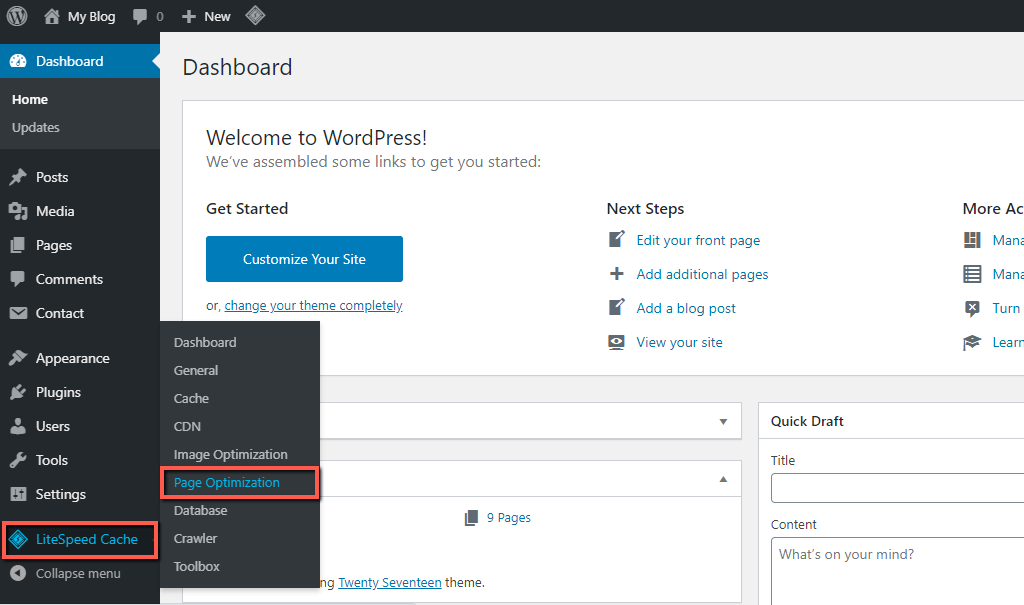
- Go to LiteSpeed Cache > Page Optimization.
- CSS Settings: Minify ON, Combine ON, Load Asynchronously ON, Generate Critical CSS ON.
- JS Settings: Minify ON, Combine ON, Load Deferred ON.
- HTML Settings: Minify ON.
- Media Settings: Lazy Load Images ON, Lazy Load Iframes ON.
- Optimization: Remove Query Strings ON, Load Google Fonts Asynchronously ON.
Example: If JS combine breaks a slider, exclude the specific script URL in “JS Excludes.” Test with GTmetrix; this can cut HTTP requests by 50%.

Step 5: Image Optimization
- Navigate to LiteSpeed Cache > Image Optimization.
- Request optimization for existing images (uses QUIC.cloud servers).
- Auto Request Cron: ON.
- Optimize Originals: ON, Level: Balanced.
- WebP Replacement: ON (serves smaller WebP format to supported browsers).
- Lazy Load: Already enabled in Page Optimization.
Example: For an e-commerce site, optimize 1000+ images to reduce sizes by 60-70% without quality loss.
Step 6: Database Optimization
- Go to LiteSpeed Cache > Database.
- Clean all transients, revisions, and auto-drafts.
- Schedule: Weekly auto-cleanup.
- Optimize Tables: Run manually or schedule.
This keeps your database lean, improving query speeds on large sites.
Step 7: Crawler Settings
- Navigate to LiteSpeed Cache > Crawler.
- Enable Crawler: ON.
- Interval: 302 seconds (default).
- Run Duration: 500 seconds.
- Crawler Cron: Enable for scheduled pre-caching.
For dynamic sites, this pre-builds cache, ensuring fast loads. Monitor server load during crawls.

Step 8: Advanced Features and Testing
- CDN: Integrate QUIC.cloud or Cloudflare for global delivery.
- Object Cache: Enable Redis/Memcached if available (via hosting panel).
- Tuning: Exclude problematic plugins/themes from optimization.
- After changes: Purge all cache, test site functionality, and benchmark speeds.
Best practices: Backup site before tweaks, monitor with New Relic or server logs for high-traffic. For e-commerce, exclude cart pages from cache.