As Windows 10 approaches its end-of-life in October 2025, many users are facing tough choices: upgrade to Windows 11 (with its strict hardware requirements like TPM 2.0), buy new gear, or explore alternatives. Enter Linux—a free, secure, and performant powerhouse that’s perfect for reviving older PCs while dodging Microsoft’s telemetry and bloat. But if you’re attached to that familiar Windows vibe, fear not. Several Linux distributions have nailed the Windows 11 aesthetic, from centered taskbars and rounded corners to Start menu mimics, all while delivering Linux’s speed and privacy.
In this article, we’ll dive into the top 3 Linux distros that look and feel like Windows 11, based on recent reviews and community buzz in 2025. These picks prioritize ease of transition for beginners, out-of-the-box Windows app support via Wine, and lightweight performance. We’ll include feature breakdowns, visual teasers (with linked screenshots), and direct ISO download links for testing in a VM or USB boot. Let’s get you off the Windows treadmill.
1. Zorin OS: The Polished Windows 11 Mimic with Pro Polish
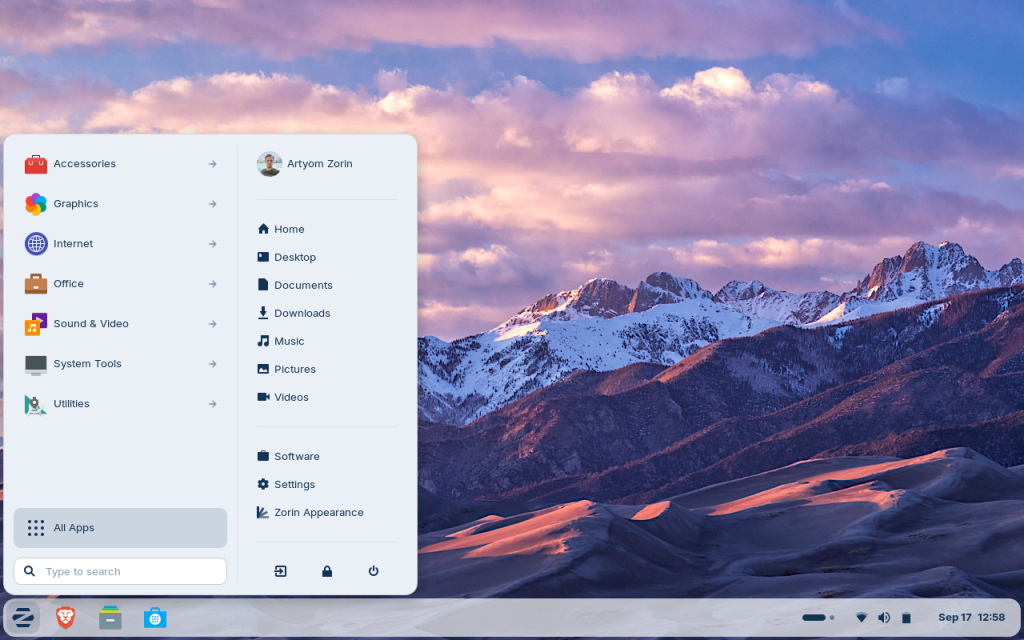
Zorin OS tops our list for its effortless elegance and customization. Built on Ubuntu LTS, it’s designed explicitly as a “Windows alternative” that feels native without the learning curve. The secret sauce? The Zorin Appearance tool, which lets you swap layouts to match Windows 11 in seconds—think centered Start menu, translucent taskbar, and Mica-like blur effects.
Key Features
- Performance & Compatibility: Runs on hardware as old as 15 years; supports Steam gaming, LibreOffice for MS Office files, and Wine for .exe apps.
- Privacy & Security: No data tracking, virus-resistant Linux kernel, and long-term updates until 2029.
- Extras: Zorin Connect for Android syncing, multilingual support (100+ languages), and accessibility tools like screen readers.
- Editions: Free Core (basic Windows/macOS themes) or Pro ($47.99) for advanced layouts and apps.
Why it beats Windows 11: Faster boot times, no forced reboots, and it extends your PC’s life without e-waste guilt.
Visual Teaser
Check out this screenshot of Zorin OS in full Windows 11 mode—note the centered icons and rounded app windows:
View Zorin OS Windows 11 Theme Screenshot
Get It Now
- Official ISO Download: Zorin OS 18 Core (Free, ~3GB) – Verify SHA256 checksum on the site for security.
- Test it live via USB with tools like Rufus or Etcher.
2. Linuxfx (aka Winux): The Closest Visual Clone for Nostalgic Users

If you want a Linux distro that screams Windows 11 from boot-up, Linuxfx is your pick. This Brazilian Ubuntu-based gem uses KDE Plasma skinned with the WX Desktop theme for pixel-perfect replication: Windows splash screen, UAC prompts, and even a faux Cortana assistant. It’s ideal for Windows die-hards weaning off Microsoft, running smoothly on low-spec rigs (2GB RAM minimum).
Key Features
- Windows Fidelity: Mirrors Start menu, notifications, weather widget, and animations; switch to Windows 10 theme if preferred.
- Hardware Love: Kernel 6.14 for broad support (Wi-Fi, Bluetooth, webcams work OOTB); revives old PCs Windows 11 rejects.
- Tools & Apps: Pre-installed Wine for Windows compatibility, Flatpak for easy installs, and Pro unlocks (via donation) like OneDrive integration and AI voice commands.
- Security: Ubuntu LTS base means 5 years of updates; no telemetry.
Reviewers call it “the best Windows clone yet” for its convincing UI without the OS frustrations.
Visual Teaser
Here’s a stunning shot of Linuxfx’s desktop—spot the identical taskbar and transparency:
View Linuxfx Windows 11 Desktop Screenshot (Courtesy of Tom’s Hardware review).

Get It Now
- Official ISO Download: Linuxfx 11.25.07 Noble LTS (~2.5GB) – Torrent mirrors available for faster speeds.
- Pro features? Donate on the Winux site.
3. AnduinOS: The Developer-Friendly Windows 11 Twin
Developed by Microsoft engineer Anduin Xue, this Ubuntu remix is a fresh 2025 contender for ex-Windows devs and casuals alike. It customizes GNOME 48 with 18 extensions for a dead-ringer Windows 11 look: centered app launcher, pinned tasks, and HDR support. At just 2GB ISO, it’s snappy on ancient hardware and emphasizes “seamless transition” with no bloat.
Key Features
- Workflow Wins: Super+V for clipboard history, Flatpak/Snap for apps, and Wine for legacy software; dev tools like VS Code prepped.
- Modern Touches: GNOME 48 optimizations for low-end PCs, privacy-first (no profiling), and GPL-v3 open-source.
- Versatility: Daily use, gaming (Steam-ready), editing, and server tasks; multilingual ISOs available.
- Lightweight: Boots faster than stock Ubuntu, with blur effects and light/dark themes.
It’s hailed as a “soft landing” for Windows 11 refugees, especially on unsupported CPUs.
Visual Teaser
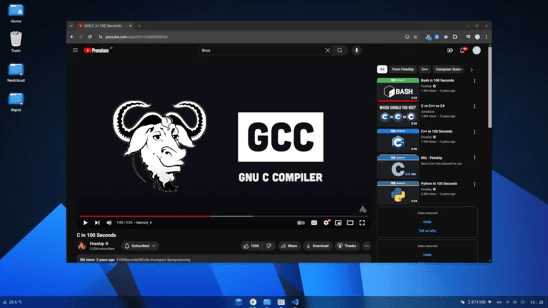
Feast your eyes on AnduinOS’s near-identical setup—complete with weather nook and quick settings:
View AnduinOS Windows 11-Like Desktop Screenshot (From The Register’s hands-on).
Get It Now
- Official ISO Download: AnduinOS 1.4.0 English (~2GB) – Grab from GitHub releases; use qBittorrent for integrity.
- Docs and mirrors at anduinos.com.
Why Switch? A Quick Comparison
| Distro | Base | Desktop | RAM Min | Win11 Similarity | Best For | ISO Size |
|---|---|---|---|---|---|---|
| Zorin OS | Ubuntu LTS | GNOME (custom) | 2GB | High (themed layouts) | Beginners, Gaming | ~3GB |
| Linuxfx | Ubuntu LTS | KDE Plasma | 2GB | Ultra (pixel-perfect) | Nostalgics, Old PCs | ~2.5GB |
| AnduinOS | Ubuntu 25.04 | GNOME 48 | 2GB | High (extensions) | Devs, Light Use | ~2GB |
All three outperform Windows 11 on efficiency and privacy, with zero cost. Start with a live USB test—no commitment needed. Got questions? Communities like Reddit’s r/linux4noobs are goldmines.
Ready to ditch the blue screen of death? Download, boot, and discover Linux’s freedom. Your wallet (and PC) will thank you. What’s your first install? Drop a comment!