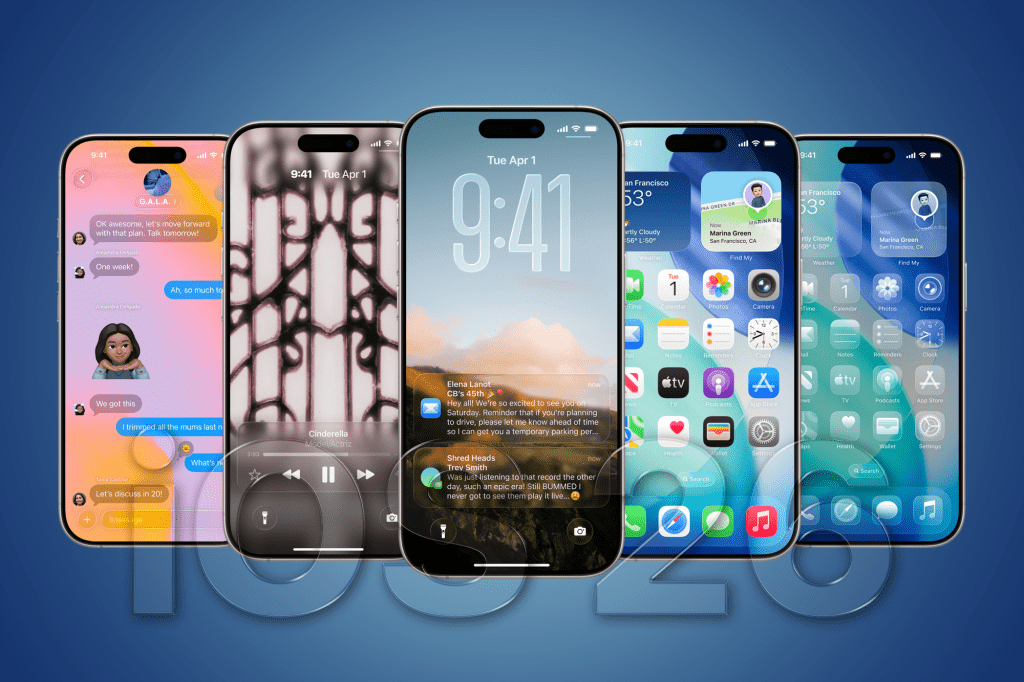
On February 11, 2026, Apple officially released iOS 26.3, the third point update to its iOS 26 operating system that debuted in September 2025. This release follows iOS 26.2 from December 2025 and emphasizes refinements rather than groundbreaking changes, aligning with Apple’s typical mid-cycle strategy to address user feedback, enhance security, and comply with regulatory demands. While iOS 26 introduced major features like Liquid Glass design and expanded Apple Intelligence capabilities, iOS 26.3 hones in on practical improvements, particularly in data transfer, privacy controls, and EU-specific interoperability. The update is available for compatible iPhones (from iPhone XS onward) via Settings > General > Software Update, with a download size around 500MB to 1GB depending on your device.
In this article, we’ll dive into the key new features, bug fixes, security enhancements, known issues, and more. While Apple didn’t provide extensive official screenshots in the release notes, we’ve incorporated visuals from reliable sources to illustrate the changes where possible.
Key New Features in iOS 26.3
iOS 26.3 isn’t packed with flashy additions, but it introduces targeted tools that make switching ecosystems easier, bolster privacy, and expand compatibility—especially in response to European Union regulations under the Digital Markets Act (DMA). Here’s a breakdown of the standout features:
1. Seamless iPhone-to-Android Data Transfer
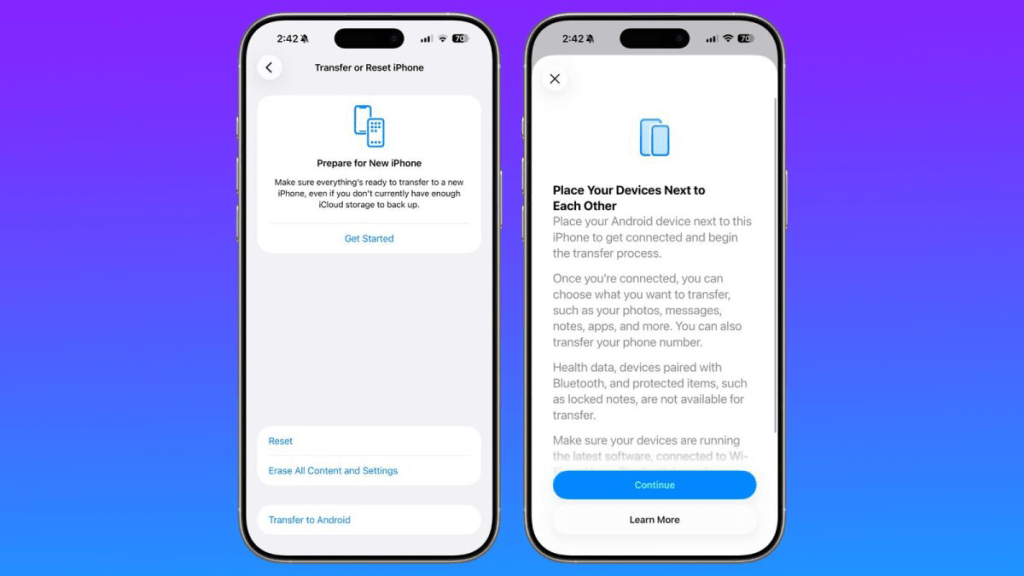
One of the headline additions is a streamlined process for transferring data from an iPhone to an Android device. Previously, users needed to download separate apps from Apple and Google (like “Move to iOS” but in reverse). Now, the transfer can be initiated directly during the Android device’s setup process. This built-in tool supports migrating photos, messages, notes, apps, phone numbers, health data, Bluetooth-paired devices, and more—without requiring app installations on either side.
To use it:
• On your iPhone, go to Settings > General > Transfer or Reset iPhone > Transfer to Android.
• Place the devices near each other, ensure they’re on the latest software, connected to Wi-Fi, and follow the on-screen prompts.
This feature addresses a common pain point for users switching platforms and reflects Apple’s efforts to reduce ecosystem lock-in, potentially influenced by antitrust scrutiny.
2. Enhanced Privacy Controls: Limit Precise Location Sharing with Carriers
Privacy takes center stage with the new “Limit Precise Location from Cell Networks” toggle. Found in Settings > Privacy & Security > Location Services > System Services, this option lets users prevent mobile carriers from accessing exact location data while still allowing emergency services (like 911) to function normally. It’s a subtle but significant step toward giving users more control over how their data is shared with telecom providers, building on iOS’s longstanding privacy ethos.
3. Notification Forwarding to Third-Party Wearables
In a nod to EU regulations, iOS 26.3 adds “Notification Forwarding” in Settings > Notifications. This allows iPhone notifications to be sent to compatible third-party wearables, such as non-Apple smartwatches. Previously limited to Apple Watch, this expansion promotes interoperability and could benefit users in the EU where DMA mandates require Apple to open up its ecosystem. Note that this feature may be region-specific and requires compatible hardware.
4. Improved Alerts for Non-Apple Trackers
Building on iOS 26’s unknown tracker detection, iOS 26.3 refines alerts for non-Apple Bluetooth trackers (e.g., those not part of the Find My network). Users now get more detailed notifications if an unauthorized tracker is detected nearby, with options to play a sound, share location with authorities, or disable it. This enhances safety and anti-stalking measures without major UI changes.
5. EU-Specific Interoperability Enhancements
For users in the European Union, iOS 26.3 includes support for third-party wearable integrations beyond notifications, such as health data syncing and accessory controls. This complies with DMA requirements to reduce Apple’s gatekeeping. Additionally, there are minor tweaks to app sideloading and alternative app stores, though these were largely introduced in earlier iOS 26 updates.
6. Safari and Web Improvements
Safari 26.3 gains support for Zstandard content encoding, which improves webpage loading speeds and efficiency on iOS devices. Other tweaks include better timestamp handling for touch events and fixes for fullscreen video controls in visionOS. These are developer-focused but benefit everyday browsing.
7. Minor UI and Messaging Upgrades
• New Wallpapers: A few fresh dynamic wallpapers with color-tinted and 3D effects, tying into the Liquid Glass aesthetic from iOS 26.
• Messaging Enhancements: Subtle improvements to RCS encryption and spam detection in Messages, ensuring more secure cross-platform texting.
Bug Fixes and Performance Improvements
Apple’s release notes describe iOS 26.3 as providing “important bug fixes and security updates,” without exhaustive details. Based on beta testing and user reports, here are the notable resolutions:
• Video Playback Rotation Lock: Fixed a persistent issue where videos would incorrectly reorient in landscape mode, especially on iPads.
• Keyboard Bug: Resolved delays or glitches in keyboard responsiveness reported in iOS 26.2.
• RAM Management and Performance: Improved multitasking stability, reducing app crashes on devices like iPhone 17 models.
• StoreKit API: Developers benefit from a fix where Product.products(for:) now properly throws errors instead of failing silently, aiding in-app purchase handling.
• Control Center and Wallpaper Issues: Addressed ghosting in Control Center and desaturation problems with wallpapers.
• Other Minor Fixes: General system stability enhancements, including better CarPlay integration and reduced over-processing in the Camera app.
Beta testers noted that the Release Candidate (RC) build was particularly stable, with fewer issues than previous betas.
Security Updates
As with most point releases, iOS 26.3 patches several vulnerabilities, though Apple hasn’t yet detailed them fully on its security page (updates typically follow shortly after release). Expect fixes for potential exploits in WebKit (Safari’s engine), kernel-level issues, and app sandboxing. One reported CVE from betas involved improved handling in Continuity features. Apple recommends updating immediately for these protections.
Known Issues and Compatibility Notes
While iOS 26.3 is stable for most users, the RC notes highlight a few lingering problems:
• Continuity Breakages: Issues with features like Handoff on iPhone 17 series and iPad Pro (M5) models, where cross-device syncing may fail intermittently.
• Beta Risks: If you’re coming from a beta, back up your device before updating, as downgrading could lead to data loss.
The update is compatible with the same devices as iOS 26, but older models like iPhone XS may not get all Apple Intelligence features.

Final Thoughts
iOS 26.3 is a pragmatic update that prioritizes user choice, privacy, and reliability over spectacle. It’s particularly appealing for those considering a switch to Android or living in the EU, where regulatory changes are driving more open features. If you’re on iOS 26.2, the upgrade is worthwhile for the security patches alone. Looking ahead, iOS 26.4 betas are expected soon, potentially bringing more Apple Intelligence expansions. As always, install on a secondary device if possible, and report any issues via Apple’s Feedback app.