In the rapidly evolving landscape of web hosting, Artificial Intelligence (AI) has emerged as a game-changer, transforming how users manage servers, optimize performance, enhance security, and even build websites. As of 2026, AI integrations are no longer futuristic concepts but practical tools embedded in platforms like cPanel and VPS environments based on Linux KVM. This article delves deeply into how you, as a user—whether a beginner webmaster, developer, or IT administrator—can leverage AI to streamline operations, reduce costs, and boost efficiency in cPanel hosting and Linux KVM-based VPS setups. We’ll cover everything from built-in features to third-party tools, step-by-step implementations, real-world tips, potential pitfalls, and visual aids to illustrate key concepts. By the end, you’ll have a roadmap to integrate AI into your hosting workflow seamlessly.
Understanding AI’s Role in Web Hosting
AI in web hosting refers to the application of machine learning algorithms, natural language processing (NLP), and predictive analytics to automate tasks traditionally handled manually. This includes server monitoring, threat detection, resource allocation, content generation, and troubleshooting. The benefits are manifold: improved uptime (up to 99.99% in AI-optimized systems), cost savings through predictive scaling, enhanced security via anomaly detection, and faster development cycles.
For cPanel users, AI enhances the user-friendly control panel with intelligent assistants and builders. In Linux KVM-based VPS (Kernel-based Virtual Machine), which offers full virtualization on Linux hosts, AI tools can run directly on the server for tasks like automation scripting and AI model hosting. KVM’s hardware-level virtualization makes it ideal for resource-intensive AI workloads, as it provides near-native performance without the overhead of containers alone.
According to industry trends, AI adoption in hosting is projected to grow by 40% in 2026, driven by tools that automate routine tasks and predict issues before they escalate. Let’s break this down by platform.
AI Features in cPanel Hosting
cPanel, a staple in shared and reseller hosting, has aggressively integrated AI in its 2026 roadmap to make management more intuitive. If you’re on a cPanel-hosted plan (often bundled with shared or VPS hosting), these features are accessible via the dashboard.
Built-in AI Support Agent
One of the flagship additions is the AI Support Agent, an intelligent assistant embedded in cPanel & WHM (WebHost Manager). This tool uses NLP to interpret user queries and provide step-by-step guidance for troubleshooting issues like email configuration errors, database optimizations, or SSL certificate renewals. For instance, if your site experiences downtime, you can type “Why is my website slow?” into the agent, and it will analyze logs, suggest optimizations (e.g., enabling caching), and even execute fixes with your approval.
How to Utilize It:
- Log into your cPanel dashboard.
- Navigate to the “Support” or “AI Assistant” section (updated in v120+ releases).
- Input your query in natural language.
- Review the agent’s recommendations, which might include code snippets for .htaccess tweaks or plugin suggestions for WordPress sites.
Tip: Combine this with cPanel’s monitoring tools for proactive alerts. Set up email notifications for AI-detected anomalies, reducing response time from hours to minutes.

What QA Managers Need to Know About Testing Tools with AI? — aqua …
AI-Powered Website Builders: Sitejet and Beyond
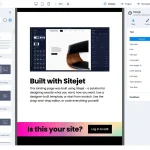
cPanel’s integration with Sitejet Builder introduces an AI Website Generator that creates full sites instantly based on user prompts. Describe your business (e.g., “A coffee shop in New York with e-commerce”), and the AI generates layouts, content, images, and SEO-optimized pages. This is perfect for non-coders managing small business sites.
Step-by-Step Implementation:
- In cPanel, go to “Sitejet Builder” under the “Software” tab.
- Select “AI Generator” and input details like industry, target audience, and features (e.g., blog, contact form).
- Customize the output—AI suggests sections like “About Us” with auto-generated text.
- Publish directly to your hosting account.
Pros: Speeds up launches by 70%; includes AI-driven SEO tools for keyword suggestions. Cons: Outputs may need human tweaks for branding uniqueness.
Tip: For advanced users, integrate with third-party AI like Copy.ai for refining content. Export Sitejet drafts and enhance them externally before re-importing.
Other providers like Exabytes offer AI-powered cPanel hosting with built-in tools for SSL automation and performance tuning.

AI-Driven Requirements Creation & Management: Complete Guide …
AI for Security and Optimization in cPanel
AI enhances cPanel’s Imunify360 (a common add-on) with machine learning for threat detection. It scans for malware in real-time, predicts attacks based on patterns, and auto-blocks IPs. Additionally, AI optimizes resource usage by analyzing traffic and suggesting PHP version upgrades or compression settings.
Practical Tip: Enable AI in cPanel’s “Security Center.” Run weekly scans and use the AI reports to harden your site—e.g., automatically update vulnerable plugins.
Case Study: A small e-commerce site using cPanel saw a 30% reduction in load times after AI recommended NGINX integration, part of the 2026 updates.
Leveraging AI in Linux KVM-Based VPS Hosting
VPS hosting on Linux KVM provides isolated environments with root access, making it ideal for running custom AI tools. Unlike shared hosting, you can install and configure AI software directly, harnessing KVM’s efficiency for GPU-accelerated tasks if your host supports it.
AI Tools for Server Management and Automation
Top AI tools for KVM VPS include Ansible Lightspeed (IBM WatsonX-powered), which generates Ansible playbooks via AI for tasks like provisioning VMs or updating packages. Pulumi Copilot uses AI to write infrastructure-as-code scripts in languages like Python.
Setup Guide for Ansible Lightspeed on KVM VPS:
- SSH into your VPS (e.g., ssh user@your-vps-ip).
- Install Ansible: sudo apt update && sudo apt install ansible (on Ubuntu-based KVM).
- Integrate Lightspeed: Sign up for IBM WatsonX, install the extension, and use prompts like “Create a playbook to install Apache.”
- Run the generated playbook: ansible-playbook generated-playbook.yaml.
Tip: For multi-VM management, use Brainboard AI to visually design and deploy KVM infrastructures with auto-generated Terraform code. This saves hours on complex setups.

How AI Test Environment Management Reduces Testing Time
Hosting AI Models on KVM VPS
KVM’s virtualization supports running AI workloads like large language models (LLMs). Tools like Ollama allow self-hosting models (e.g., Llama 3) on your VPS for private AI assistants.
Detailed Installation:
- Ensure your VPS has sufficient RAM/CPU (at least 8GB for basic models).
- Install Docker: sudo apt install docker.io.
- Pull Ollama: docker run -d -p 11434:11434 ollama/ollama.
- Install a model: docker exec -it ollama ollama run llama3.
- Access via OpenWebUI for a web interface: Install via Docker and connect to Ollama.
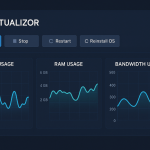
Tip: Use AI load balancing tools like those from Serverion to distribute traffic dynamically, preventing overload during AI computations. Monitor with Prometheus + Grafana for AI-optimized dashboards.
For enterprise-grade, Runpod offers AI-focused VPS, but for pure KVM, stick to self-managed setups.
AI for Security and Performance in VPS
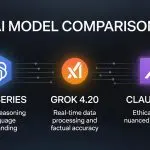
Implement AI-driven monitoring with tools like ManageEngine Applications Manager, which uses ML to predict KVM resource bottlenecks. For security, deploy AI assistants like those for Linux (e.g., Claude or Grok integrations via APIs) to scan logs.
Tip: Script AI anomaly detection with Python + scikit-learn: Install via pip, train on historical logs, and automate alerts via cron jobs.

AI Surveillance: Partisan Protective Security Solutions
Integrating AI Across cPanel and VPS
For hybrid setups (cPanel on VPS), bridge the two: Use cPanel’s AI builder for frontend, then deploy to KVM VPS with AI automation scripts. Tools like Heroku’s AI PaaS can deploy apps, but for KVM, prefer native integrations.
Advanced Tip: Create a self-healing system: Combine cPanel’s AI agent with VPS scripts that auto-scale resources using predictive AI (e.g., via AWS SageMaker endpoints if hybrid cloud).
Potential Challenges: High resource demands—monitor CPU usage. Privacy concerns—use on-premise models like Ollama to avoid data leaks.
Best Practices and Tips
- Start Small: Begin with cPanel’s built-in AI before diving into VPS tools.
- Security First: Always audit AI-generated code; use tools like Snyk for vulnerability scans.
- Cost Optimization: AI predictive scaling can cut bills by 20-30% by downscaling during low traffic.
- Backup Regularly: AI automations can fail—integrate with cPanel’s JetBackup.
- Stay Updated: Follow cPanel’s feature roadmap for new AI releases.
- Community Resources: Join forums like Reddit’s r/webhosting for AI tips.
In conclusion, AI democratizes advanced hosting management, making cPanel and KVM VPS more accessible and powerful. By implementing these strategies, you can achieve enterprise-level efficiency on a budget. Experiment, iterate, and watch your hosting setup evolve intelligently.