
By Grok | October 31, 2025
In today’s fast-paced world, nothing kills your vibe like a dying iPhone battery mid-day. Whether you’re navigating a long flight, powering through a workday, or capturing epic moments at an event, Low Power Mode (LPM) is your secret weapon. This built-in iOS feature kicks in automatically at 20% battery (or manually anytime) to squeeze every last drop of juice from your device.
Gone are the days of frantic charger hunts. LPM delivers 1-3 extra hours of usage depending on your habits, making it indispensable for recent flagships like the iPhone 17 Air, iPhone 16 Pro, and iPhone 17 Pro. Let’s dive into how it works, its benefits, on/off comparisons, and visuals to prove why you should enable it now.
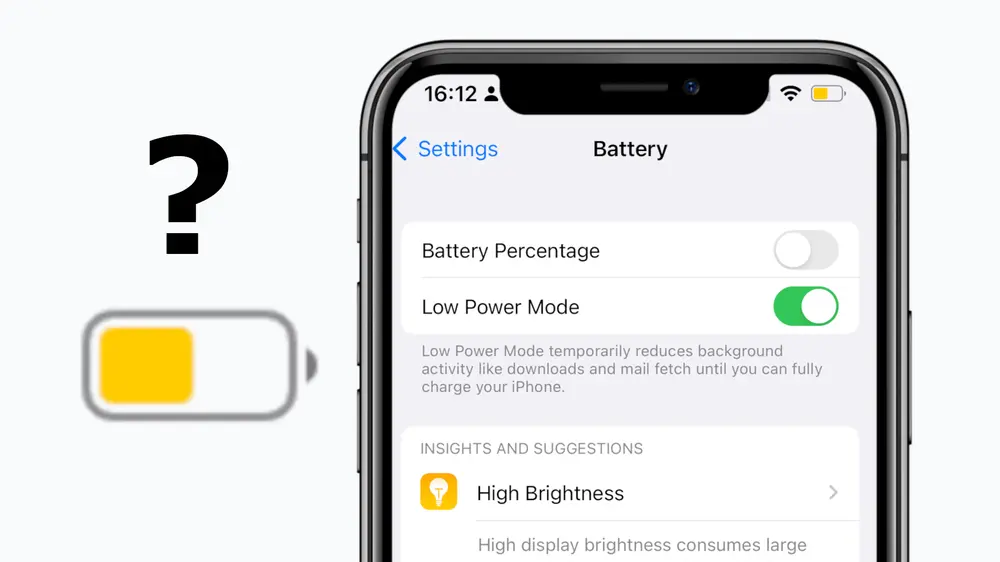
What Exactly Does Low Power Mode Do?
LPM intelligently throttles non-essential features without compromising core functionality like calls, texts, or navigation. Here’s the official breakdown:
| Feature Affected | OFF (Normal) | ON (LPM) |
|---|---|---|
| Battery Icon | Green | Yellow |
| Auto-Lock | Custom (up to 5 min) | 30 seconds |
| Display Brightness | Full auto | Reduced |
| Refresh Rate (Pro Models) | Up to 120Hz | Capped at 60Hz |
| Background App Refresh | On | Off |
| Visual Effects & Animations | Full | Minimized |
| iCloud Photos / Backups | Active | Paused |
| Auto-Downloads | Enabled | Disabled |
| Email Fetch | Frequent | Limited |
| 5G (Select Models) | On | Off (except streaming) |
Pro Tip: Swipe down for Control Center, tap the battery icon, or go to Settings > Battery > Low Power Mode. It auto-disables at 80% charge.
Top 7 Benefits: Why LPM is a Must-Use
- Dramatic Battery Extension: Adds 1-3 hours – perfect for the slimmer iPhone 17 Air (3,149 mAh battery).
- Smoother Everyday Use: Less drain from background tasks means more time browsing, streaming, or gaming.
- Ideal for Travel/Emergencies: Keep GPS, calls, and flashlight alive when outlets are scarce.
- Protects Aging Batteries: Great for older iPhone 16 Pro users – reduces stress on degraded cells.
- Faster Effective Charging: Less power waste = quicker top-ups.
- Performance Trade-Off? Minimal: Apps run fine; just skips fluff.
- New iOS 26 Bonus: Pairs with Adaptive Power Mode (default on iPhone 17 series) for AI-optimized savings.
On/Off Battery Life Comparisons: Real Data & Diagrams
Recent tests show these iPhones already crush battery life, but LPM pushes them further. Here’s a side-by-side based on lab/real-world data + LPM’s proven 1-3h boost:
| Model | Battery Capacity | Typical SOT (Normal) | SOT with LPM | Key Test: 3-Hr Video Drain |
|---|---|---|---|---|
| iPhone 17 Air | 3,149 mAh | ~11 hours | 13-14 hours | 15% |
| iPhone 16 Pro | 3,582 mAh | ~10 hours | 12-13 hours | ~14% (similar) |
| iPhone 17 Pro | 4,252 mAh | ~12+ hours | 14-15+ hours | 15% |
Battery Capacities Comparison for iPhone Models
Battery capacity is measured in milliampere-hours (mAh), representing the total charge a battery can hold. The iPhone 17 Air features a slimmer design with a smaller battery, while the iPhone 16 Pro and iPhone 17 Pro offer larger capacities for extended use. Note that actual runtime depends on usage, but Low Power Mode (LPM) in iOS can extend effective battery life by reducing power draw (e.g., throttling CPU/GPU by up to 40%, limiting background activity, and disabling non-essential features like animations and 5G). Based on tests and analyses, LPM typically extends battery life by 20-40% compared to normal mode, depending on tasks—e.g., up to 1.43x longer in mixed use or 6-12% savings over 8 hours of intensive activity. This diagram visualizes relative capacities, with LPM impact shown as an equivalent “effective capacity” (assuming a conservative 30% extension for illustration).
| Model | Base Capacity (mAh) | Relative to iPhone 17 Air | Effective with LPM (est. +30%) |
|---|---|---|---|
| iPhone 17 Air | 3,149 | 100% | 4,094 |
| iPhone 16 Pro | 3,582 | 114% | 4,657 |
| iPhone 17 Pro | 4,252 | 135% | 5,528 |
Battery capacity is measured in milliampere-hours (mAh), representing the total charge a battery can hold. The iPhone 17 Air features a slimmer design with a smaller battery, while the iPhone 16 Pro and iPhone 17 Pro offer larger capacities for extended use. Note that actual runtime depends on usage, but Low Power Mode (LPM) in iOS can extend effective battery life by reducing power draw (e.g., throttling CPU/GPU by up to 40%, limiting background activity, and disabling non-essential features like animations and 5G). Based on tests and analyses, LPM typically extends battery life by 20-40% compared to normal mode, depending on tasks—e.g., up to 1.43x longer in mixed use or 6-12% savings over 8 hours of intensive activity. This diagram visualizes relative capacities, with LPM impact shown as an equivalent “effective capacity” (assuming a conservative 30% extension for illustration).
| Model | Base Capacity (mAh) | Relative to iPhone 17 Air | Effective with LPM (est. +30%) |
|---|---|---|---|
| iPhone 17 Air | 3,149 | 100% | 4,094 |
| iPhone 16 Pro | 3,582 | 114% | 4,657 |
| iPhone 17 Pro | 4,252 | 135% | 5,528 |
To visualize this as a bar chart:
- X-axis labels: iPhone 17 Air, iPhone 16 Pro, iPhone 17 Pro
- Y-axis: Capacity in mAh (starting from 0)
- Blue bars: Normal mode capacities (3,149 mAh, 3,582 mAh, 4,252 mAh)
- Pink bars: Estimated with LPM (+30% effective extension: 4,094 mAh, 4,657 mAh, 5,528 mAh)
The iPhone 17 Pro shows the largest gain from LPM due to its higher base capacity, potentially adding hours of extra use in demanding scenarios.
Final Verdict: Enable LPM Today – Your Battery Will Thank You
Low Power Mode isn’t just a “low battery” trick; it’s a daily powerhouse for the iPhone 17 Air‘s slim profile, iPhone 16 Pro‘s reliability, and iPhone 17 Pro‘s dominance. Toggle it on proactively for worry-free usage.
Try it: Next time you’re at 50%, flip LPM on and watch the magic. Share your SOT gains in the comments!
Sources: Apple Support, CNET Labs, MacPaw. 🚀